ElectronicsRanker
Menu

Review

Amcrest AWC201-B Review

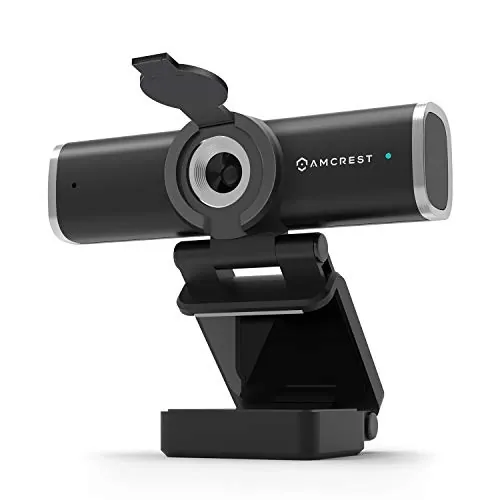
The Amcrest AWC201-B is a budget 1080p USB webcam aimed at video calls, online classes, and basic streaming. Its strongest points are easy plug-and-play setup, broad compatibility, and generally well-liked picture quality for the price. The main drawback is reliability, with repeated reports of failures after short use and mixed feedback on microphone quality.
Expert reviewed
66
Overall score
Data-driven scoring Expert reviewed Updated analysis

Why we ranked it highly

The Amcrest AWC201-B is a USB 1080p webcam designed for everyday computer use across video conferencing, webinars, remote work, online learning, and light streaming. Based on the supplied data, it targets buyers who want a low-cost, straightforward webcam that works across a wide range of platforms without much setup. It includes a built-in microphone, a privacy cover, a wide 70-degree viewing angle, and a mounting clip with tripod thread for more flexible positioning. Its scoring profile suggests a practical rather than premium product. Setup, compatibility, and value are among its strongest areas, while video quality is rated solid for the category. The main concerns are reliability and audio consistency. Customer feedback broadly supports that pattern: many buyers like the image quality and ease of use, but microphone performance is mixed and several reviews mention the webcam stopping working over time.
90-day review Expert reviewed User feedback Data scoring

Key specs

Additional details

Shooting Modes
Low Light
Exposure Control Type
Automatic
Color
AWC201-B
Video Capture Resolution
1080p
Water Resistance Level
Not Water Resistant
File Format
JPEG
Screen Size
5 Inches
Video Capture Format
MP4
Effective Still Resolution
2 MP
Compatible Devices
Devices and systems that support Windows, Mac OS, Android, Skype, Youtube, Yahoo!atMessenger, MSN, Zoom, Windows LiveatMessager, Gmail, WeChat etc instant messaging applications
Image stabilization
Optical

Connectivity

Connectivity Technology
USB

Focus

Focus Type
Autofocus

Lens

Maximum Focal Length
4 Millimeters

Sensor

Photo Sensor Technology
CMOS
Photo Sensor Resolution
2 MP

Item details

Brand
Amcrest
Model Name
AWC201-B
Manufacturer
Amcrest
UPC
850011990322
Global Trade Identification Number
00850011990322
Model Number
AWC201-B
Mfr Part Number
AWC201-B
Built-In Media
Privacy Cover

Zoom

Zoom Type
smooth zoom
Digital Zoom
4 x

Measurements

Item Weight
0.15 Kilograms

Scores breakdown

72 /100

Performance

71 /100

Features

84 /100

Usability

76 /100

Design

80 /100

Display quality

52 /100

Audio quality

78 /100

Camera quality

74 /100

Connectivity

Strengths

  • Easy plug-and-play setup, supported by a high setup score and repeated customer feedback that it works quickly on Windows and Mac.
  • Good 1080p video quality for the price, with customers frequently praising picture clarity and resolution.
  • Broad compatibility across Windows, macOS, Linux, Android, and common video apps such as Zoom, Teams, Skype, Google Meet, OBS Studio, and YouTube.
  • Includes practical extras such as a privacy cover, mounting clip, and 1/4-inch tripod thread for flexible placement.
  • Strong value positioning, with a value score of 82 and multiple reviews describing it as a budget-friendly buy.
  • Wide 70-degree field of view is useful for calls, webinars, and showing more of a room or multiple people.

Limitations

  • Reliability is the main concern, with a low reliability score and repeated reports that the webcam stopped working after a short period.
  • Microphone performance is inconsistent, with mixed customer feedback ranging from acceptable to low pickup or failure to capture sound.
  • Audio quality is not a standout feature, reflected in a low audio score and complaints about muffled or quiet sound.
  • Build quality appears average at best, with a weak build score and at least one report of cable failure.
  • Accuracy-related performance is only moderate, so users looking for more refined image handling may want to compare alternatives.
  • Some users may still prefer a dedicated external microphone for clearer voice capture.

Ideal user profiles

  • Budget-conscious buyers who want a simple 1080p webcam for Zoom, Teams, or Google Meet.
  • Remote workers or students who need broad platform compatibility and easy setup.
  • Users who want a webcam with a privacy cover and flexible mounting options.
  • People needing a basic streaming or conferencing webcam without spending much.

Use cases

  • Video calls on Zoom, Microsoft Teams, Skype, and Google Meet.
  • Remote work and online classes on Windows or Mac computers.
  • Basic livestreaming or webcam video through OBS Studio or YouTube.
  • Personal training or wider-frame calls where more of the user or room needs to be visible.
  • Desktop setups using the monitor clip or tripod thread for alternative camera placement.

Fit and positioning

Who this works for

Category positioning

This model sits in the budget end of the webcam market. It is positioned more as a practical conferencing and general-use webcam than as a specialist streaming or creator-focused device. The strong setup score, broad app and platform support, and included privacy cover make it beginner-friendly, while the price helps its value case. The weaker reliability and audio scores mean it does not present as a premium long-term option, but it can still make sense for cost-sensitive buyers who prioritize simple video calling over higher-end capture or audio performance.

Best for

The AWC201-B is best for users who want an affordable webcam for Zoom, Teams, Google Meet, Skype, and similar platforms. Its strongest evidence-backed advantages are easy setup, strong compatibility, good basic image quality, and useful extras like the privacy cover and tripod support. Buyers who need a low-cost webcam for a home office, schoolwork, or occasional streaming are the clearest fit.

Not best for

This webcam is less suitable for buyers who need dependable long-term hardware, stronger built-in audio, or more polished premium performance. Reliability is its weakest area by score, and several reviews report failure after short use or cable issues. Users who rely heavily on microphone quality, or who do not want the risk of replacement, may be better served by a more established step-up option.

Performance analysis

How it performs in practice

Each scoring dimension is separated into a compact card so the strengths and tradeoffs are easier to compare without reading one long block.

Performance analysis

For its core job as a basic webcam, performance is decent rather than exceptional. The performance score of 72, display quality score of 80, and camera quality score of 78 point to solid 1080p video output for everyday calls and meetings. Customer feedback generally supports that, with repeated praise for clear picture quality and acceptable framing. The 70-degree lens also helps with wider shots for group calls or showing more of a room. The main performance compromise is not the image itself, but the inconsistent microphone and lower long-term dependability, which can affect real-world use.

Feature analysis

The feature set is practical for the price. It includes 1080p capture, autofocus, a built-in microphone, a privacy cover, plug-and-play USB connectivity, a monitor clip, and a 1/4-inch tripod thread. Broad software and platform support also adds value. The feature score of 71 suggests it covers category basics well, though it does not stand out with more advanced creator-focused tools or verified premium extras.

Usability analysis

Usability is one of the product's better areas, backed by an 84 usability score and a 90 setup score. Reviews consistently describe installation as simple, with the webcam being recognized quickly after plugging into Windows or Mac systems. The included mounting options improve everyday convenience, and the privacy cover adds practical reassurance when the camera is not in use. The main usability downside is that hardware or microphone inconsistency may interrupt an otherwise easy experience.

Design

The webcam's design seems practical and unobtrusive. One review specifically praises the simple, sleek look and notes that it does not feel bulky on top of a monitor. The 70-degree field of view is useful without being described as heavily distorted, and the combination of a clip mount and tripod thread adds flexibility in how the camera can be positioned. Its design score of 76 suggests a functional layout that works well for desktop use.

How it compares

Within the webcam category, this model compares best on affordability, ease of setup, and broad compatibility rather than on premium hardware quality or audio capture. It appears stronger than many very cheap webcams in image quality and included extras, especially with the privacy cover and flexible mounting support. However, compared with more dependable mid-range or premium webcams, it looks less convincing on microphone consistency and long-term reliability. That leaves it in a useful middle ground: better equipped than the bare minimum, but not as reassuring as stronger long-term options for work-critical use.

Ranking summary

The Amcrest AWC201-B earns an overall score of 66 because it gets the basics right while falling short on long-term dependability. Its strongest areas are setup, compatibility, value, and generally solid video quality, making it an accessible choice for low-cost conferencing and everyday webcam use. Those strengths are reflected in a 90 setup score, 88 compatibility score, and 82 value score. The reason it does not rank higher is its very weak reliability and durability profile, combined with inconsistent microphone performance. In practical terms, it ranks as a capable budget webcam with real trade-offs rather than a safer all-around recommendation.

Buying advice

Consider this webcam if your priority is getting a low-cost 1080p USB webcam that is quick to set up and works across many devices and apps. It makes the most sense for remote work, classes, occasional streaming, and general video calls where value matters more than premium audio. Before buying, think about whether you need reliable built-in microphone performance and whether this will be used every day for work-critical meetings. If so, the weak reliability history and mixed microphone feedback are important cautions. Also verify your preferred platform and mounting setup, even though compatibility is broadly strong on paper.
66
Overall score

Final verdict

The Amcrest AWC201-B is a solid budget webcam with a clear strength in easy setup, wide compatibility, and good everyday 1080p video quality for the money. For buyers who want a simple webcam for calls and online meetings without spending much, it can be a practical option. Its main limitation is reliability: the low reliability and durability scores, plus repeated failure complaints, stop it from being a stronger recommendation. Overall, this is a decent value-focused webcam, but not the safest choice if you need consistent long-term dependability or stronger built-in audio.
Back to review

Key topics

Amcrest 1080P Webcam review, Amcrest AWC201-B webcam review, best budget webcam, 1080p webcam with microphone, USB webcam for PC and laptop, webcam with privacy cover, Amcrest webcam comparison, webcam for Zoom and Teams

Frequently asked questions

Is the Amcrest 1080P Webcam worth it?
For buyers focused on low cost, easy setup, and solid basic video quality, it looks like a reasonable value option. It scores well for setup, compatibility, and value, and many customers praise the picture quality. The main caution is reliability, as multiple buyers report failures after relatively short use.
Is the Amcrest 1080P Webcam good for video calls?
It appears well suited to common video calling tasks such as Zoom, Teams, Skype, and Google Meet. The 1080p resolution, wide-angle lens, and simple USB plug-and-play setup support that use case well. However, the built-in microphone gets mixed feedback, so voice quality may not be consistent for every user.
How good is the video quality on the Amcrest AWC201-B?
Video quality is one of its stronger areas. The webcam has a display quality score of 80 and a camera quality score of 78, and customer feedback often describes the image as clear and good for the price. Based on reviews, lighting conditions may still affect results, even with its low-light marketing claims.
Does the Amcrest 1080P Webcam have a good microphone?
The microphone is a weaker area. Its audio quality score is 52, and review feedback is mixed. Some buyers say it is good enough for normal calls, while others report muffled sound, low volume, or poor pickup. If audio quality matters, an external microphone may be a safer choice.
Is the Amcrest 1080P Webcam easy to set up?
Yes, setup is one of its clearest strengths. It has a setup score of 90, and multiple reviews describe it as a true plug-and-play webcam that worked quickly on Windows and Mac after being connected by USB. That makes it suitable for buyers who want minimal installation effort.
What are the main limitations of the Amcrest 1080P Webcam?
The biggest limitation is reliability. It has a reliability score of 38 and a durability score of 40, with several customers saying the webcam or cable stopped working after a short period. Audio is another weaker area, especially for users expecting stronger built-in microphone performance.
Is the Amcrest webcam compatible with common devices and apps?
Compatibility is one of its strongest areas, backed by a score of 88. The listed support covers Windows, macOS, Linux, and Android, and it is marketed for use with Zoom, Teams, Skype, YouTube, Google Meet, OBS Studio, and Facebook Live. Buyers should still confirm support with their exact device and workflow.
Is the Amcrest 1080P Webcam good value for money?
It appears to offer good value at its price point. The value score is 82, and several customers specifically call it a strong budget choice. The trade-off is that lower cost comes with more risk around long-term reliability and mixed microphone performance.