ElectronicsRanker
Menu

Review

CableCreation USB to USB C Adapter Review

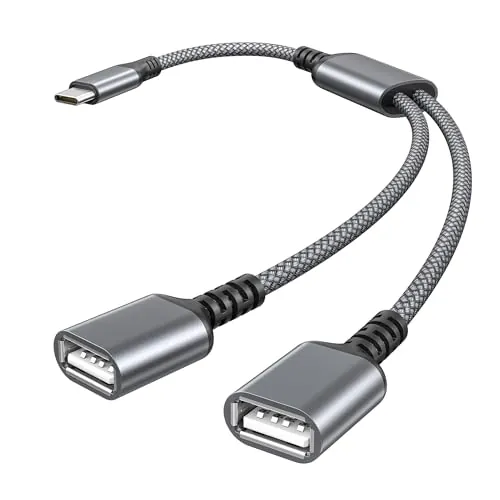
The CableCreation USB to USB C Adapter is a short USB-C OTG cable that adds one USB-A female connection to compatible USB-C laptops, tablets, and phones. It is strongest as a compact everyday adapter for flash drives, mice, keyboards, and security keys, supported by high connectivity, build, and portability scores. Charging is not recommended, and some users report a tight USB-A socket.
Expert reviewed
88
Overall score
Data-driven scoring Expert reviewed Updated analysis

Why we ranked it highly

The CableCreation CC0253 is a 0.5 ft USB-C-to-USB-A female OTG adapter cable designed to let compatible USB-C host devices use standard USB-A peripherals. CableCreation lists uses including flash drives, keyboards, mice, cameras, hubs, and card readers, while stating that the host device must support USB On-The-Go. The manufacturer rates data transfer at up to 5 Gbps and positions charging as not recommended. Its score profile is particularly strong for connectivity (91/100), build quality (91/100), durability (90/100), and portability (97/100). Customer feedback commonly praises its construction, flexibility, and usefulness with USB-C-only laptops. As a single-port adapter rather than a hub, it appears aimed at simple, close-range peripheral connections rather than broad desktop expansion.
90-day review Expert reviewed User feedback Data scoring

Key specs

Features & Specs

Compatible Devices
For MacBook Air (2018~2020), iPad Pro 2020/2018, 16inch MacBook Pro 2020, 15inch MacBook Pro(2016~2019), 13inch MacBook Pro(2016~2020), MacBook 12 inch(2015~2017), For One Plus 6/6T/5/5T/3/3T, Pixel 3/3XL/2/2XL, For Surface Go, Surface Book 2, XPS 13/15, Moto Z8, Galaxy S22/S22Ultra/S20/S20+/S20Ultra/S10/S10+/S10e/S9/S9+/S8/S8+, Note 8/9/10, P9/P10, P20, Mate 20 10 Pro,, Laptop, Television
Specific Uses For Product
Camera
Connector Type
Usb 3.1
Number of Ports
2
Power Plug Type
No Plug
Smart Home Compatibility
Not Smart Home Compatible

Additional details

Color
Space Gray
Finish
Metallic

Measurements

Item Dimensions
9.41 x 6.26 x 0.07 inches
Item Weight
0.01 Kilograms
Package Quantity
1
Unit Count
1.0 Count
Number of Items
1

Item details

Brand
CableCreation
Model Number
CC0253
UPC
714602978345
Manufacturer
CableCreation
Mfr Part Number
CC0253

Scores breakdown

88 /100

Performance

83 /100

Features

85 /100

Usability

89 /100

Design

40 /100

App experience

80 /100

Display quality

80 /100

Audio quality

80 /100

Camera quality

Strengths

  • High 91/100 connectivity score, with USB-C host-to-USB-A peripheral support.
  • Manufacturer-rated for data transfers up to 5 Gbps.
  • Short 0.5 ft cable format can reduce strain compared with a rigid adapter.
  • Strong build and durability scores of 91/100 and 90/100.
  • Very portable at a listed weight of 0.01 kg.
  • 4.6/5 average rating from 4,058 Amazon reviews.
  • Includes a stated 24-month warranty and lifetime technical support.

Limitations

  • Charging is not recommended by the manufacturer; this is primarily a data and peripheral adapter.
  • Some reviewers report a tight USB-A socket that can require extra force for full insertion.
  • OTG operation depends on the USB-C host device and its software support.
  • One reviewer reported that an SD card reader was detected but could not be read on a Galaxy Tab S3.
  • The 0.5 ft cable is convenient for close connections but does not add much reach.
  • It adds one USB-A female connection rather than expanding a device into a multiport hub.

Ideal user profiles

  • USB-C laptop owners who need to connect an existing USB-A mouse, flash drive, or security key.
  • Tablet and phone users whose devices support USB On-The-Go peripherals.
  • Travelers and mobile workers seeking a small, cable-based alternative to a rigid USB-C adapter.
  • Buyers who prioritize a braided cable and metal-shell construction for everyday peripheral use.

Use cases

  • Connecting a USB-A flash drive to a compatible USB-C laptop, tablet, or phone.
  • Using a wired USB-A mouse when other laptop ports are occupied.
  • Attaching a USB-A security key with less leverage on the USB-C port.
  • Connecting a USB-A keyboard or card reader to a compatible OTG-capable device.
  • Moving photos, video, or other files between compatible USB devices.
  • Adapting legacy USB-A accessories for USB-C-only laptops.

Fit and positioning

Who this works for

Category positioning

This is a value-focused, single-purpose USB-C OTG adapter rather than a multiport dock or charging accessory. At a listed price of 10.45, it is positioned for buyers who need one legacy USB-A port on a USB-C device and prefer a short flexible cable over a rigid plug-in converter. The 89/100 value score and 97/100 portability score reinforce that role. Its braided jacket and aluminum-alloy shell are listed construction features, while its lack of recommended charging support keeps it focused on data and peripheral use.

Best for

This adapter is best for compatible USB-C laptop, tablet, and phone owners who occasionally need to connect a USB-A flash drive, mouse, keyboard, security key, or similar peripheral. It suits buyers who value a short lead that can place less direct leverage on a USB-C port than a rigid adapter. Strong connectivity (91/100), setup (93/100), portability (97/100), and customer satisfaction (92/100) scores support this practical, everyday use case.

Not best for

Buyers needing charging pass-through, several USB ports, Ethernet, display output, or long cable reach should look beyond this single USB-A OTG adapter. CableCreation does not recommend it for charging. It is also worth avoiding if a very loose, effortless USB-A insertion feel is important, since some review feedback describes the socket as tight. Finally, USB-C alone does not guarantee OTG support, so phone and tablet owners should confirm host and peripheral compatibility first.

Performance analysis

How it performs in practice

Each scoring dimension is separated into a compact card so the strengths and tradeoffs are easier to compare without reading one long block.

Performance analysis

For its core task of bridging USB-C hosts to USB-A peripherals, the adapter has an 88/100 performance score and 91/100 connectivity score. CableCreation specifies transfer capability of up to 5 Gbps, which is appropriate for supported USB 3 data devices, although real-world rates depend on the host, peripheral, and storage media. Reviews describe successful use with USB keys, a mouse, flash drives, and USB-C-only MacBook setups. Results can vary with individual OTG hosts and accessories, as shown by one reported card-reader issue on a Galaxy Tab S3.

Feature analysis

The feature set is intentionally simple: one USB-C host connection, one USB-A female port, and claimed OTG support for compatible devices. Its 83/100 feature score reflects a focused rather than expansive design. Listed features include a 0.5 ft braided cable, aluminum-alloy shell, and up to 5 Gbps data-transfer rating. It does not replace a hub, dock, or charging adapter, as there is no stated display output, networking, multiport expansion, or recommended charging capability.

Usability analysis

Daily use is straightforward: plug the USB-C end into a compatible host and connect the USB-A accessory. The 85/100 usability score and 93/100 setup score align with reviews that call it useful for routine laptop, phone, and flash-drive connections. The cable format can be more forgiving than a rigid adapter when an attached device might be bumped. However, feedback is mixed on fit; some users say the USB-A socket is tight, so peripherals may need a firm, fully seated connection.

Design

The 89/100 design score reflects a compact cable-based layout with a USB-C plug on one end and a USB-A female socket on the other. At 0.5 ft, it is intended to keep an accessory close while avoiding the fixed protrusion of a rigid converter. Reviewers found this helpful for security keys and laptop accessories where reducing pressure on the USB-C socket matters. One review notes the braided cable can feel stiff and tend to project straight rather than hang loosely.

How it compares

Within the USB-C adapter category, this model is more specialized than a multiport hub and more flexible than a rigid USB-C-to-USB-A converter. Its short cable design, 91/100 build-quality score, and 97/100 portability score make it appealing for protecting a host port from the leverage of a directly attached USB accessory. The stated 5 Gbps capability is appropriate for compatible data devices, while the single USB-A port keeps the design uncomplicated. Buyers needing several legacy ports, display connections, wired networking, or charging pass-through should compare it with hubs or docks instead. Its 89/100 value score is most relevant when one dependable USB-A connection is enough.

Ranking summary

The CableCreation USB to USB C Adapter earns an overall score of 88/100 because it performs a narrow task well: connecting USB-A peripherals to compatible USB-C hosts. Its strongest results are portability (97/100), setup (93/100), customer satisfaction (92/100), connectivity (91/100), build quality (91/100), and durability (90/100). These scores are reinforced by a 4.6/5 rating from 4,058 reviews and repeated praise for solid construction and everyday usefulness. The ranking is moderated by its single-port design, charging limitation, and occasional reports of a tight USB-A socket. Compatibility is good but remains dependent on OTG support and the connected peripheral.

Buying advice

Consider this CableCreation adapter if you have a USB-C laptop, tablet, or phone that supports the required host/OTG function and need to use one USB-A peripheral nearby. It is particularly sensible for flash drives, keyboards, mice, or security keys, and its short cable may reduce stress from a protruding accessory. Before purchasing, confirm your device’s OTG support and check whether your exact peripheral needs extra power or has software limitations. Do not buy it primarily for charging, multiport expansion, display output, or extra cable length, since those functions are not part of its stated purpose. Review the current warranty terms if support coverage matters.
88
Overall score

Final verdict

The CableCreation USB to USB C Adapter is a strong option in the simple USB-C OTG adapter category, with an 88/100 overall score. Its main strengths are dependable everyday peripheral connectivity, compact cable-based design, strong listed construction, and excellent portability. The high customer rating and review volume provide useful supporting evidence, though they do not guarantee every device combination. Its main limitation is equally clear: it is a data and peripheral adapter, not a charging or multiport solution. For compatible users who only need a single USB-A port on a USB-C device, it appears to offer good value at the listed price.
Back to review

Key topics

CableCreation USB to USB C Adapter review, CableCreation CC0253 review, USB-C OTG adapter review, USB-C to USB-A female adapter, best USB-C OTG cable, USB-C to USB-A adapter comparison, CableCreation USB-C adapter ranking

Frequently asked questions

Is the CableCreation USB to USB C Adapter worth it?
For a low-cost way to connect one USB-A peripheral to a compatible USB-C host, the available data suggests good value. It earns an 89/100 value score, a 4.6/5 Amazon rating from 4,058 reviews, and strong scores for connectivity, construction, and portability. It is less suitable if charging support or multiple extra ports are required.
What can the CableCreation CC0253 connect?
The manufacturer lists USB-A peripherals including flash drives, keyboards, mice, cameras, USB hubs, and card readers, used with compatible USB-C phones, tablets, and laptops that support OTG. Compatibility still depends on the host device, operating system, connected accessory, and available power. The adapter provides a single USB-A female connection.
Does this CableCreation adapter support fast data transfer?
CableCreation rates the adapter for transfers up to 5 Gbps under USB 3.2 Gen 1 terminology. Its speed score is 86/100, indicating a solid profile for routine file and peripheral connections. Actual transfer rates will also depend on the USB-C host, the USB-A device, files being moved, and the storage hardware on both ends.
Can the CableCreation USB-C OTG cable be used for charging?
Charging is not recommended by the manufacturer, which describes this cable as mainly intended for data transfer and USB peripheral connectivity. Buyers should not treat it as a charging adapter. If charging is a key requirement, check for a product specifically designed and rated for USB-C power delivery or the required charging standard.
Is the CableCreation USB to USB C Adapter easy to set up?
Setup is straightforward in principle: connect the USB-C end to a compatible host device and insert the USB-A peripheral. The adapter scores 93/100 for setup, and reviews frequently describe it as working for routine laptop, phone, and drive connections. A reported tight USB-A socket means users should ensure the peripheral is fully seated.
What are the main limitations of this USB-C OTG adapter?
The main documented limitation is that charging is not recommended. Review feedback is also mixed on socket fit, with some users finding the USB-A end tight. OTG behavior is device-dependent: one reviewer had success with flash drives but reported an issue reading an SD card reader on a Galaxy Tab S3, so peripheral combinations should be checked.
Is this adapter portable?
Yes. The 0.5 ft cable length and listed 0.01 kg weight support its 97/100 portability score. Its short flexible lead may also be practical where a rigid adapter would protrude directly from a laptop, tablet, or phone. It is designed for nearby peripherals rather than for extending a USB connection across a desk.
Does CableCreation provide warranty support for this adapter?
CableCreation states that the package includes a 24-month product warranty and lifetime 24/7 technical support. This contributes to the 90/100 warranty and support score. The supplied information does not provide claim procedures, regional terms, or service-response details, so buyers should review the seller’s current warranty terms before purchase.

Related Guides & Rankings