ElectronicsRanker
Menu

Review

Kingston A400 120GB SSD Review

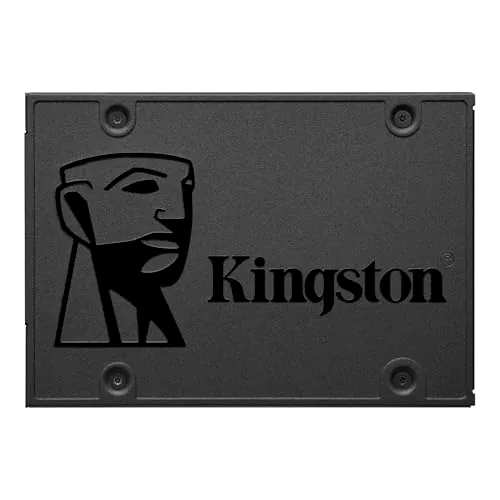
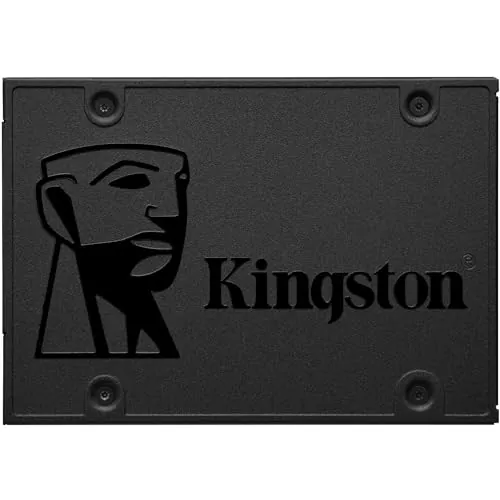
The Kingston A400 120GB is a budget 2.5-inch SATA internal SSD aimed at replacing older hard drives in laptops and desktops. It stands out most as a low-cost boot drive upgrade, with strong speed, setup and value scores backed by very positive customer feedback. Its main drawbacks are the small 120GB capacity and some reports of early failure in customer reviews.
Expert reviewed
85
Overall score
Data-driven scoring Expert reviewed Updated analysis

Why we ranked it highly

The Kingston A400 120GB is an internal 2.5-inch SATA solid-state drive designed as an affordable upgrade for older desktops and laptops. Based on the supplied data, its main appeal is straightforward: improve system responsiveness, cut boot times, and speed up everyday loading compared with a traditional hard drive. The listed read and write speeds of up to 500MB/s and 450MB/s support that positioning, and customer feedback frequently mentions noticeably faster startup and smoother day-to-day use. This model appears best suited to budget-conscious users who need a simple operating system drive, especially for older PCs, office machines, or light personal systems. Its strongest areas are setup, usability, speed, value and customer satisfaction. The key trade-offs are limited 120GB capacity, a fairly basic feature set, and mixed long-term reliability confidence based on some failure reports in reviews.
90-day review Expert reviewed User feedback Data scoring

Key specs

Features & Specs

Digital Storage Capacity
120 GB
Hard Disk Interface
Serial ATA
Connectivity Technology
SATA
Additional Features
Fast speed, portable
Hard Disk Form Factor
2.5 Inches
Compatible Devices
Desktop,Laptop
Specific Uses For Product
Business, Gaming, Personal
Read Speed
500 Megabytes Per Second
Media Speed
450 megabits_per_second
Cache Memory Installed Size
6
Data Transfer Rate
500 Megabits Per Second
Form Factor
2.5-inch
Hardware Connectivity
SATA 6.0 Gb/s
Hardware Platform
laptop

Measurements

Hard-Drive Size
120 GB
Item Weight
0.09 Pounds
Item Dimensions L x W x Thickness
3.94"L x 2.75"W x 0.28"Th
Number of Items
1

Item details

Brand
Kingston
Model Number
SA400S37/120G
Hard Disk Description
Solid State Drive
Built-In Media
(1) SSD
Model Name
A400 Series
Manufacturer
Kingston Technology
Global Trade Identification Number
00740617261196, 05057454820536
UPC
619659091965 740617261196 692754113145
Mfr Part Number
SA400S37/120G
Item Type Name
120GB A400 SATA 3 2.5 Solid State Drive SA400S37/120G

User guide

Installation Type
Internal Hard Drive

Additional details

Color
Black
Enclosure Material
SATA

Scores breakdown

86 /100

Performance

67 /100

Features

92 /100

Usability

78 /100

Design

82 /100

Connectivity

90 /100

Speed

72 /100

Reliability

84 /100

Compatibility

Strengths

  • Noticeably faster boot, load and file transfer times than mechanical hard drives, supported by the product description and repeated buyer feedback.
  • Very easy to install and migrate to for many users, with strong setup and usability scores.
  • Strong value positioning for older laptops and desktops that need a low-cost performance upgrade.
  • High customer satisfaction, reflected in a 4.7/5 rating across 28,572 reviews.
  • 2.5-inch SATA form factor gives it broad compatibility with many desktops and laptops.
  • No moving parts, which should reduce noise and help with shock resistance compared with a hard drive.

Limitations

  • 120GB capacity is quite limited by current standards and is best suited to an OS drive or light-use system.
  • Feature set is basic for an SSD, with no advanced extras highlighted in the supplied data.
  • Some customers report failures within months, which weakens long-term reliability confidence.
  • No cables or screws are included according to review feedback, which may add friction for some installations.
  • SATA performance is a clear step up from an HDD, but it is not positioned as one of the fastest SSD options overall.
  • Warranty and support details are not clearly provided in the available information.

Ideal user profiles

  • Users upgrading an old laptop or desktop from a mechanical hard drive.
  • Budget-focused buyers who want a simple boot drive for Windows or Linux.
  • Home or office users with light storage needs and cloud-based workflows.
  • DIY upgraders looking for a straightforward SATA SSD installation.

Use cases

  • Replacing a slow 2.5-inch hard drive in an older laptop.
  • Using as a low-cost operating system drive for faster boot times.
  • Refreshing an older desktop for office, web and personal use.
  • Building a basic SATA-based storage setup in a compatible PC.
  • Adding a quiet, low-power drive for light business or home computing.
  • Improving game or application load times on older systems that support SATA SSDs.

Fit and positioning

Who this works for

Category positioning

Within the internal SSD category, the Kingston A400 120GB sits firmly in the budget SATA segment. It is not presented as a premium or feature-rich drive, but as a practical upgrade for users moving from a mechanical hard drive. Its scores show strong speed, setup and value, which makes it more performance-focused than a hard drive replacement but still entry-level compared with higher-capacity or more advanced SSDs. For buyers with modest storage needs, it looks like a beginner-friendly and cost-effective option.

Best for

This drive is best for buyers who want an inexpensive way to make an older laptop or desktop feel quicker. Its 90 speed score, 93 setup score and 90 value score line up closely with user reports of faster boot times, quick installation and better day-to-day responsiveness. It is especially suitable as a small OS drive for office work, web use, basic gaming setups, or light home systems where storage needs are limited.

Not best for

Buyers who need large storage capacity, stronger long-term reliability confidence, or a more advanced SSD feature set should look carefully before choosing this model. The 120GB size is restrictive for large game libraries, media storage or heavier workloads, and the reliability and durability scores are only moderate. It is also less ideal for users who expect included accessories or clearly documented support coverage in the box.

Performance analysis

How it performs in practice

Each scoring dimension is separated into a compact card so the strengths and tradeoffs are easier to compare without reading one long block.

Performance analysis

The Kingston A400 performs well in its intended role as a hard drive replacement, earning a performance score of 86. The supplied specs list read speeds up to 500MB/s and write speeds up to 450MB/s, and customer feedback consistently describes faster boots, shorter load times and better responsiveness after installation. Several reviews specifically mention older systems feeling dramatically quicker once upgraded. That said, performance should be viewed in context: this is a SATA SSD built for affordable everyday speed gains rather than top-tier storage performance. For basic computing and OS use, the data suggests it does its job effectively.

Feature analysis

With a feature score of 67, this is a fairly basic SSD by category standards. The core proposition is simple SATA solid-state storage in a 2.5-inch form factor, with compatibility for desktops and laptops and backward compatibility to older SATA revisions. There are no advanced features highlighted in the supplied data beyond the core speed, form factor and capacity options. For users who just want an affordable storage upgrade, that may be enough, but it is not a feature-led product.

Usability analysis

Usability is one of the A400's strongest areas, reflected in its 92 usability score. Review feedback repeatedly describes smooth installation, easy operating system migration and immediate improvements in system responsiveness. Buyers mention Windows installs going smoothly and older PCs becoming much more pleasant to use. Because it uses a common 2.5-inch SATA format, everyday practicality is high for compatible systems. The main usability limitation is not operation itself, but the small 120GB capacity, which can fill quickly.

Design

The design is straightforward and practical rather than distinctive, which suits an internal SSD. Its 2.5-inch form factor, low weight and slim dimensions make it easy to fit into many desktops and laptops designed for SATA storage. A design score of 78 suggests it does the basics well. There is little in the supplied data about aesthetics or physical refinement, but for this type of product, compact size and simple fitment matter more than visual styling. It appears well suited to unobtrusive internal use.

How it compares

Compared with the wider SSD category, this Kingston drive appears to compete more on affordability and ease of upgrade than on advanced features or maximum storage performance. It has a strong profile for users moving from a hard drive, where the difference in boot speed and responsiveness is likely to be obvious. Its compact 2.5-inch SATA format also helps with broad compatibility in older systems. Where it compares less favorably is storage size, long-term reliability confidence and feature depth. That means it makes the most sense as an entry-level or secondary upgrade rather than a more ambitious storage solution for heavier workloads or large libraries.

Ranking summary

The Kingston A400 120GB ranks well as a budget internal SSD because it delivers strongly where entry-level buyers usually care most: speed, setup simplicity, value and broad customer approval. Its overall score of 85 is supported by high sub-scores for speed, usability, setup, value and customer satisfaction, making it especially compelling as an HDD replacement for older systems. It ranks lower than stronger premium SSD options would because its feature set is basic, capacity is limited to 120GB in this version, and reliability confidence is held back by some reports of early failure. In short, it ranks as a practical, affordable upgrade rather than a category leader in every area.

Buying advice

Consider the Kingston A400 120GB if your main goal is to replace a slow hard drive in an older laptop or desktop without spending much. It is especially suitable as a simple boot drive for Windows, Linux, office use or light home computing. Before buying, check that your system accepts a 2.5-inch SATA drive and that you have any needed cables, brackets or screws. You should also think carefully about capacity: 120GB is enough for an OS and core apps, but not much more. If you need more room or stronger long-term confidence, a larger or higher-tier SSD may be the safer choice.
85
Overall score

Final verdict

The Kingston A400 120GB is a strong budget SSD for buyers who want a simple, low-cost way to speed up an older computer. Its main strength is the clear real-world improvement in boot and load times, supported by high speed, setup, value and customer satisfaction scores. The main limitation is that this 120GB version is small by modern standards, and reliability confidence is only moderate because of some early-failure reports. Overall, it is a good-value entry-level SATA SSD for light-use systems and OS-drive upgrades, but less convincing for users who need more capacity or stronger long-term reassurance.
Back to review

Key topics

Kingston A400 120GB review, Kingston A400 SSD review, 120GB SATA SSD review, best budget SATA SSD, Kingston A400 comparison, internal SSD for old laptop, SSD for HDD replacement, Kingston SA400S37 120G review

Frequently asked questions

Is Kingston 120GB A400 worth it?
For a low-cost SATA upgrade, it looks like a strong value option. The drive has an overall score of 85, a value score of 90, and a 4.7/5 average from 28,572 reviews. It appears most worthwhile for reviving an older PC or laptop, though the 120GB capacity and some reports of early failure are important trade-offs.
Is the Kingston A400 120GB good for replacing a hard drive?
Yes, that is the clearest use case in the supplied data. The product description focuses on replacing mechanical hard drives, and many reviews mention much faster boot times and better responsiveness after upgrading older desktops and laptops. It is best suited to systems that use a 2.5-inch SATA drive.
What are the main limitations of the Kingston A400 120GB?
The biggest limitation is capacity. At 120GB, it is better as an operating system drive than as a main storage drive for large apps, games or media libraries. The other concern is reliability confidence, as some customers report failures within months even though many others report trouble-free use.
Is the Kingston A400 120GB easy to install?
Based on the review summary and setup score of 93, installation appears to be one of this drive's strongest areas. Buyers frequently describe it as working out of the box and easy to use for Windows installs or drive migration. Some users may still need their own SATA cable, screws or migration software.
How fast is the Kingston A400 120GB SSD?
The listed speeds are up to 500MB/s read and 450MB/s write, and the speed score is 90. In practice, user feedback consistently points to noticeably faster startup, loading and file transfers compared with traditional hard drives. It is a meaningful upgrade from HDD storage, even if it is not a premium SSD.
Is the Kingston A400 120GB good for gaming?
It can help reduce game loading times on SATA-based systems, and one reviewer reported a dramatic improvement in loading performance after upgrading from hard drives. That said, 120GB capacity is restrictive for modern game libraries, so it makes more sense for a few key titles or as a system drive.
Is the Kingston A400 120GB compatible with laptops and desktops?
The supplied specifications list desktop and laptop compatibility, with a 2.5-inch form factor and SATA interface. It should fit many systems designed for 2.5-inch SATA drives, and it is also listed as backward compatible with SATA Rev. 2.0. Buyers should still check physical fit and connector support before purchase.
Does the Kingston A400 120GB have good reliability?
Reliability looks mixed rather than outstanding. The product benefits from having no moving parts, and many reviews describe stable long-term use, but the reliability score is 72 and the review summary notes some failures in less than six months. It appears generally well-liked, but not free from durability concerns.

Related Guides & Rankings