ElectronicsRanker
Menu

Review

Kingston A400 960GB SSD Review

The Kingston A400 960GB is a 2.5-inch SATA internal SSD aimed at desktop and laptop users upgrading from a traditional hard drive. Its strongest case is improving boot times, loading speeds, and general system responsiveness at a reasonable price. The main caution from the available data is mixed compatibility feedback, with some users reporting that their systems did not recognize the drive immediately.
Expert reviewed
87
Overall score
Data-driven scoring Expert reviewed Updated analysis

Why we ranked it highly

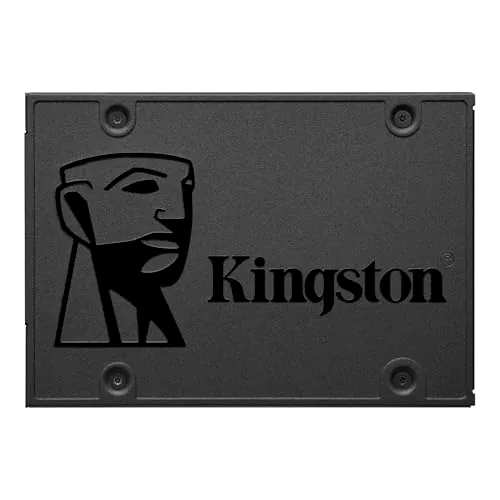
The Kingston A400 960GB is a mainstream 2.5-inch SATA solid-state drive designed as an internal storage upgrade for desktops and notebooks. Its clearest role is replacing an older mechanical hard drive to make an existing system feel faster in everyday use. The provided specifications list up to 500MB/s read and 450MB/s write speeds, and customer feedback consistently highlights quicker boot times, faster application loading, and improved responsiveness after installation. This model appears best suited to buyers who want a simple, cost-conscious performance upgrade rather than an advanced enthusiast storage solution. It offers a large 960GB capacity for operating systems, applications, games, and files, while the SSD design brings quieter operation and fewer mechanical failure risks than a hard drive. The main trade-offs are a limited feature set and some mixed compatibility feedback from a minority of users.
90-day review Expert reviewed User feedback Data scoring

Key specs

Features & Specs

Digital Storage Capacity
960 GB
Hard Disk Interface
Solid State
Connectivity Technology
SATA
Additional Features
Backward Compatible
Hard Disk Form Factor
2.5 Inches
Compatible Devices
Desktop,Notebook Computer
Specific Uses For Product
personal, gaming, business
Read Speed
500 Megabytes Per Second
Media Speed
450.0
Cache Memory Installed Size
960
Data Transfer Rate
450 Megabits Per Second
Form Factor
2.5-inch
Hardware Connectivity
SATA 3.0 Gb/s
Hardware Platform
PC, laptop

Measurements

Hard-Drive Size
960 GB
Item Weight
0.09 Pounds
Item Dimensions L x W x Thickness
3.94"L x 2.75"W x 0.28"Th
Number of Items
1
Customer Package Type
Single Drive

Item details

Brand
Kingston
Model Number
SA400S37/960G
Hard Disk Description
Solid State Drive
Built-In Media
Kingston Technology A400 960GB SATA III M.2 Internal SSD
Model Name
A400
Manufacturer
Kingston Digital, Inc.
Global Trade Identification Number
00740617277357
UPC
740617277357
Mfr Part Number
SA400S37/960G
Item Type Name
Kingston A400 960GB SSD

User guide

Installation Type
Internal Hard Drive

Additional details

Color
Black
Enclosure Material
stainless steel

Scores breakdown

90 /100

Performance

58 /100

Features

88 /100

Usability

80 /100

Design

72 /100

Connectivity

89 /100

Speed

84 /100

Reliability

68 /100

Compatibility

Strengths

  • Delivers strong everyday SSD performance for a SATA drive, with listed speeds up to 500MB/s read and 450MB/s write.
  • Very highly rated by buyers, with a 4.8/5 average from 204,504 reviews.
  • Frequently praised as an effective HDD replacement that noticeably improves boot times and general system responsiveness.
  • Installation appears straightforward for many users thanks to the standard 2.5-inch SATA form factor.
  • 960GB capacity gives enough space for operating systems, applications, games, and personal files in a single upgrade.
  • Solid value profile, supported by an 88 value score and repeated review feedback calling it affordable.
  • No moving parts, which should make it quieter and more shock resistant than a mechanical hard drive.

Limitations

  • Feature set is basic, reflected in the relatively modest 58 feature score and lack of advanced extras in the provided data.
  • Compatibility feedback is mixed, with some customers reporting that their computer did not recognize the drive immediately.
  • Performance is limited by the SATA interface, so it is not positioned as a high-end option compared with faster PCIe SSD categories.
  • Not intended for server environments according to the product description.
  • Some users may need to initialize the drive before the operating system can detect and format it.
  • Warranty and support information is limited in the provided data, which reduces clarity for long-term support expectations.

Ideal user profiles

  • PC or laptop owners replacing an older mechanical hard drive to improve boot and load times.
  • Budget-conscious buyers who want a straightforward 2.5-inch SATA SSD upgrade.
  • Users refurbishing older notebooks or desktops for everyday work, browsing, and general home use.
  • People needing a simple internal SSD for personal, gaming, or business workloads on compatible systems.

Use cases

  • Upgrading an older laptop to improve startup speed and day-to-day responsiveness.
  • Replacing a failing or slow hard disk in a desktop PC.
  • Using as a boot drive for Windows installation and everyday applications.
  • Storing games, documents, photos, and videos on a larger-capacity SATA SSD.
  • Extending the useful life of an older computer without a full system replacement.
  • Adding quiet, low-vibration storage to a notebook computer.

Fit and positioning

Who this works for

Category positioning

The A400 sits as a value-focused SATA SSD for mainstream upgrades rather than a premium or feature-heavy storage product. Its scores show a strong balance of performance, speed, usability, setup, and value, which fits buyers looking to revive an older PC or laptop without spending heavily. At the same time, the lower feature and compatibility scores suggest it is more of a practical replacement drive than a specialist or enthusiast option.

Best for

This SSD is best for users upgrading an older desktop or notebook from a mechanical hard drive to a solid-state drive. Its 90 performance score, 89 speed score, 90 setup score, and 88 value score all support that use case. It also suits buyers who want a standard 2.5-inch SATA drive with enough space for a boot drive plus applications, games, and personal files.

Not best for

Buyers wanting advanced SSD features, higher-end performance tiers, or specialist workloads should look carefully before choosing this model. The feature score is only 58, and the product description explicitly says it is not intended for server environments. It may also be a less comfortable choice for anyone with uncertain system compatibility, since some customers report recognition issues during installation.

Performance analysis

How it performs in practice

Each scoring dimension is separated into a compact card so the strengths and tradeoffs are easier to compare without reading one long block.

Performance analysis

The A400 performs well for its intended role as a SATA SSD upgrade. Its performance score of 90 is supported by the listed read and write speeds of up to 500MB/s and 450MB/s, and by repeated review comments describing much faster booting, loading, and general system responsiveness than a hard drive. In practical terms, this looks like a strong everyday performer for older desktops and laptops. The main caveat is category context: it is fast for SATA storage, but it is not positioned as a cutting-edge SSD beyond that class.

Feature analysis

This is a basic internal SSD with a simple, practical feature set. The available data focuses on capacity, SATA connectivity, 2.5-inch form factor, backward compatibility, and its role as a hard drive replacement. That keeps it accessible, but the 58 feature score reflects that it does not stand out for advanced extras in the supplied information. Its appeal is straightforward storage performance rather than broad functionality.

Usability analysis

Daily usability appears strong. The 88 usability score and customer feedback both suggest that once installed, the drive delivers a noticeable improvement in how responsive a PC or laptop feels. Reviews regularly mention smooth booting, quicker program launches, and less waiting during common tasks. The only usability friction noted in the provided data is that a minority of users had compatibility or recognition issues, which can complicate first-time setup.

Design

The design is straightforward and practical. Its standard 2.5-inch form factor makes it easy to understand as a drop-in replacement in many compatible desktops and notebooks, and its low weight helps for mobile computing use. With an 80 design score, it appears well suited to upgrade scenarios where simplicity matters more than visual flair. The design focus is clearly installation convenience and broad physical compatibility.

How it compares

Within the SATA SSD category, the A400 compares well as a value-oriented upgrade drive. It stands out more for practical speed gains, easy installation, and broad buyer satisfaction than for advanced features or specialist capabilities. Compared with stronger premium storage options in the wider SSD market, its appeal is narrower: it is designed to replace an HDD and make an older system feel quicker, not to offer the newest performance tier. That said, for buyers limited to a 2.5-inch SATA bay, its combination of 960GB capacity, good speed scores, and excellent review sentiment makes it more attractive than many low-cost upgrade options that lack the same scale of positive feedback.

Ranking summary

The Kingston A400 earns its place as a strong-ranked SATA SSD because it combines good real-world performance with easy setup, high customer approval, and solid value. Its overall score of 87 is backed by strong results in performance at 90, speed at 89, setup at 90, value at 88, and customer satisfaction at 96. Those numbers match the review pattern, where buyers consistently report much faster boot times and a noticeably more responsive system after upgrading from a hard drive. It ranks lower in areas such as features at 58 and compatibility at 68, which keeps it from feeling like a top-tier all-rounder, but for straightforward HDD replacement it remains a compelling option.

Buying advice

Consider the Kingston A400 if your main goal is to replace an older hard drive in a desktop or laptop with a straightforward SATA SSD that improves startup and loading times. It makes the most sense for mainstream home, office, and light gaming use where value and responsiveness matter more than premium features. Before buying, check that your system supports a 2.5-inch SATA drive and be aware that some users needed to initialize the drive before it appeared in the operating system. If you need server use, advanced SSD features, or the fastest storage class available, this is probably not the right fit.
87
Overall score

Final verdict

The Kingston A400 960GB is a strong option in the SATA SSD category for buyers who want a simple, affordable hard drive replacement. Its main strength is clear: it delivers the kind of real-world speed improvement that makes older desktops and laptops feel much more responsive, and the very large review base suggests that many buyers are happy with that result. Its main limitation is that it is a basic drive with mixed compatibility feedback from some users, rather than a feature-rich or high-end model. If your system takes a 2.5-inch SATA drive and your priority is value-led everyday performance, it is an easy product to shortlist.
Back to review

Key topics

kingston a400 960gb review, kingston a400 sata ssd review, best 2.5 inch sata ssd upgrade, kingston 960gb internal ssd, ssd for hdd replacement, budget sata ssd comparison, kingston a400 performance review, internal ssd for laptop upgrade, internal ssd for desktop pc, kingston a400 value

Frequently asked questions

Is Kingston A400 960GB worth it?
For buyers wanting a simple SATA SSD upgrade, the available data points to strong value. It has an overall score of 87, a value score of 88, and a very high 4.8/5 rating from over 204,000 reviews. It looks especially worthwhile for replacing an older hard drive rather than chasing premium SSD features.
Is the Kingston A400 good for replacing an HDD?
Yes. That is the clearest use case in both the product description and customer feedback. Reviews repeatedly mention much faster boot times, quicker app loading, and a more responsive system after replacing a mechanical hard drive. Its 2.5-inch SATA format also suits many older laptops and desktops that originally shipped with HDDs.
How fast is the Kingston A400 960GB?
The provided specifications list speeds up to 500MB/s read and 450MB/s write, which is strong for a standard SATA SSD. Its performance and speed scores, 90 and 89 respectively, support the view that it performs well within this category. It is designed as a fast SATA upgrade, not a next-generation PCIe model.
Is the Kingston A400 easy to install?
For many buyers, yes. The setup score is 90, and reviews often describe installation as simple. It uses a common 2.5-inch SATA form factor, which helps with compatibility in many desktops and notebooks. Some users may still need to initialize the drive in the operating system before it appears for formatting.
What are the main limitations of the Kingston A400?
The main limitation is that it is a basic SATA SSD rather than a feature-rich or high-end storage option. Its feature score is 58, and compatibility feedback is somewhat mixed, with some customers saying their systems did not recognize it immediately. It is also not intended for server environments.
Is the Kingston A400 good value for money?
Based on the provided data, it appears to offer very good value. Buyers repeatedly describe it as affordable, and its value score of 88 reinforces that position. The strongest value case is for older PCs and laptops where a hard-drive-to-SSD swap can produce a noticeable real-world improvement without a full system replacement.
Is the Kingston A400 compatible with desktops and laptops?
The listed compatible devices are desktop and notebook computers, and the drive uses a standard 2.5-inch SATA connection. However, compatibility is not flawless in user feedback. While many customers say the drive was recognized immediately, others report detection issues, so checking your system's bay size and SATA support is important.
Is the Kingston A400 reliable?
The available evidence suggests solid reliability for mainstream use. It has a reliability score of 84 and very strong customer satisfaction overall. Reviews describe it as dependable over extended use, and the SSD design has no moving parts, which should reduce the mechanical failure risks associated with traditional hard drives.

Related Guides & Rankings