Is the Silicon Power P34A60 256GB worth it?
For buyers focused on affordability and everyday speed, the data suggests it is a worthwhile option. It scores 84 overall, with particularly strong results for value, speed, and customer satisfaction. The main caution is compatibility, as some users report recognition issues or Linux-related problems, so it is best to confirm slot support before buying.
Is the Silicon Power P34A60 good for upgrading an older laptop?
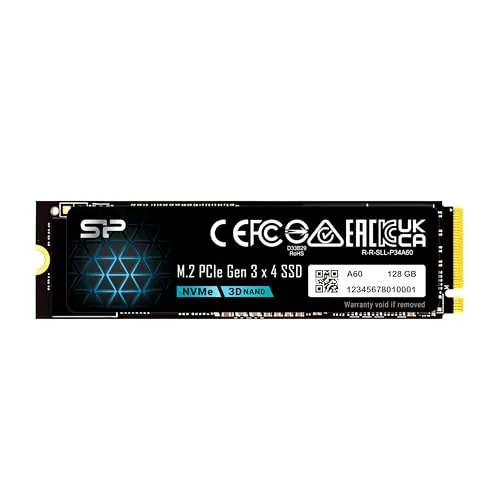
It appears well suited to that role when the laptop supports an M-key M.2 NVMe drive. Review feedback repeatedly mentions faster boot times, quicker app launches, and easy installation in laptop upgrades. Its compact M.2 2280 format also helps, but checking compatibility is important because some systems may not recognize it properly.
What are the main limitations of the Silicon Power P34A60?
The main limitations are mixed compatibility feedback, some reports of heat under load, and at least one detailed report of Linux controller or firmware-related issues. This 256GB version is also relatively small by current standards, making it more suitable as a boot drive than a large all-in-one storage solution.
How fast is the Silicon Power P34A60 256GB SSD?
Based on the provided specifications, it is rated for up to 2,200 MB/s read and 1,600 MB/s write speeds. Its score profile also supports solid real-world responsiveness, with an 86 performance score and 87 speed score. Customer reviews frequently mention much faster boot times and near-instant app loading compared with hard drives.
Is the Silicon Power P34A60 easy to install?
For many buyers, installation appears fairly straightforward. The setup score of 82 aligns with reviews describing quick physical installation in laptops and desktops. The larger challenge can be software setup afterward, such as reinstalling Windows or cloning an existing drive, which depends more on the user’s system and migration process.
Does the Silicon Power P34A60 run hot?
Customer feedback is mixed. Some users report that it runs very hot, while others say temperatures are not a problem, even in compact systems. That inconsistency suggests heat behavior may vary by workload, enclosure airflow, and host device. If your system has limited cooling, it is sensible to pay attention to thermal conditions.
Is the Silicon Power P34A60 compatible with Linux?
Compatibility with Linux looks less certain than with standard Windows upgrade use. One detailed review reported controller freezes and timeout errors under Ubuntu 24.04, while other feedback is more positive in general PC use. If Linux stability is a priority, it would be wise to research current kernel and firmware compatibility before purchase.
What kind of M.2 slot does the Silicon Power P34A60 require?
According to the provided product details, the drive requires a system with an M.2 connector using only an M key. The listing specifically notes that the SSD does not have a B notch, so a mismatched slot can prevent installation. Checking your laptop or motherboard manual is important before buying.