ElectronicsRanker
Menu

Review

Syntech USB C to USB Adapter (2 Pack) Review

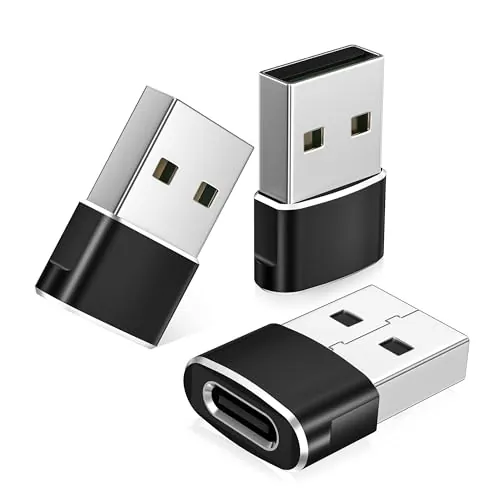
The Syntech USB C to USB Adapter is a compact USB-C to USB-A adapter set aimed at people who need older accessories to work with newer laptops, tablets, and phones. It stands out for portability, simple plug-and-play use, and broad compatibility across many USB-C devices. Its main drawback is physical width, which can stop two adapters fitting side by side on some MacBook models, and some users report occasional connection issues.
Expert reviewed
88
Overall score
Data-driven scoring Expert reviewed Updated analysis

Why we ranked it highly

The Syntech USB C to USB Adapter (2 Pack) is a simple accessory designed to connect standard USB-A devices to a USB-C port. It is positioned as a practical solution for laptops, tablets, and phones that have moved away from older USB-A ports, and the supplied compatibility list covers a wide range of Apple, Microsoft, Samsung, Google, and other USB-C devices. Based on the review data, it appears most useful for connecting flash drives, keyboards, mice, printers, and charging cables rather than serving as a feature-rich dock or hub. Its strongest areas are ease of use, compatibility, portability, and value. The compact zinc alloy design, plug-and-play setup, and high customer rating make it a straightforward choice for everyday connectivity needs. The main cautions are its relatively basic feature set, reports of occasional disconnections, and a body shape that may block adjacent ports on some devices.
90-day review Expert reviewed User feedback Data scoring
Key specs

Features & Specs

Compatible Devices
iPhone 17/17e/Air/Pro/Pro Max, iPhone 16/16 Pro/16 Plus/16 Pro Max, iPhone 15 14 13 12 11 Pro Max, iPad Air 5/4, iPad Mini 6, iPad Pro 12.9 6/5/4/3, iPad Pro 11 3/2/1, MacBook Neo, MacBook Air M2 15in/13in, MacBook Air M1, MacBook Air Retina 13in, MacBook Pro 16in/14in, Mac Pro 2023/2019, iMac 24in M3/M1, iMac Retina 5K/4K; Samsung Galaxy S24/S23/S22/S20/S10/S9/S8/S7/S5/S4 series; Samsung Z Fold, Flip, A, Note, Tab; Xiaomi 14/13/12/11, Xiaomi Redmi, Xiaomi Mi; LG G8/G7/G6/G5/G4/G3, LG V60/V50/V40/V30/V20, LG Velvet, U, Stylo; Google Pixel, Nexus; HTC Desire, Wildfire, U; Motorola Edge, Razr, Moto G, Defy; Asus, Nokia, Sony, and other USB A/USB C compatible devices
Specific Uses For Product
device interconnectivity, data transfer, charging, peripheral device connection
Connector Type
USB 3.0
Number of Ports
2
Current Rating
3 Amps
Power Plug Type
No Plug
Nominal Power
4.5 Watts
Smart Home Compatibility
Not Smart Home Compatible

Additional details

Color
Silver
Finish
Metallic,Zinc

Measurements

Item Dimensions
1.08 x 0.65 x 0.32 inches
Item Weight
18.1 Grams
Package Quantity
1
Unit Count
2.0 Count
Number of Items
2

Item details

Brand
Syntech
Model Number
M3-SILBER
Manufacturer
Syntech
Mfr Part Number
M3- SILBER

Scores breakdown

86 /100

Performance

72 /100

Features

92 /100

Usability

84 /100

Design

85 /100

Connectivity

80 /100

Speed

83 /100

Reliability

90 /100

Compatibility

Strengths

  • Very strong plug-and-play usability, supported by a 98 setup score and repeated review feedback that it works without drivers.
  • Broad device compatibility across USB-C laptops, tablets, and phones, reflected in a 90 compatibility score.
  • Compact, lightweight design makes it easy to carry in a bag, pocket, or glove box.
  • Good value for money at the listed price, reinforced by a 94 value score and strong customer feedback.
  • Zinc alloy metallic housing and rated 10,000 insertions suggest better-than-basic build durability.
  • Works well for common USB-A peripherals such as flash drives, keyboards, mice, and printers based on review evidence.

Limitations

  • The adapter body is too wide for side-by-side use on some MacBook and Mac mini ports, which is also stated in the product details.
  • Connectivity feedback is mixed, with some users reporting occasional disconnections.
  • Feature set is basic rather than advanced, with no indication of extra functions beyond adapter duties.
  • Small size improves portability but also makes the adapters easier to misplace.
  • Audio accessory performance is less clearly established than basic peripheral use based on the available reviews.

Ideal user profiles

  • MacBook or iPad users who need to connect older USB-A accessories to a USB-C port.
  • Laptop owners who want a low-cost adapter for flash drives, keyboards, mice, or printers.
  • Travelers and commuters who need a tiny adapter that is easy to carry daily.
  • Users with multiple USB-C devices who want a simple two-pack for home and work.

Use cases

  • Connecting a USB flash drive to a USB-C laptop or tablet.
  • Using a wired or wireless USB-A mouse and keyboard with a modern laptop.
  • Attaching a printer or other office peripheral after moving to a USB-C-only laptop.
  • Syncing or charging a phone through a USB-A cable.
  • Keeping one adapter at home and one in a work bag for everyday convenience.
  • Using USB-A accessories with MacBook, Surface, iPad, or compatible Android devices.

Fit and positioning

Who this works for

Category positioning

Within the USB-C adapter category, this Syntech model looks like a value-focused, highly portable basic adapter rather than a premium multiport accessory. Its score profile suggests it competes on convenience, simplicity, and broad compatibility instead of advanced functionality. The low price, two-pack format, compact size, and strong customer sentiment make it especially well positioned for buyers who just need a reliable USB-A connection on a modern USB-C device.

Best for

This adapter is best for users who need a small, inexpensive way to keep USB-A accessories working with USB-C devices. Its 98 setup score, 96 portability score, 90 compatibility score, and 94 value score all point to a product that works well for uncomplicated everyday use. It makes the most sense for laptop and tablet owners connecting flash drives, keyboards, mice, printers, and charging cables without wanting a larger hub.

Not best for

It is less suitable for buyers who need a slimmer adapter shape for tightly spaced laptop ports, since the listing itself notes that two may not fit side by side on some MacBook and Mac mini models. It may also be a less ideal choice for users who are highly sensitive to occasional connection instability, as the review summary mentions mixed connectivity experiences. If you need extra ports or premium features, this basic adapter may feel limited.

Performance analysis

How it performs in practice

Each scoring dimension is separated into a compact card so the strengths and tradeoffs are easier to compare without reading one long block.

Performance analysis

For its core job, the Syntech adapter performs well. The 86 performance score suggests solid real-world results for common USB-A connections, and customer feedback repeatedly mentions successful use with flash drives, printers, keyboards, and mice. The adapter is also described as supporting USB 3.0 data transfer and charging or syncing through a USB-A connection. That said, performance evidence is strongest for everyday peripherals rather than more demanding edge cases, and the mixed connectivity feedback means consistency may vary depending on the connected device and host port.

Feature analysis

This is a straightforward adapter with a modest feature set, reflected in its 72 feature score. Its main functions are device interconnectivity, data transfer, charging, and peripheral support, all in a simple two-pack design. There is no evidence of extra controls, integrated cables, multiple ports per adapter, or advanced management features. For buyers who only need USB-C to USB-A conversion, that simplicity may be a strength rather than a weakness.

Usability analysis

Usability is one of the strongest parts of this product. It has a 92 usability score and an even higher 98 setup score, which aligns with the repeated plug-and-play comments in reviews. Users describe it as easy to carry, easy to connect, and immediately useful for common accessories. The main usability downside is physical: the compact body is convenient, but some owners mention that its width can interfere with neighboring ports on tightly spaced devices.

Design

The design is minimalist and practical, with a small metallic housing and embossed texture intended to improve grip. Its 84 design score suggests a good but not perfect result. Customers generally like the compact dimensions and unobtrusive shape, especially for travel or keeping one adapter attached to a bag or laptop setup. The trade-off is that the body is not the slimmest, so port spacing can become an issue on some laptops.

How it compares

Compared with many USB-C to USB-A adapters, this Syntech model appears especially competitive on portability, simplicity, and value. The two-pack format and low price make it more accessible than some premium adapters, while the zinc alloy housing and strong review profile help it stand above many low-cost generic options. Its compromise is that it remains a basic single-purpose adapter rather than a more flexible hub, and its width may be less convenient on tightly spaced laptop ports. For straightforward peripheral use, it compares well; for denser or more advanced setups, some buyers may want a different design.

Ranking summary

With an overall score of 88, the Syntech USB C to USB Adapter ranks as a strong option in the basic USB-C adapter category. Its best scoring areas are setup, portability, customer satisfaction, value, usability, and compatibility, which matches its role as a simple everyday accessory. It does not stand out for advanced features, as shown by the lower 72 feature score, but that is less important for buyers who only need dependable USB-A access. The main factors preventing an even higher ranking are the wider body design, which can block neighboring ports, and some mixed reports around connection stability.

Buying advice

Buy this adapter if you mainly need a simple, low-cost way to connect USB-A accessories to a USB-C laptop, tablet, or phone. It is especially sensible for flash drives, keyboards, mice, printers, and charging cables, and the very high setup, portability, and value scores support that use. Before buying, check the spacing of your device's USB-C ports if you may use two adapters at once, especially on a MacBook. If you need extra ports, advanced functionality, or guaranteed stability for every specialized accessory, consider whether a hub or slimmer adapter design would suit you better.
88
Overall score

Final verdict

The Syntech USB C to USB Adapter (2 Pack) is a strong option in the basic adapter category. Its main strengths are excellent plug-and-play usability, broad compatibility, compact size, and very good value for money. Customer satisfaction is also notably high, backed by a large volume of reviews. Its main limitation is physical width, which can make side-by-side use difficult on some laptops, and there are occasional reports of connection inconsistency. If your priority is a simple adapter for everyday USB-A accessories rather than a more advanced hub, this is a well-rounded and practical choice.
Back to review

Key topics

Syntech USB C to USB Adapter review, Syntech USB C to USB Adapter 2 pack, USB-C male to USB 3.0 female adapter, best USB-C to USB adapter, USB-C adapter for MacBook review, USB adapter for iPad and iPhone, USB-C to USB adapter comparison, compact USB-C adapter

Frequently asked questions

Is the Syntech USB C to USB Adapter worth it?
Based on the available data, it looks like a strong value option. It has a high overall score of 88, a very high value score of 94, and a 4.7-star average from a very large review base. Most feedback points to simple, reliable use for common USB-A peripherals, though width and occasional connection complaints are worth noting.
What is the Syntech USB C to USB Adapter best used for?
It appears best suited to straightforward adapter tasks such as connecting flash drives, keyboards, mice, printers, and charging cables to USB-C devices. Reviews repeatedly mention MacBook and laptop use, and the high usability and compatibility scores support that everyday accessory role.
Does the Syntech USB C to USB Adapter work with MacBook?
Yes, MacBook compatibility is strongly supported by both the product details and multiple user reviews. Buyers specifically mention using it with MacBook models for USB drives, printers, mice, and keyboards. One practical limitation is that two adapters may not fit side by side on some MacBook models.
Is the Syntech USB C to USB Adapter easy to set up?
Yes. This is one of its clearest strengths. The adapter has a setup score of 98, and the listing describes it as plug and play with no driver required. Reviews also consistently describe it as simple to use with little to no setup friction.
How reliable is the Syntech USB C to USB Adapter?
Reliability looks good overall but not flawless. It carries an 83 reliability score, and many reviews report stable day-to-day performance. However, the aggregated review summary notes mixed connectivity experiences, with some users mentioning occasional disconnections.
Can you use two Syntech adapters side by side on a laptop?
Not always. The product details explicitly note that they cannot fit side by side on a MacBook or Mac mini, and some customer feedback says the adapters are too wide for simultaneous use in closely spaced ports. If adjacent port access matters, check your device spacing first.
Is the Syntech USB C to USB Adapter good for travel?
Yes, portability is one of its strongest points. It has a 96 portability score, weighs just 18.1 grams, and has very small dimensions. Reviews frequently describe it as compact and easy to carry, although that same small size may make it easier to lose.
Does the Syntech USB C to USB Adapter support many devices?
It appears to support a wide range of USB-C devices, including many MacBook, iPad, iPhone, Surface, Samsung, Pixel, and other compatible products listed in the specifications. Its 90 compatibility score reflects that broad support, though actual results can still vary by accessory and device combination.

Related Guides & Rankings