ElectronicsRanker
Menu

Review

WD 1TB Black My Passport Portable Hard Drive Review

The WD 1TB Black My Passport is a USB 3.0 portable external hard drive aimed at backups, file transfers and extra storage. It stands out for its compact size, included backup and security tools, and strong buyer feedback. Its mechanical HDD design is slower and less drop-resistant than an SSD, while a small number of reports raise recognition and warranty-service concerns.
Expert reviewed
80
Overall score
Data-driven scoring Expert reviewed Updated analysis

Why we ranked it highly

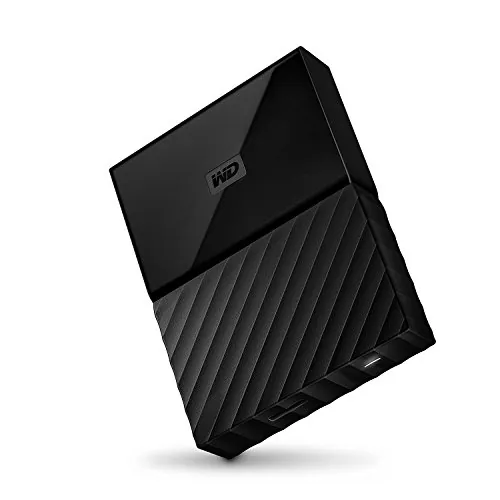
The WD My Passport WDBYNN0010BBK-WESN is a 1TB, 2.5-inch portable external hard drive that connects over USB 3.0 and is compatible with USB 2.0. It is designed for personal, business and gaming storage, with a compact 4.33-inch by 3.21-inch footprint and USB-powered operation. The supplied details identify included WD Backup software, WD Security password protection with hardware encryption, and WD Drive Utilities for formatting and drive checks. Its 80/100 overall score is supported by strong usability, portability, brand trust and customer satisfaction results. It appears best suited to PC users who need economical capacity for routine backups and moving files. Mac use is possible but requires reformatting, while buyers who travel with a drive often or need higher impact resistance may prefer an SSD.
90-day review Expert reviewed User feedback Data scoring

Key specs

Features & Specs

Digital Storage Capacity
1 TB
Hard Disk Interface
USB 3.0
Connectivity Technology
USB
Additional Features
LED indicators^Operating temperature range:5 - 35 °C^Security algorithms:256-bit AES^USB powered^Y
Hard Disk Form Factor
4.2 Inches
Compatible Devices
HDD
Specific Uses For Product
personal, gaming, business
Read Speed
1 Bytes Per Second
Media Speed
480 Mbps (USB 2.0)
Cache Memory Installed Size
1
Data Transfer Rate
1 Megabytes Per Second
Form Factor
2.5-inch
Hardware Connectivity
USB 3.0
Hardware Platform
PC

Measurements

Hard-Drive Size
1 TB
Item Weight
0.54 Pounds
Item Dimensions L x W x Thickness
4.33"L x 3.21"W x 0.64"Th
Number of Items
1
Unit Count
1.0 Count
Customer Package Type
Standard Packaging

Item details

Brand
WD
Model Number
WDBYNN0010BBK-WESN
Hard Disk Description
Portable
Built-In Media
Portable hard drive^USB 3.0 cable^Quick Install Guide
Model Name
My Passport
Manufacturer
Western Digital Technologies, Inc.
Global Trade Identification Number
00718037847177
UPC
718037847177
Item Part Number
WDBYNN0010BBK-WESN, WDBYNN0010BBKWESN
Mfr Part Number
WDBYNN0010BBK-WESN
Item Type Name
WD My Passport Portable Hard Drive and auto backup software ,Black ,1 TB (WDBYNN0010BBK-WESN)

User guide

Installation Type
External Hard Drive

Additional details

Color
Black
Enclosure Material
plastic

Scores breakdown

78 /100

Performance

82 /100

Features

83 /100

Usability

82 /100

Design

76 /100

App experience

78 /100

Connectivity

72 /100

Speed

80 /100

Reliability

Strengths

  • Compact 0.54-pound, 2.5-inch portable hard drive design with a strong 90/100 portability score.
  • 1TB capacity provides practical space for computer backups, photo libraries, documents and game storage.
  • Includes WD Backup, WD Security and WD Drive Utilities software for backup, password protection and drive-health checks.
  • USB 3.0 connection is backward compatible with USB 2.0.
  • High customer satisfaction score of 87/100, supported by a 4.6/5 average from 3,107 reviews.
  • Three-year manufacturer limited warranty is listed in the supplied product details.

Limitations

  • As a mechanical HDD, it is less resistant to drops and generally slower than an SSD, according to customer feedback and the 72/100 speed score.
  • Durability is a relative weakness at 68/100; one review describes a partition failure after more than a year.
  • Some buyers report that their computers did not recognize the drive.
  • It is formatted for Windows and requires reformatting for Mac OS X.
  • Warranty-service feedback is mixed, including one report of customer-paid replacement shipping and no first-party data recovery support.
  • The supplied compatibility details list Windows platforms and do not confirm Linux software support.

Ideal user profiles

  • PC users who need a compact 1TB drive for routine backups and file transfers.
  • Buyers looking for portable mass storage rather than SSD-level drop resistance or top transfer speed.
  • Users who value included backup, security and drive-utility software.
  • PS4 owners seeking external storage and willing to dedicate a USB port.
  • Mac users who are comfortable reformatting the drive before use.

Use cases

  • Backing up documents, photos and other computer files.
  • Moving folders and media between an older PC and a new PC.
  • Keeping a secondary computer backup.
  • Adding external storage to a PS4 after console formatting.
  • Storing Dropbox files or other locally synced content.
  • Using Time Machine backups after reformatting for Mac OS X.

Fit and positioning

Who this works for

Category positioning

This is a value-oriented portable HDD rather than a performance-focused portable SSD. Its 1TB capacity, USB 3.0 interface, backup software and password protection cover the practical essentials for home backup and file transport. A 90/100 portability score makes its small, USB-powered form especially appealing for an HDD. However, the 72/100 speed and 68/100 durability scores reflect the usual mechanical-drive compromises. It is positioned for buyers who prioritize capacity, simple backup tools and a lower-cost storage approach over maximum speed and drop resistance.

Best for

The WD My Passport is best for PC users wanting a small 1TB drive for documents, photos, routine backups and transfers between computers. Its 83/100 usability score, 82/100 setup score and included WD software support that role. It can also suit PS4 storage based on a positive verified-purchase report. Mac users can consider it when they are prepared to reformat the drive. Buyers who keep the drive mainly on a desk rather than exposing it to frequent travel-related impacts are a particularly good fit.

Not best for

This model is not the strongest choice for users who need the faster transfers, greater shock resistance and more travel-friendly durability typically associated with an SSD. Its speed score is 72/100 and durability score is 68/100. It may also be a poor fit for buyers who require confirmed Linux software support or friction-free Mac use, since the listed configuration is Windows-focused and Mac OS X requires reformatting. Consider support expectations carefully because warranty-service feedback is mixed.

Performance analysis

How it performs in practice

Each scoring dimension is separated into a compact card so the strengths and tradeoffs are easier to compare without reading one long block.

Performance analysis

The My Passport performs its central job well for everyday backup and file-storage tasks, earning 78/100 for performance. Reviews describe reliable computer backups, transfers between older and newer PCs, photo storage and external PS4 use. USB 3.0 is the preferred connection for its practical transfer performance, while USB 2.0 backward compatibility adds flexibility. The supplied specification speed figures are inconsistent and should not be treated as a dependable benchmark. In practical terms, this is an HDD for steady bulk storage work, not a drive positioned for SSD-class responsiveness.

Feature analysis

The feature score of 82/100 reflects a useful package for a portable HDD. WD Backup supports automated backup workflows, WD Security adds password protection with listed hardware encryption, and WD Drive Utilities provides drive-checking and configuration functions. The drive is USB-powered, includes LED indicators and supports USB 3.0 with USB 2.0 compatibility. These are practical features for backup-focused ownership. The available details do not establish advanced cross-platform software support, and one review specifically notes no Linux software.

Usability analysis

With an 83/100 usability score, the drive appears straightforward for its core purpose. Multiple reviews describe easy connection, plug-and-play PC use, uncomplicated transfers and quiet operation. Its small format also makes it easy to place beside a computer without demanding much space. Usability is less consistent across every situation: Mac users must reformat it, and aggregated feedback includes some reports of computers failing to recognize the drive. For ordinary Windows backup and transfer tasks, the available evidence is broadly positive.

Design

The design score of 82/100 is driven by a simple, compact physical format. At 4.33 by 3.21 by 0.64 inches and 0.54 pounds, the drive is small enough to fit easily beside a laptop or in a bag. It uses a USB connection and is powered through USB, reducing the number of accessories needed. Reviews also praise its small footprint and quiet operation. The design is practical for storage and backup, although the small HDD format still needs careful handling when moved.

How it compares

Within the portable storage category, the My Passport favors capacity, backup convenience and a compact USB-powered design over SSD-style performance. Its 1TB capacity and USB 3.0 connection suit general file storage, computer backups and media transfers, while the included security and utility software add more management tools than a bare drive. Its portability score is particularly strong for an HDD. Against faster solid-state alternatives, however, its mechanical design brings lower speed and less drop resistance. It is therefore more attractive for desk, home and routine backup use than for users regularly moving a drive between demanding environments.

Ranking summary

The WD 1TB Black My Passport earns an 80/100 overall score because it handles the everyday portable-HDD brief effectively. Its strongest results are portability at 90/100, customer satisfaction at 87/100, brand trust at 85/100, usability at 83/100 and setup at 82/100. Included backup, security and utility software reinforce its usefulness for basic backup and transfer tasks. The ranking is held back by a 72/100 speed score and 68/100 durability score, both consistent with a mechanical drive rather than an SSD. Recognition complaints and mixed warranty-service feedback also prevent it from being an uncomplicated choice for every buyer.

Buying advice

Consider the WD My Passport if you want compact 1TB storage for a Windows PC, routine backups, documents, photos or occasional transfers, and value included backup and password-protection tools. It can work with Mac OS X after reformatting, so Mac buyers should confirm their preferred file-system setup first. For PS4 use, review the console's current external-storage requirements despite a positive buyer report. Avoid relying on it as the only copy of essential files, especially given the isolated failure report. Buyers who need faster transfers or expect frequent drops should compare an SSD instead.
80
Overall score

Final verdict

The WD 1TB Black My Passport is a strong everyday portable HDD, rather than a high-speed or rugged portable-storage choice. Its main strengths are its very compact USB-powered design, practical 1TB capacity, useful WD backup and security software, and positive customer feedback. It is particularly sensible for PC backups and moving files between systems. The main limitation is the mechanical-drive trade-off: it is slower and less impact-resistant than an SSD, with some reported recognition and support issues. Buyers who prioritize economical bulk storage should find it capable, provided they maintain a separate backup for critical files.
Back to review

Key topics

WD 1TB Black My Passport review, WD My Passport portable hard drive, WD My Passport 1TB external hard drive review, USB 3.0 portable HDD, 1TB backup drive, WD My Passport comparison, best portable external hard drives, external hard drive for PS4

Frequently asked questions

Is the WD 1TB Black My Passport worth it?
The WD 1TB Black My Passport is a solid option for buyers who want compact 1TB HDD storage for backups and file transfers. Its 80/100 overall score reflects strong portability, usability and customer satisfaction. It is less compelling for buyers who need SSD-like speed or better protection against drops.
Is the WD My Passport good for backing up a computer?
Yes, backup use is one of its clearest strengths. The supplied details list WD Backup software, while reviews describe successful computer backups, photo transfers and Time Machine use after Mac reformatting. As with any single drive, the reported partition-failure experience means important files should not rely on only one backup copy.
How portable is the WD 1TB Black My Passport?
Portability is this model's strongest scored area at 90/100. It measures 4.33 by 3.21 by 0.64 inches and weighs 0.54 pounds, so it takes little desk or bag space. However, it is a mechanical hard drive, so its compact size should not be mistaken for SSD-level drop durability.
Does the WD My Passport work with Mac computers?
The product details say the drive requires reformatting for Mac OS X. Review feedback includes successful MacBook use and Time Machine backups after formatting, although one buyer found the process somewhat challenging. Mac buyers should plan to format the drive before storing files and confirm that the chosen format suits their workflow.
Can the WD My Passport be used with a PS4?
One verified-purchase review reports straightforward use with a PS4: the console formatted the drive and the reviewer reported no noticeable delay when reading or writing data. This is useful real-world feedback, but it is not a full compatibility guarantee. Check the console's current external-storage requirements before buying.
What are the main limitations of this WD portable hard drive?
The main trade-offs are mechanical-HDD speed and durability. Its speed score is 72/100 and durability score is 68/100, and a reviewer specifically preferred an SSD for portable use because SSDs better tolerate drops. There are also isolated reports of recognition problems and mixed feedback about warranty service.
Is the WD My Passport easy to set up?
Setup scores 82/100. Several reviewers describe plug-and-play use on PCs, simple file transfers and easy PS4 setup after formatting. The experience may require more work on Mac because reformatting is required, and some aggregated feedback mentions computers not recognizing the drive. Keep the included USB cable available during initial setup.
Does the WD My Passport include security features?
Yes. The supplied product details list password protection with hardware encryption and specify 256-bit AES security algorithms. WD Security software is also identified in the provided material. These features can help protect access to stored files, but they do not replace maintaining separate backups of important data.

Related Guides & Rankings