ElectronicsRanker
Menu

Review

WD 5TB My Passport Ultra for Mac Review

The WD 5TB My Passport Ultra for Mac is a portable external hard drive aimed at Mac users who want extra storage and straightforward Time Machine backups. It stands out for Mac-ready formatting, USB-C connectivity, and useful security features. Its main limitation is reliability, with multiple reviews mentioning failures, mounting issues, or inconsistent long-term behavior.
Expert reviewed
68
Overall score
Data-driven scoring Expert reviewed Updated analysis

Why we ranked it highly

The WD 5TB My Passport Ultra for Mac is a 2.5-inch portable external hard drive designed primarily for macOS users who need more storage for backups, archives, and large file libraries. It comes formatted for Mac out of the box and is positioned as a convenient companion for Time Machine, which aligns with many of the positive customer reviews. The drive also includes USB-C and USB 3.1 support, a metal enclosure, and password protection with 256-bit AES hardware encryption. Based on the supplied scores, its strongest areas are connectivity, speed, compatibility, and customer satisfaction. In practical terms, it appears best suited to home users, students, and professionals who want a simple local backup drive for a MacBook or iMac. The biggest caution is reliability. While many users report smooth, fast backups, several reviews describe failures, mounting issues, or software friction, which lowers confidence for long-term or mission-critical use.
90-day review Expert reviewed User feedback Data scoring

Key specs

Features & Specs

Digital Storage Capacity
5 TB
Hard Disk Interface
USB 3.0
Connectivity Technology
USB
Additional Features
Hardware Encryption, Portable
Hard Disk Form Factor
2.5 Inches
Compatible Devices
MAC
Hard Disk Rotational Speed
1 RPM
Specific Uses For Product
business, personal
Media Speed
150 MB/s
Cache Memory Installed Size
5
Data Transfer Rate
2.5 Megabytes Per Second
Form Factor
2.5-inch
Hardware Connectivity
USB 3.0, USB Type C
Hardware Platform
Mac

Measurements

Hard-Drive Size
5 TB
Item Weight
8.1 Ounces
Item Dimensions L x W x Thickness
4.33"L x 3.21"W x 0.83"Th
Number of Items
1
Unit Count
1.0 Count
Customer Package Type
Standard Packaging

Item details

Brand
WD
Model Number
WDBPMV0050BSL-WESN
Hard Disk Description
Portable
Built-In Media
My Passport Ultra for Mac portable storage, Quick Start Guide, USB 3.0 cable
Model Name
My Passport Ultra for Mac
Manufacturer
Western Digital Technologies, Inc.
Global Trade Identification Number
00718037871561
UPC
718037871561
Mfr Part Number
WDBPMV0050BSL-WESN
Item Type Name
HDD

User guide

Installation Type
External Hard Drive

Additional details

Color
Silver
Enclosure Material
Metal

Scores breakdown

74 /100

Performance

72 /100

Features

70 /100

Usability

72 /100

Design

52 /100

App experience

78 /100

Connectivity

76 /100

Speed

48 /100

Reliability

Strengths

  • Formatted for macOS out of the box, with repeated review mentions of easy Time Machine use.
  • USB-C and USB 3.1 support make it convenient for newer Mac setups and hubs.
  • 5TB capacity offers substantial space for backups, media libraries, and file archives.
  • Password protection with 256-bit AES hardware encryption adds a useful security feature.
  • Customer feedback frequently describes backup performance as quick for everyday use.
  • Metal enclosure and slim 2.5-inch format support a more premium feel than basic plastic drives.

Limitations

  • Reliability is the biggest concern, with several reviews reporting drive failure, mounting issues, or error states.
  • This is a mechanical HDD rather than an SSD, so it may be more vulnerable to movement while operating.
  • Some users report confusing setup around security software and passwords on Mac.
  • Portability is limited by the practical care required when the drive is active.
  • Support experiences appear mixed, with some helpful troubleshooting but also complaints about slow or unhelpful assistance.
  • The product is mainly aimed at Mac users, so broader plug-and-play compatibility is more limited out of the box.

Ideal user profiles

  • Mac users who want a high-capacity Time Machine backup drive with USB-C.
  • Home users needing external storage for documents, photos, and media libraries.
  • MacBook or iMac owners who prefer simple local backups over cloud-only storage.
  • Users who want hardware encryption and password protection for stored files.

Use cases

  • Time Machine backups for MacBook, iMac, or Mac mini systems.
  • Storing large photo, video, and document archives outside the internal Mac drive.
  • Keeping a secondary local backup of important personal or business files.
  • Expanding storage for users working with large creative project files.
  • Moving files between a Mac and another system after reformatting or driver setup.
  • General desktop or home-office external storage where the drive can stay relatively stationary.

Fit and positioning

Who this works for

Category positioning

This WD model sits in the portable HDD category as a Mac-focused, mid-range option that emphasizes convenience rather than ruggedness or peak performance. The 5TB capacity, Mac formatting, and USB-C connection give it clear appeal for backup and storage expansion, especially for Time Machine users. It is more feature-rich than a bare-bones budget external drive thanks to its metal finish and hardware encryption, but its weaker reliability and durability scores stop it from feeling like a top-tier specialist choice.

Best for

This drive is best for Mac users who want straightforward external storage with Time Machine compatibility, good everyday transfer performance, and a large 5TB capacity. Its strongest scores in connectivity, speed, and customer satisfaction support that role, and several reviews describe smooth plug-and-play backup use. Buyers who mainly want a local backup drive that stays on a desk or moves occasionally are the most natural fit.

Not best for

It is less suitable for buyers who need highly dependable long-term storage, frequent travel use while active, or a drive for rough handling. Reliability and durability are its weakest score areas, and some reviews mention failures, mounting problems, and confusion around setup or security software. Users who want SSD-like resilience, silent operation under all conditions, or broad plug-and-play Windows compatibility may want to look more carefully at alternatives.

Performance analysis

How it performs in practice

Each scoring dimension is separated into a compact card so the strengths and tradeoffs are easier to compare without reading one long block.

Performance analysis

For its main job as a Mac backup and storage drive, performance looks good rather than class-leading. The performance score of 74 and speed score of 76 suggest solid everyday results for an external HDD, and several reviews describe backups completing quickly and working smoothly in the background with Time Machine. The supplied specs mention media speed of 150 MB/s, which fits the general picture of respectable hard-drive performance. This is still a mechanical drive, though, so buyers should not expect SSD-style responsiveness, and real-world results may vary depending on file size, hub use, and backup type.

Feature analysis

The feature set is competitive for a Mac-oriented portable hard drive. Key inclusions are 5TB capacity, USB-C and USB 3.1 compatibility, Mac formatting out of the box, Time Machine readiness, and password protection with 256-bit AES hardware encryption. These are useful, practical features rather than unusual extras. The main limitation is that some of the security and software-related features appear less polished in practice based on review feedback, which holds the feature score to a solid but not standout 72.

Usability analysis

Daily usability is one of the stronger parts of this drive when used in a simple Mac backup role. Multiple reviewers describe plugging it in and getting started quickly, especially for Time Machine. Its usability score of 70 suggests a generally decent experience with some friction points. Those issues appear mostly around advanced setup, security software, or troubleshooting rather than basic storage use. As with many HDDs, the best user experience is likely when the drive is left on a stable surface instead of being moved around during operation.

Design

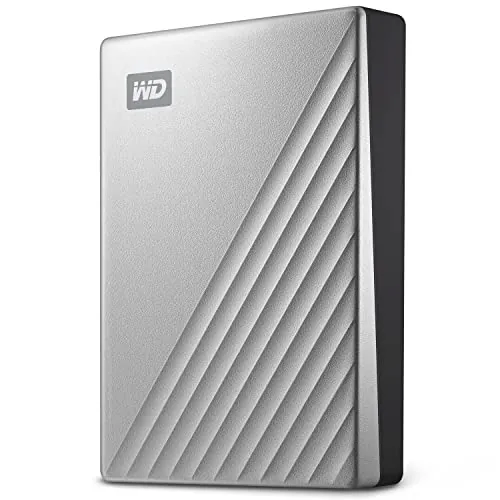
Design is a clear selling point here. The silver metal enclosure, compact 2.5-inch form factor, and Mac-oriented styling make it a natural visual match for MacBook and iMac setups. At 8.1 ounces and under an inch thick, it is easy to slip into a bag or place beside a laptop. One minor design complaint from reviews is the placement of the indicator light at the back, which is less convenient for quick status checks. Overall, the design is clean and practical, even if not especially rugged.

How it compares

Within the portable external hard drive category, this WD model compares well on Mac-specific convenience and everyday usability. The out-of-box macOS formatting, Time Machine compatibility, USB-C support, and hardware encryption help it stand out against more generic drives that require extra setup. Its speed profile is also solid for an HDD. Where it compares less favorably is long-term confidence. The reliability and durability scores are weaker than the rest of its profile, and review complaints focus on issues that matter more than cosmetic flaws. Compared with typical portable HDD expectations, it looks strongest as a desktop-style Mac backup drive rather than a heavily traveled everyday work drive.

Ranking summary

This product ranks as a capable but imperfect portable external hard drive for Mac users. Its overall score of 68 is supported by stronger results in connectivity, customer satisfaction, speed, compatibility, and performance, which align with its core purpose as a Time Machine-friendly backup drive. It also offers practical extras such as USB-C, hardware encryption, and a premium-looking metal enclosure. What keeps it from ranking higher is a clear weakness in reliability and durability, with low scores of 48 and 46 and multiple reviews reporting failures or mounting issues. In short, it performs well when working properly, but confidence over time is the main concern.

Buying advice

Consider this drive if you use a Mac and want a large-capacity external HDD mainly for Time Machine, file archiving, or keeping your internal storage free. It makes the most sense for buyers who value USB-C convenience, hardware encryption, and straightforward local backup use. Before buying, think carefully about how you plan to use it. If you need a drive for frequent movement while operating, mission-critical storage, or the smoothest possible software setup, this may be a less comfortable fit. Also verify your compatibility needs if you plan to use it beyond macOS, and keep separate backups of important files because review evidence on reliability is mixed.
68
Overall score

Final verdict

The WD 5TB My Passport Ultra for Mac is an above-average portable HDD for Mac users, but not a fully confidence-inspiring one. Its main strength is convenience: it offers high capacity, USB-C connectivity, Mac formatting, and strong everyday backup performance for Time Machine workflows. Its main limitation is reliability, with enough review evidence of failures and mounting issues to justify caution. If you want a desktop-friendly Mac backup drive and maintain more than one copy of valuable data, it can be a sensible choice. If reliability under frequent mobile use is your top priority, it looks more limited.
Back to review

Key topics

WD My Passport Ultra for Mac review, WD 5TB external hard drive review, best external hard drive for Mac, My Passport Ultra for Mac ranking, WD portable hard drive for Time Machine, USB-C external hard drive for Mac, 5TB Mac backup drive review, WD My Passport Ultra comparison

Frequently asked questions

Is the WD 5TB My Passport Ultra for Mac worth it?
It looks like a reasonable option for Mac users who want a large-capacity backup drive with USB-C, hardware encryption, and Time Machine support. Its scores for connectivity, speed, and customer satisfaction are solid. The main caution is reliability, as some reviews report failures and mounting problems, so it is better suited to buyers who keep good backup discipline rather than relying on a single copy.
Is the WD 5TB My Passport Ultra for Mac good for Time Machine backups?
Yes, the available product information and several reviews point to Time Machine as one of its strongest use cases. It is formatted for macOS out of the box, and multiple buyers describe simple plug-in backup use. Performance and usability scores are also reasonably strong, although long-term reliability feedback is more mixed.
What are the main limitations of the WD 5TB My Passport Ultra for Mac?
The main drawbacks are reliability and durability concerns. Some reviews mention failures within months, drives not mounting, or error recovery through Disk Utility. It is also a mechanical hard drive rather than an SSD, so users should avoid moving it while it is operating. A few buyers also found the security software and setup process confusing.
Is this WD drive an SSD?
No. Based on the supplied information and reviews, this is a portable external HDD, not an SSD. That matters because hard drives with spinning platters are generally more sensitive to shock or movement during use than solid-state drives. If you need something for frequent travel and active use on the move, that is worth considering.
Is the WD 5TB My Passport Ultra for Mac easy to set up?
Setup appears fairly straightforward for basic Mac backup use, especially when used as a simple external drive or with Time Machine. However, the setup score is only moderate, and some reviews describe confusion around security software, passwords, or WD support resources. Basic storage use seems easier than fully configuring extra software features.
Does the WD 5TB My Passport Ultra for Mac work with Windows?
Out of the box, it is described as formatted for Mac and aimed at Mac compatibility. One review suggests it can be used with Windows after downloading drivers or reformatting, but the supplied product information lists Mac as the compatible platform. Buyers needing easy cross-platform use should verify their workflow before purchasing.
How portable is the WD 5TB My Passport Ultra for Mac?
Its size and weight make it easy to carry, and the slim metal enclosure helps with travel convenience. That said, portability in practice is more limited than the product name suggests because several reviews emphasize that it is a spinning hard drive and should not be moved while running. It is best treated as transportable storage rather than a rugged mobile drive.
Does it have good security features?
It includes password protection and 256-bit AES hardware encryption, which is a useful feature for users storing sensitive files. That said, a few reviews mention confusion when trying to set up the software or security tools on Mac. The security offering is a plus, but the setup experience may not be equally smooth for every user.

Related Guides & Rankings