ElectronicsRanker
Menu

Review

Western Digital 10TB Elements Desktop External Hard Drive Review

The Western Digital 10TB Elements Desktop is a high-capacity desktop external hard drive aimed at backup and bulk file storage. Its strongest case is simple plug-and-play use for Windows PCs, supported by strong usability and setup scores. The main limitations are mixed speed feedback, some noise complaints, and a smaller but notable number of reliability concerns in customer reviews.
Expert reviewed
81
Overall score
Data-driven scoring Expert reviewed Updated analysis

Why we ranked it highly

The Western Digital 10TB Elements Desktop External Hard Drive is a 3.5-inch mechanical external storage drive designed for personal desktop use. It focuses on delivering large-capacity add-on storage rather than premium features, making it most relevant for buyers who need space for backups, videos, photos, games, or general file archiving. Based on the provided data, its strongest areas are ease of setup, day-to-day usability, customer satisfaction, and overall brand trust. It connects over USB 3.0 and remains compatible with USB 2.0 devices, which helps with broad compatibility across older and newer PCs. The drive ships ready for Windows and requires reformatting for Mac use. Review feedback suggests that performance is good enough for everyday backup and storage tasks, but not always consistent enough to satisfy buyers expecting especially fast transfers or uniformly quiet operation.
90-day review Expert reviewed User feedback Data scoring

Key specs

Features & Specs

Digital Storage Capacity
10 TB
Hard Disk Interface
USB 2.0/3.0
Connectivity Technology
USB
Additional Features
Portable
Hard Disk Form Factor
3.5 Inches
Compatible Devices
Desktop
Specific Uses For Product
Personal Storage
Read Speed
113.5 Megabytes Per Second
Media Speed
113.5 Megabytes Per Second
Cache Memory Installed Size
10
Data Transfer Rate
480 Megabits Per Second
Form Factor
Desktop
Hardware Connectivity
USB 3.0
Hardware Platform
PC

Measurements

Hard-Drive Size
10 TB
Item Weight
2.09 Pounds
Item Dimensions L x W x Thickness
5.31"L x 1.89"W x 6.53"Th
Number of Items
1
Customer Package Type
FFP

Item details

Brand
WD
Model Number
WDBWLG0100HBK-NESN
Hard Disk Description
Mechanical Hard Disk
Built-In Media
AC adapter, Quick Start Guide, USB Cable, WD Elements Desktop hard drive
Model Name
Elements Desktop
Manufacturer
Western Digital
Global Trade Identification Number
00718037864570
UPC
718037864570
Mfr Part Number
WDBWLG0100HBK-NESN
Item Type Name
WD 10TB Elements Desktop Hard Drive - USB 3.0 - WDBWLG0100HBK-NESN

User guide

Installation Type
External Hard Drive

Additional details

Color
Black
Enclosure Material
Aluminum/Glass

Scores breakdown

78 /100

Performance

72 /100

Features

88 /100

Usability

73 /100

Design

62 /100

App experience

76 /100

Connectivity

74 /100

Speed

69 /100

Reliability

Strengths

  • High 10TB capacity makes it well suited to backups, media libraries, and large file storage.
  • Very easy setup, with strong plug-and-play feedback and a 90 setup score.
  • USB 3.0 support with backward compatibility for USB 2.0 devices adds broad everyday connectivity.
  • Strong customer sentiment, reflected in a 4.5/5 rating across 27,645 reviews and a 90 customer satisfaction score.
  • Good fit for desktop backup use, with repeated customer praise for storing games, videos, and personal files.
  • Generally solid brand confidence, supported by an 84 brand trust score and repeated positive comments about WD reliability.

Limitations

  • Not a portable drive in practical terms, as it is a desktop 3.5-inch unit that includes an AC adapter.
  • Speed feedback is mixed, with some users reporting smooth transfers while others find it slower than expected.
  • Some customers report failures after a few months, which weighs on long-term reliability.
  • Noise levels are inconsistent across reviews, with some buyers mentioning clicking or louder operation.
  • Mac users need to reformat the drive before normal use, since it ships ready for Windows PCs.
  • Companion software and app experience appear to be a weaker area, reflected by the 62 app experience score.

Ideal user profiles

  • PC users who want simple plug-and-play desktop backup storage.
  • People building a large archive for photos, videos, games, or personal files.
  • Home users who value capacity and straightforward setup over portability.
  • Buyers looking for a well-reviewed external hard drive from an established storage brand.

Use cases

  • Backing up a Windows desktop or laptop.
  • Storing large video, photo, and media collections.
  • Keeping game files or other bulky personal data in one place.
  • Adding high-capacity storage to a home office setup.
  • Maintaining a secondary copy of important files for redundancy.
  • Long-term desktop-based storage for personal archives.

Fit and positioning

Who this works for

Category positioning

This model sits in the high-capacity desktop external hard drive segment, leaning more toward practical mass storage than portability or advanced extras. Its score profile suggests a value-oriented, easy-to-use option for home users who want straightforward backup capacity from a known storage brand. It is not positioned as a speed-focused or feature-rich specialist drive, but as a simple desktop solution where capacity and convenience matter more than mobility or premium software features.

Best for

This drive is best for users who want a large-capacity desktop backup drive with minimal setup friction. Its 10TB capacity, 90 setup score, 88 usability score, and strong customer satisfaction make it especially suitable for personal archives, media libraries, and general PC backup use. Buyers who mainly want a stationary storage expansion device for a desk are more likely to benefit than those who need travel-friendly storage.

Not best for

It is less suitable for buyers who prioritize portability, consistently fast transfers, or the strongest long-term reliability signals. The portability score is low, the speed score is only moderate, and review summaries include some reports of early failure and mixed noise levels. Mac users should also be prepared to reformat the drive before use, which adds a little setup complexity compared with a native cross-platform solution.

Performance analysis

How it performs in practice

Each scoring dimension is separated into a compact card so the strengths and tradeoffs are easier to compare without reading one long block.

Performance analysis

For its core job of bulk storage and backup, performance looks solid rather than exceptional. The performance score of 78 suggests dependable everyday operation for file storage, media backups, and general expansion of desktop capacity. The listed read speed is 113.5MB/s, which is workable for a mechanical desktop drive, but customer feedback is split: some users report smooth, quick transfers, while others find it slower than expected. In practical terms, it appears well suited to large-volume storage tasks where capacity matters more than top-tier transfer speed.

Feature analysis

The feature set is simple and functional, reflected in a 72 feature score. You get 10TB of storage, USB 3.0 connectivity, backward compatibility with USB 2.0, plug-and-play Windows support, and the included basics such as a power adapter and USB cable. What stands out here is capacity and ease of use rather than advanced extras. Buyers looking for premium bundled software or more sophisticated drive management features may find it fairly basic.

Usability analysis

Usability is one of the strongest parts of this drive, backed by an 88 usability score. The product is positioned as plug-and-play for Windows PCs, and customer feedback repeatedly describes setup and everyday use as straightforward. For desktop users who want to connect the drive and start moving files without much effort, this is a clear plus. The main caveat is for Mac users, who need to reformat the drive before regular use.

Design

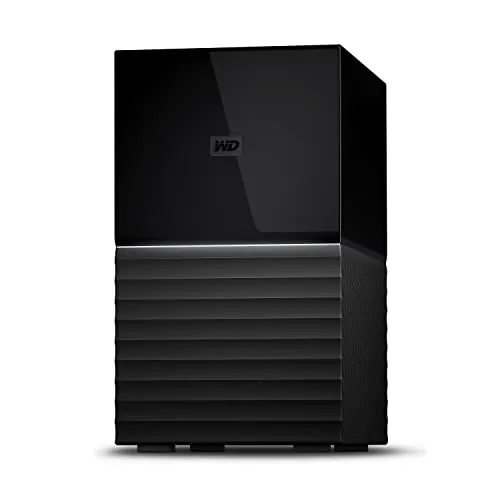
The design is clean and practical rather than especially compact or refined, which fits its 73 design score. Its desktop orientation is clear from the 3.5-inch format, upright placement, and need for external power. Reviews suggest it sits stably on a desk, which is useful for long-term stationary use. This is a drive designed to stay in one place and quietly provide extra storage, not one built around travel convenience or minimalist portability.

How it compares

Within the external desktop hard drive category, this WD model looks strongest as a capacity-first, user-friendly option rather than a feature-heavy or speed-led one. Compared with what buyers often expect from desktop HDD storage, it performs well in ease of setup, broad USB compatibility, and customer satisfaction. It is less convincing as a top choice for users who want the fastest sustained transfers, consistently quiet operation, or the strongest reliability profile. In category terms, it fits best among mainstream desktop backup drives where capacity, simplicity, and brand familiarity matter more than mobility, advanced software, or premium performance tuning.

Ranking summary

The Western Digital 10TB Elements Desktop ranks well as a practical high-capacity desktop storage choice because it combines strong setup, usability, brand trust, and customer satisfaction with a large 10TB capacity. Its 81 overall score is supported by standout scores in setup (90), usability (88), customer satisfaction (90), and brand trust (84). Where it loses ground is in long-term confidence and refinement: reliability (69), durability (68), and app experience (62) are weaker, while speed feedback is mixed. Overall, it ranks best as a straightforward backup and archive drive rather than a premium performance-focused storage product.

Buying advice

Consider this drive if you want a desktop external hard drive mainly for backups, media storage, or general file archiving and you value simple setup. It is especially suitable for Windows users who want plug-and-play storage with lots of room. Before buying, make sure a desktop form factor and external power adapter fit your setup, and remember that Mac users need to reformat the drive first. If your priorities are maximum portability, very fast transfer speeds, or the strongest possible long-term reliability signals, it would be worth comparing other storage types and backup strategies before deciding.
81
Overall score

Final verdict

The Western Digital 10TB Elements Desktop External Hard Drive is a strong mainstream option for high-capacity desktop backup and archive use. Its biggest strengths are its large storage capacity, very easy setup, and strong customer satisfaction at scale. The main limitation is that speed and long-term reliability are not uniformly praised, with some users reporting slower-than-expected transfers, noise, or early failure. If you want a simple desktop drive for bulk storage and understand the importance of keeping more than one copy of important files, it is a sensible and broadly appealing choice.
Back to review

Key topics

Western Digital 10TB Elements Desktop External Hard Drive, WD Elements Desktop review, 10TB external hard drive review, best desktop external hard drive, USB 3.0 external hard drive, WD external hard drive comparison, desktop backup drive, external hard drive for Windows PC, 10TB backup hard drive, WD Elements Desktop ranking

Frequently asked questions

Is the Western Digital 10TB Elements Desktop External Hard Drive worth it?
It looks like a strong option if your priority is large-capacity desktop storage with simple setup. The drive has an 81 overall score, a 4.5/5 average rating from 27,645 reviews, and particularly strong scores for setup, usability, and customer satisfaction. The main trade-offs are mixed speed feedback, some noise complaints, and a few reports of early failure.
Is this WD Elements drive good for backups?
Yes, backup use is one of its clearest strengths based on the available data. Customers frequently describe it as an excellent backup solution, and the 10TB capacity gives plenty of room for large file collections. It is especially suitable for desktop backup workflows where portability is less important than capacity and ease of use.
Is the WD Elements 10TB easy to set up?
Setup appears to be one of the easiest parts of the experience. It is described as plug-and-play for Windows PCs, and it has a 90 setup score with repeated customer comments saying it works right out of the box. Mac users should note that reformatting is required before normal use.
How fast is the Western Digital 10TB Elements Desktop drive?
Speed is acceptable rather than class-leading based on the available information. The listed read speed is 113.5MB/s, the speed score is 74, and customer feedback is mixed. Some users report smooth and fairly quick transfers, while others describe it as slower than expected for large transfers.
Does the WD Elements 10TB work with Mac?
It can work with Mac, but not in its default shipping format. The product information states that it ships as Windows compatible and needs to be reformatted before working properly with Mac. If you use both Mac and Windows, file system format choice matters for read and write compatibility.
What are the main drawbacks of this external hard drive?
The main limitations are moderate reliability and build-related confidence compared with its strongest areas. Review summaries mention some failures after a few months, speed opinions are mixed, and noise levels vary from quiet to noticeable clicking. It is also a desktop unit with external power, so it is less convenient for travel or mobile use.
Is this a portable external hard drive?
Not really in the usual sense. Although the specifications list an additional feature as portable, the product is clearly a desktop 3.5-inch external hard drive that uses an AC adapter. It is better viewed as stationary add-on storage for a desk rather than something designed for frequent travel.
Is the WD Elements 10TB good value for money?
It appears to offer solid value if you need a lot of storage and prioritize easy use. The value score is 78, and customers often describe it as a good value for backup, games, and large media files. Value is less convincing if you need top transfer speeds, quieter operation, or stronger long-term reliability signals.

Related Guides & Rankings