#1 Overall Winner
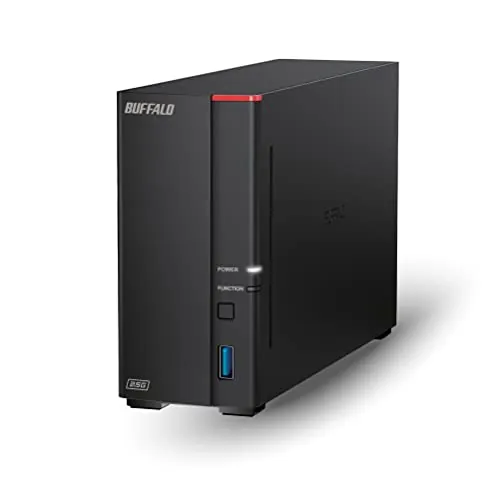
BUFFALO LinkStation 710 2TB 1-Bay NAS
- Centralizes 2TB of network-accessible storage for compatible computers on the home network.
Comparison
The BUFFALO LinkStation 710 and BUFFALO MiniStation 2TB solve different storage problems: one is a network NAS for shared backups, while the other is a compact USB drive for direct local storage. The MiniStation leads on overall score, portability, value, reliability, and review satisfaction; the LinkStation is the better fit for households that need network sharing and backup features.
#1 Overall Winner
Contender
Choose the MiniStation 2TB for compact, direct USB storage and the stronger all-round review profile. Choose the LinkStation 710 if multiple people or computers need shared storage and automated network backups, and you are comfortable maintaining a separate backup for important files.
Overall winner
Depends on your needs
| Feature | BUFFALO LinkStation 710 2TB 1-Bay NAS | BUFFALO MiniStation 2TB Portable HDD | Winner |
|---|---|---|---|
| Storage type | 1-bay Ethernet NAS with included 2TB HDD | 2TB portable USB mechanical HDD | Depends |
| Overall assessment | Overall score: 64 | Overall score: 78 | BUFFALO MiniStation 2TB Portable HDD |
| Network sharing | Shared router-based storage with folder restrictions | Direct USB storage | BUFFALO LinkStation 710 2TB 1-Bay NAS |
| Backup features | PC backup software and automated backup support | Local external storage | BUFFALO LinkStation 710 2TB 1-Bay NAS |
| Portability | 1.66 kg; mains-powered NAS | About 175 g; compact USB drive | BUFFALO MiniStation 2TB Portable HDD |
| Setup | Ethernet, software, and network configuration | USB connection; adequate power required | Depends |
| Features | Personal cloud, cloud sync, permissions, SSL transfers | Simple USB storage and fault-prediction-service compatibility | BUFFALO LinkStation 710 2TB 1-Bay NAS |
| Reliability feedback | Mixed review feedback; reliability score: 52 | Generally trouble-free review feedback; reliability score: 74 | BUFFALO MiniStation 2TB Portable HDD |
| Compatibility | Listed for Windows and macOS; reports are mixed | Listed for compatible Type-A Windows and Mac systems | BUFFALO MiniStation 2TB Portable HDD |
| Customer satisfaction | 3.9/5 from 3,254 reviews | 4.2/5 from 7,395 reviews | BUFFALO MiniStation 2TB Portable HDD |
| Value | Value score: 73 | Value score: 79 | BUFFALO MiniStation 2TB Portable HDD |
| Warranty and support | 24/7 US support; stated 2-year warranty including HDD | Warranty/support details not provided | BUFFALO LinkStation 710 2TB 1-Bay NAS |
The LinkStation is designed for centralized file access, backup, and sharing over Ethernet, whereas the MiniStation is designed for local USB storage. The LinkStation's performance reports are mixed: some users describe responsive access, while others report very slow transfers. The MiniStation has the higher performance score, but no directly comparable measured transfer data is supplied. For predictable direct storage on one compatible computer, the MiniStation has the stronger evidence; for network-wide access, the LinkStation provides the needed function.
The MiniStation has a slightly higher supplied speed score, though the data does not provide a controlled head-to-head transfer test. LinkStation review feedback is inconsistent, ranging from reports of fast Finder access to complaints about very slow transfers. Direct USB storage can also remove network configuration from the transfer path, but actual speed will depend on the computer, USB connection, source drive, and available power. Do not choose solely on speed claims without checking your intended setup.
The MiniStation has the stronger reliability score and more consistently positive supplied feedback, with reviewers describing normal operation and long-term BUFFALO use. The LinkStation receives mixed reports: several users report dependable operation, while others report connectivity trouble or device failure. A one-bay LinkStation has no redundancy, so a failure can affect all data stored on it. In either case, use more than one copy for important files.
The MiniStation is generally more straightforward because it connects directly by USB. Its main usability caveat is power sensitivity when used through some laptop ports or bus-powered hubs. The LinkStation has a quick-start guide, support, and reports of easy setup from some owners, but other reviews describe difficult software navigation, disabled shares, permissions issues, and network discovery problems. For less technical users who do not need network storage, the MiniStation is the easier option.
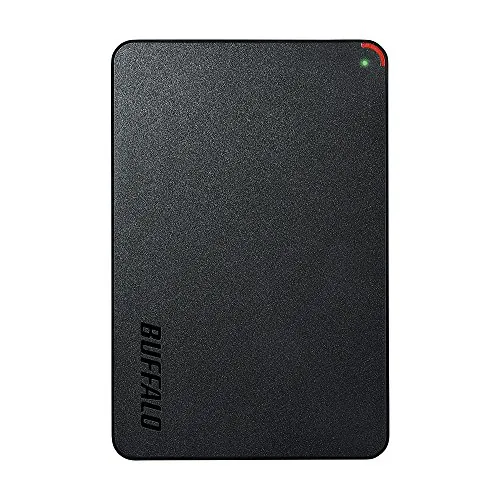
The LinkStation is a slim vertical network appliance measuring 8.07 by 1.77 by 5.02 inches and weighing 1.66 kg, so it suits a fixed place beside a router. The MiniStation measures about 4.53 by 2.99 by 0.55 inches and weighs around 175 g, making it far more practical in a bag. The LinkStation is designed around always-available network storage; the MiniStation is designed around minimal physical burden.
Both products have the same supplied build-quality score. The LinkStation is a larger dedicated NAS enclosure intended for stationary use, while the MiniStation uses a plastic portable enclosure. Available MiniStation reviews describe it as compact and one reviewer calls it more durable than expected. The LinkStation's long-term hardware feedback is more mixed because some owners report failures. Neither product's listed configuration offers multi-drive fault tolerance.
The MiniStation has the higher durability score and positive limited feedback about its sturdiness, although its portable plastic enclosure should still be handled carefully. The LinkStation is meant for stationary placement, but the provided reviews include concerns about failure over time. Neither listed product is described as water- or dust-resistant. The more important durability consideration is backup strategy: both are single-drive mechanical storage products.
The MiniStation is the decisive portability winner. Its 175 g weight, slim 0.55-inch profile, and USB-powered operation make it suitable for carrying with a laptop. The 1.66 kg LinkStation needs a power adapter and Ethernet connection, so it is intended to stay at home or in a small office. The LinkStation can be compact on a desk, but it is not a practical travel drive.
The LinkStation 710 has the clear feature advantage. It offers automated backup support, NAS Navigator management, personal-cloud access, cloud sync with Dropbox, Azure, and OneDrive, folder-level restrictions, and SSL-encrypted transfers. The MiniStation is intentionally simpler: it is a portable USB hard drive with compatibility for the Mimamori Signal fault-prediction service. Choose the NAS for storage management features and the portable drive for uncomplicated local capacity.
The LinkStation includes NAS Navigator and backup software, but its app/software experience score is modest and reviews are mixed. Some owners find the interface manageable after setup, while others find configuration and navigation confusing. No companion app experience is provided for the MiniStation; it functions as a direct USB drive instead. The MiniStation avoids NAS-management software, while the LinkStation offers more management options with greater potential setup friction.
The LinkStation is the only product here with meaningful connected features. It supports personal-cloud access, remote file availability, cloud syncing, user access restrictions, and encrypted transfers. The MiniStation has no listed cloud, networking, or app-based smart features; its Mimamori Signal service compatibility is its relevant monitoring-related feature. Buyers wanting basic direct storage do not need these extras, but connected storage users will prefer the LinkStation.
MiniStation setup is fundamentally direct: connect the included USB cable to a compatible computer with sufficient power. If the drive is not recognized, the manufacturer advises a direct connection, a self-powered hub, or an optional AC adapter. LinkStation setup requires connection to a router, software or browser-based configuration, and share or permission setup. Some owners report quick success, but others needed firmware updates or troubleshooting. The best choice depends on whether simplicity or network capability matters more.
Both products list Windows and Mac support, but the exact conditions differ. The LinkStation is listed as compatible with Windows and macOS 26, although aggregated review feedback reports some Windows and Mac M1 issues. The MiniStation is listed for Windows 7 through 10 and OS X 10.10.1 or later on systems with Type-A USB, which means newer operating-system support should be confirmed before purchase. The MiniStation has the higher supplied compatibility score.
The LinkStation connects by Ethernet and includes a Cat 6A Ethernet cable, allowing compatible devices on the network to use shared storage. It also supports the listed cloud services. The MiniStation uses direct USB 3.1 Gen 1, USB 3.0, or USB 2.0 through a Type-A connection. The MiniStation has the higher connectivity score, helped by its direct connection model, but it may require a direct port or self-powered hub when bus power is inadequate. Select Ethernet for shared access and USB for individual local access.
The LinkStation has the higher supplied power-efficiency score, but it is an always-available network appliance that uses an AC adapter. The MiniStation is bus-powered through USB, eliminating a separate mains adapter but making reliable operation dependent on the host port or hub supplying enough power. Choose the MiniStation for cable-light portable use and the LinkStation when persistent network availability is the priority.
The MiniStation has the higher value score, supported by its stronger overall score, portability, reliability score, and customer-satisfaction results. It delivers a simple 2TB local-storage solution without requiring a router or NAS configuration. The LinkStation can still represent good value for buyers who will actively use its backup automation, shared folders, security controls, and personal-cloud features. Its value is reduced for users who only need a drive connected to one computer or who are unwilling to manage network-storage complexity.
Both products come from BUFFALO, so this comparison is primarily about confidence in the specific product type rather than competing brands. The MiniStation has the higher brand-trust score in the supplied assessment and a larger, higher-rated review base. The LinkStation lists 24/7 US-based support and a two-year warranty, which may reassure NAS buyers, but its review feedback includes inconsistent experiences with reliability and support processes.
The MiniStation leads in supplied customer satisfaction, with a 4.2/5 rating from 7,395 reviews versus the LinkStation's 3.9/5 from 3,254 reviews. MiniStation feedback emphasizes compact size, quiet use, and generally normal operation. LinkStation feedback is more divided: buyers praise centralized backup, some easy setups, and network storage features, but recurring complaints involve software, connectivity, speed, compatibility, and unit reliability.
The LinkStation has clearer provided support information: BUFFALO states 24/7 US-based support and a two-year warranty including the hard drive. Some reviews praise responsive support, while others describe difficulty reaching help or dissatisfaction following failures. No equivalent MiniStation warranty or support terms are supplied, and its warranty-support score is lower. Buyers should confirm current warranty, return, and regional support terms before ordering either model.
The BUFFALO MiniStation 2TB is the best overall option in this comparison. It earns the higher overall score, has stronger value, portability, reliability, compatibility, and customer-satisfaction results, and offers a simpler direct-storage experience for most individual users. Its limits are equally clear: it is not shared network storage and depends on adequate USB bus power.
The BUFFALO LinkStation 710 remains the more capable product for a specific buyer: someone who needs files and backups available across a home network, wants folder-level access controls, or values subscription-free personal-cloud and cloud-sync features. Its lower overall standing reflects mixed feedback on reliability, speed, connectivity, compatibility, and software usability. If those NAS functions are essential, choose it with realistic expectations and keep an independent backup of important data. Otherwise, the MiniStation is the more straightforward recommendation.

Overall winner
Depends on your needs
The MiniStation is the stronger overall choice in the supplied scoring because it rates higher for overall performance, value, reliability, portability, and customer satisfaction. Choose the LinkStation instead when shared Ethernet storage, automated multi-computer backups, folder permissions, or subscription-free personal-cloud access are more important than simple portability.
Not for every use. The LinkStation is designed to stay connected to a router as centralized network storage, while the MiniStation is designed to connect directly to a computer by USB. The NAS is more suitable for shared home storage; the portable drive is more suitable for carrying files and making local backups.
The MiniStation is likely easier for users who want direct storage because it avoids router setup, NAS discovery, permissions, and share configuration. It can still require attention to USB power. The LinkStation includes setup guidance and support, but review feedback shows that its software and network configuration can be challenging for some owners.
The LinkStation is better suited to automated backups across multiple compatible computers because it includes PC backup software and network-based central storage. The MiniStation is better for a straightforward local backup drive attached to one computer at a time. Neither single-drive product should be treated as the sole copy of irreplaceable files.
The BUFFALO MiniStation is clearly the more portable option. It weighs about 175 g and measures approximately 4.53 by 2.99 by 0.55 inches. The LinkStation is a larger, mains-powered Ethernet NAS weighing 1.66 kg, intended to remain near a router rather than travel with a laptop.
Yes, based on the listed features. The LinkStation can share files across a network, set individual folder access restrictions, and provide subscription-free personal-cloud access. The MiniStation is a direct USB drive, so sharing generally requires connecting it to a host computer rather than using built-in network sharing features.
There are mixed signals in the supplied reviews. Some owners report dependable backup use and responsive support, while others describe failures, network issues, and inconsistent speed. Its reliability score is lower than the MiniStation's. Because it is a one-bay NAS with no redundancy, maintaining separate backups is especially important.
Yes. The product information warns that a computer may not recognize it when USB bus power is insufficient, especially through a bus-powered hub. The stated remedies are connecting the drive directly to the computer, using a self-powered USB hub, or using the optional AC adapter. Confirm power availability before relying on it.
Check our rankings and expert guides to find the best electronics products for your goals.