ElectronicsRanker
Menu

Review

fanxiang S101Q 256GB SATA SSD Review

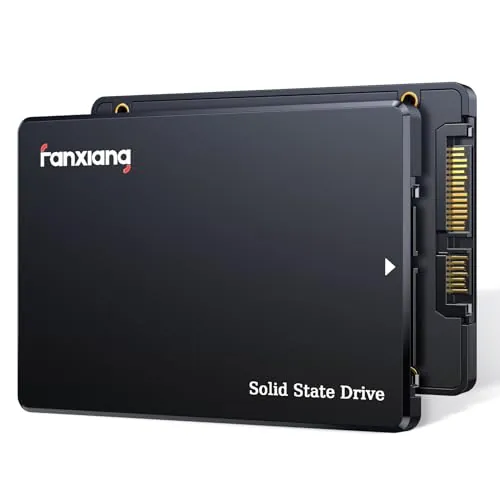
The fanxiang S101Q is a 2.5-inch SATA internal SSD aimed at budget desktop and laptop upgrades. Its strongest case is replacing an older hard drive to improve boot times, app loading, and general responsiveness. The main limitation is uncertainty around long-term reliability, with some customer reports of early failures or capacity-related concerns.
Expert reviewed
74
Overall score
Data-driven scoring Expert reviewed Updated analysis

Why we ranked it highly

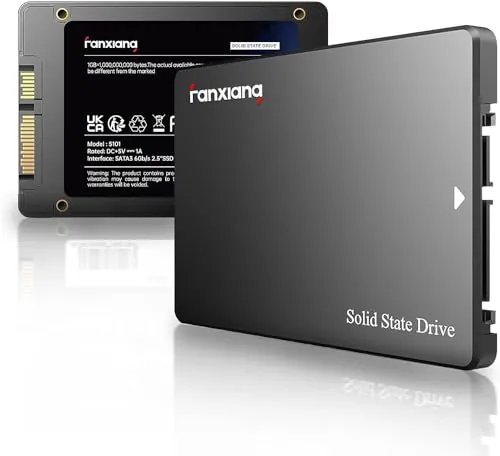
The fanxiang S101Q is a 256GB 2.5-inch SATA III internal solid state drive designed for laptops, desktops, and similar systems that use a standard SATA connection. Based on the product data and customer feedback, it is positioned mainly as an affordable upgrade for older computers still running mechanical hard drives. The core appeal is straightforward: better boot times, faster app launches, lower weight, and easier everyday responsiveness without moving into more expensive storage categories. Its scoring profile supports that role well. Performance, speed, setup, compatibility, and value are the most convincing areas, while reliability and brand trust are noticeably less certain. The feature set is basic rather than advanced, but it includes standard SSD support claims such as TRIM, S.M.A.R.T, wear-leveling, ECC, and shock resistance. For buyers seeking a low-cost SATA refresh rather than premium storage, it looks practical if expectations remain realistic.
90-day review Expert reviewed User feedback Data scoring

Key specs

Features & Specs

Digital Storage Capacity
256 GB
Hard Disk Interface
Serial ATA
Connectivity Technology
SATA
Additional Features
Shock Resistant
Hard Disk Form Factor
2.5 Inches
Compatible Devices
Desktop, Gaming Console, Laptop
Specific Uses For Product
Personal, Business
Read Speed
530 Megabytes Per Second
Media Speed
420
Cache Memory Installed Size
256 GB
Data Transfer Rate
530 Megabytes Per Second
Form Factor
2.5-inch
Hardware Connectivity
SATA 6.0 Gb/s
Hardware Platform
Linux

User guide

Installation Type
Internal Hard Drive

Additional details

Color
Black
Enclosure Material
Polycarbonate

Item details

Brand
fanxiang
Model Number
S101Q
Hard Disk Description
Solid State Drive
Built-In Media
256 GB SSD 2.5 SATA Internal
Model Name
S101Q
Manufacturer
fanxiang
Mfr Part Number
S101Q

Measurements

Hard-Drive Size
256 GB
Item Weight
1.6 Ounces
Item Dimensions L x W x Thickness
3.94"L x 0.28"W x 2.76"Th
Number of Items
1
Unit Count
1.0 Count
Customer Package Type
FFP

Scores breakdown

79 /100

Performance

67 /100

Features

86 /100

Usability

70 /100

Design

78 /100

Connectivity

80 /100

Speed

55 /100

Accuracy

61 /100

Reliability

Strengths

  • Strong ease-of-installation profile backed by an 88 setup score and multiple reviews describing it as a straightforward drop-in upgrade.
  • Good value for money, with an 84 value score and several buyers highlighting the low cost relative to the speed improvement over HDDs.
  • Solid everyday SATA SSD performance, supported by a 79 performance score, 80 speed score, and listed speeds up to 530MB/s read and 420MB/s write.
  • Broad device and OS compatibility, including SATA III backward compatibility plus support for Windows, Linux, and Mac OS.
  • Very positive buyer sentiment overall, reflected in a 4.5/5 rating from 5,646 reviews and an 88 customer satisfaction score.
  • Useful for reviving older laptops and desktops, with repeated review feedback mentioning much faster boot times and better responsiveness after replacing HDDs.

Limitations

  • Reliability is the main concern, with a 61 reliability score and some customer reports of failures within a short period.
  • Brand trust is only moderate at 58, partly because some review feedback raises questions about long-term consistency and product clarity.
  • Feature set is basic for the category, with a 67 feature score and no evidence of higher-end extras beyond standard SATA SSD functions.
  • Capacity is limited at 256GB, which may be too small for users storing large game libraries, media collections, or project files.
  • Some compatibility feedback is mixed despite the generally broad support claims, so fit and system behavior should still be checked before purchase.
  • There are isolated but serious review complaints about capacity reporting and unstable behavior on higher-capacity variants, which may affect confidence across the range.

Ideal user profiles

  • Users upgrading an older laptop or desktop from a mechanical hard drive to improve boot and app load times.
  • Budget-focused buyers who want a low-cost 2.5-inch SATA SSD for everyday computing.
  • DIY upgraders who value simple installation and broad compatibility across common operating systems.
  • Light-duty users needing modest storage for office work, web use, or basic home computing.

Use cases

  • Replacing a failing hard drive in an older laptop.
  • Speeding up boot times on a desktop PC that still uses an HDD.
  • Installing Windows or Linux on a budget SATA SSD.
  • Giving an aging all-in-one computer a more responsive feel.
  • Using as a secondary internal drive for documents and everyday applications.
  • Low-cost storage upgrades for home or office machines with 2.5-inch SATA bays.

Fit and positioning

Who this works for

Category positioning

This model sits in the budget end of the 2.5-inch SATA SSD market. It is not positioned as a premium enthusiast drive with standout extras or unusually high endurance claims. Instead, it appears to compete on affordability, ease of upgrade, and solid mainstream SATA performance. The strongest evidence points to value-focused buyers who want to revive an older machine rather than maximize storage innovation or brand assurance.

Best for

The S101Q makes the most sense for budget-conscious users upgrading an older laptop or desktop from an HDD. Its 86 usability score, 88 setup score, 83 compatibility score, and 84 value score all support that use case. Reviews repeatedly mention easy installation and a noticeable improvement in boot speed and overall system responsiveness, especially on aging computers.

Not best for

This is a less suitable choice for buyers who prioritize long-term reliability confidence, premium brand reassurance, or larger storage capacity. The reliability score of 61 and brand trust score of 58 are weaker than its other metrics, and some reviews mention early failure or inconsistent behavior. The 256GB size also limits its appeal for heavy gaming, media storage, or larger project workloads.

Performance analysis

How it performs in practice

Each scoring dimension is separated into a compact card so the strengths and tradeoffs are easier to compare without reading one long block.

Performance analysis

For a SATA III drive, the S101Q appears to deliver competent everyday performance. The listing states read speeds up to 530MB/s and write speeds up to 420MB/s, and its performance score of 79 aligns with a solid mainstream result rather than category-leading output. In practical terms, the biggest benefit is likely to be improved boot times, quicker app loading, and a more responsive feel compared with a mechanical hard drive. Reviews strongly support that upgrade scenario, with several users describing older systems becoming usable again after installation. There is less evidence here for demanding sustained workloads or high-end professional use.

Feature analysis

The feature set is functional but basic, which fits its 67 feature score. It offers standard SATA SSD support claims such as 3D NAND, SLC cache, TRIM, S.M.A.R.T, ECC, wear-leveling, garbage collection, and shock resistance. Those are useful baseline features for this category, but there is no evidence of more advanced differentiators beyond the core storage upgrade role. This is primarily a straightforward internal SSD rather than a feature-rich storage product.

Usability analysis

Usability is one of the drive's strongest areas, reflected in an 86 score. The 2.5-inch SATA format is familiar and widely used, and customer feedback often describes the upgrade process as simple. For buyers replacing an HDD in an older machine, the product seems to deliver an immediate everyday benefit without much learning curve. As with most internal drives, the actual experience still depends on whether the user is cloning an existing drive or performing a fresh operating system install.

Design

The design is practical and standard for the category. It uses a slim 7mm 2.5-inch form factor that suits many laptops, desktops, and older upgrade paths, and the low 1.6-ounce weight helps from a handling and installation perspective. The design score of 70 suggests it is functional rather than distinctive. That is appropriate here, since buyers in this category are generally looking for fit, convenience, and compatibility rather than visual flair.

How it compares

Within the 2.5-inch SATA SSD category, the S101Q looks competitive on the basics rather than on premium refinements. It compares well where buyers often feel the difference immediately: boot speed, everyday responsiveness, installation simplicity, and low purchase cost. Its compatibility profile is also strong for older systems that cannot use newer storage formats. Where it appears less competitive is in trust-related factors. Compared with stronger category options, the weaker reliability and brand confidence scores make it a more cautious recommendation for important data or long-term heavy use. In short, it fits better as a value upgrade than as a best-in-class storage choice.

Ranking summary

The fanxiang S101Q earns its place as a solid budget SATA SSD because it scores best in the areas that matter most for a basic upgrade: setup, usability, compatibility, speed, value, and customer satisfaction. Its overall score of 74 suggests a good but not top-tier option in the category. Performance is credible for SATA use, and review feedback strongly supports old-PC upgrades as its best role. What holds it back from a stronger ranking is not day-one usability, but confidence over time. Reliability, durability, accuracy, and brand trust are all more mixed, which makes it harder to recommend as confidently for critical or long-term storage needs.

Buying advice

Consider this SSD if your main goal is to replace a slow or failing hard drive in an older laptop or desktop at a low cost. It is especially suitable for everyday home or office use where a simple SATA upgrade can make a system feel much faster. Before buying, check that your device accepts a 2.5-inch 7mm SATA drive and decide whether 256GB is enough for your files and applications. If you need more storage, stronger long-term reliability confidence, or maximum peace of mind for important data, it may be worth comparing with more established alternatives even at a higher price.
74
Overall score

Final verdict

The fanxiang S101Q 256GB is a strong budget-oriented SATA SSD for basic upgrades, especially when replacing an old hard drive in a laptop or desktop. Its main strengths are easy installation, solid everyday SATA performance, broad compatibility, and very good value. The main limitation is that long-term confidence is not as strong as its speed and usability scores, with some customer feedback raising reliability concerns. Overall, this is a good low-cost option for reviving older systems, but a more cautious choice for users who prioritize brand assurance and data-storage confidence above upfront savings.
Back to review

Key topics

fanxiang 256gb sata ssd review, fanxiang s101q review, best budget sata ssd, 2.5 inch sata iii ssd review, internal solid state drive comparison, ssd for laptop upgrade, ssd for desktop upgrade, fanxiang ssd ranking

Frequently asked questions

Is the fanxiang S101Q 256GB SATA SSD worth it?
For a low-cost SATA upgrade, it looks like a reasonable option. It scores well for setup, value, compatibility, and customer satisfaction, and many reviews describe faster boot times after replacing old hard drives. The main caution is reliability confidence, which is weaker than its usability and value scores suggest.
Is the fanxiang S101Q good for upgrading an old laptop or desktop?
Yes, that appears to be its strongest use case. Reviews repeatedly mention older laptops and desktops feeling much faster after the switch from HDD storage, and the product uses the common 2.5-inch SATA form factor. Buyers should still confirm their device supports a 7mm 2.5-inch SATA drive before ordering.
How fast is the fanxiang S101Q 256GB SSD?
The listed speeds are up to 530MB/s read and 420MB/s write, which is typical for a SATA III SSD rather than an NVMe model. Its speed score of 80 suggests solid everyday responsiveness for booting, launching apps, and general system use, especially compared with older spinning hard drives.
What are the main limitations of the fanxiang S101Q?
The biggest concerns are long-term reliability and buyer confidence rather than raw speed. Some reviews mention failures or capacity concerns, and the product's reliability and brand trust scores are only moderate. The 256GB capacity is also fairly limited for users with large files, games, or media libraries.
Is the fanxiang S101Q easy to install?
Based on the data, installation is one of its strongest areas. It has an 88 setup score, and several reviews describe it as a simple drop-in replacement for older hard drives. As with any internal SSD, buyers may still need a SATA connection, mounting support, and an OS installation or cloning plan.
Is the fanxiang S101Q compatible with Windows, Linux, and Mac?
The listing says it is compatible with Windows, Linux, and Mac OS, and it uses a standard SATA III interface that is backward compatible with older SATA versions. Review feedback on compatibility is mostly positive but not completely uniform, so it is sensible to verify fit and system support before purchase.
Does the fanxiang S101Q have good reliability?
Reliability is mixed rather than clearly strong. The drive includes standard features such as TRIM, S.M.A.R.T, ECC, wear-leveling, and garbage collection, which are positive on paper, but some buyers report failures or unstable behavior. Its 61 reliability score reflects that uncertainty.
Is 256GB enough storage on this SSD?
That depends on your workload. For a basic boot drive handling Windows or Linux, office files, and light everyday apps, 256GB can be enough. For large games, creative projects, or extensive media storage, it will feel restrictive, so a larger capacity may be more practical.

Related Guides & Rankings