#1 Overall Winner
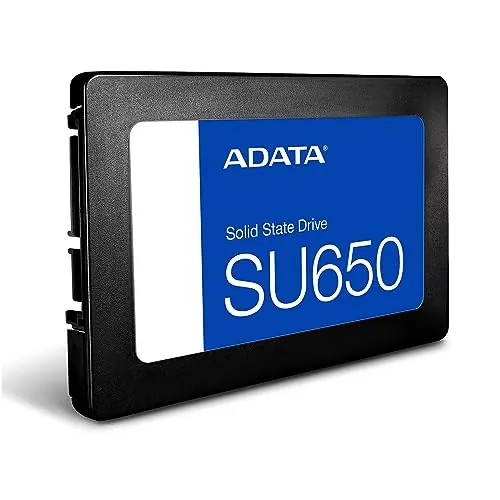
ADATA Ultimate SU650 1TB Internal SSD
- 1TB of internal SATA storage.
Comparison
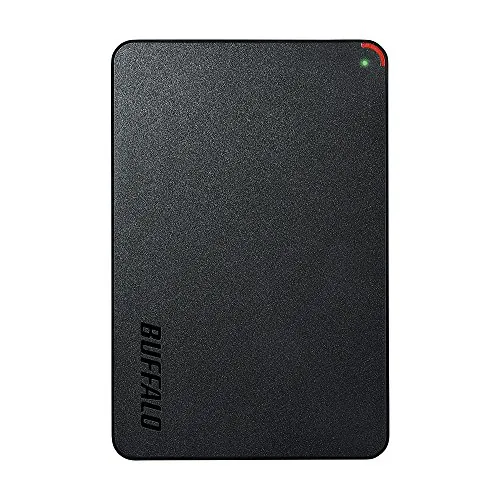
The ADATA Ultimate SU650 1TB and BUFFALO External SSD 500GB solve different storage needs: one is an internal SATA desktop upgrade, while the other is a portable USB drive. ADATA is the stronger overall option for capacity, stated speed, value, and review scores; BUFFALO is the better fit for users who need broad USB connectivity and storage they can carry.
#1 Overall Winner
Contender
Choose the ADATA Ultimate SU650 for a compatible desktop where you want 1TB of internal SATA storage, stronger stated transfer performance, and highly rated value. Choose the BUFFALO External SSD if you need a compact drive for moving files among compatible devices or for supported console storage. Do not choose based on speed alone: internal SATA and portable USB storage serve different practical needs.
Overall winner
Depends on your needs
| Feature | ADATA Ultimate SU650 1TB Internal SSD | BUFFALO External SSD 500GB | Winner |
|---|---|---|---|
Drive type |
Internal 2.5-inch SATA SSD |
External USB SSD |
Depends |
Capacity |
1TB |
500GB |
ADATA Ultimate SU650 1TB Internal SSD |
Listed read speed |
Up to 520MB/s |
340MB/s |
ADATA Ultimate SU650 1TB Internal SSD |
Listed write speed |
Up to 450MB/s |
Not clearly specified as write speed |
ADATA Ultimate SU650 1TB Internal SSD |
Connectivity |
SATA 6Gb/s |
USB-A and USB-C, USB 3.2 |
BUFFALO External SSD 500GB |
Listed compatibility |
Desktop |
PC, Mac, PS4, PS5, and other listed devices |
BUFFALO External SSD 500GB |
Portability |
Internal drive |
Compact external drive |
BUFFALO External SSD 500GB |
Setup |
Internal installation required |
USB use; console formatting may be needed |
Depends |
Reliability score direction |
Higher |
Lower |
ADATA Ultimate SU650 1TB Internal SSD |
Value score direction |
Higher |
Lower |
ADATA Ultimate SU650 1TB Internal SSD |
Customer feedback |
4.8/5 from 5,647 reviews |
4.4/5 from 4,056 reviews |
ADATA Ultimate SU650 1TB Internal SSD |
Warranty information |
Not provided |
3 years registered; 2 years unregistered |
BUFFALO External SSD 500GB |
For a compatible desktop, the ADATA has the advantage in stated performance. It is rated for up to 520MB/s reads and 450MB/s writes, while the BUFFALO lists 340MB/s read speed. Reviews for both products describe a clear improvement over hard drives, but ADATA's feedback more consistently highlights fast booting and internal-drive replacement performance. BUFFALO is still suitable for portable transfers and external storage, yet its lower speed score and reports of occasional slowdown make it less convincing for speed-focused workloads.
ADATA is the faster option on the provided figures and scoring. Its up-to-520MB/s read and 450MB/s write specifications exceed BUFFALO's listed 340MB/s read speed. ADATA reviews commonly mention improved boot times and quick data movement. BUFFALO can still make file transfers and external storage more responsive than a hard drive, but its stated ceiling and score place it behind ADATA where the host system can use an internal SATA SSD.
The supplied reliability assessment favours ADATA. Its reviews generally describe stable installation and operation, although one review reports serious overheating. BUFFALO's review summary is positive overall, but the supplied feedback includes mixed durability reports and isolated claims of data corruption or severe speed loss. These reports do not prove a universal fault, but they make careful backup practices especially important. Neither SSD should be the only location for irreplaceable data.
Both products have positive ease-of-use feedback, but usability depends on the task. ADATA reviews describe easy installation, formatting, drive recognition, and successful system restoration; however, it still requires opening and working inside a compatible desktop. BUFFALO is more convenient for routine computer use because it connects externally. Its console experience may be less direct: one PS5 review reports that formatting with Buffalo's DiskFormatter2 utility was necessary before extended storage worked.
ADATA uses the standard 2.5-inch internal SATA design, prioritising a simple desktop installation over physical access after setup. At 30g, it is light, but not designed for regular transport. BUFFALO is the more practical physical design for mobile use, with a compact external format, USB connection options, and a stated focus on carrying data in a pocket. The BUFFALO design is better for mobility; ADATA's design is more appropriate for a fixed internal upgrade.
ADATA is a lightweight internal SSD with a plastic case noted in review feedback and specified vibration resistance. BUFFALO is positioned as shock-resistant and rugged for portable use. However, BUFFALO's durability feedback is mixed: some reviewers describe a sturdy build, while others report that its plastic shell feels thin or can shatter. The supplied build-quality assessment slightly favours ADATA, but neither product has enough provided material detail to support stronger construction claims.
Both drives are solid-state and therefore avoid the moving parts of a conventional hard drive. ADATA specifies vibration resistance, while BUFFALO specifies shock resistance and drop protection for portable use. The advantage is less clear in buyer feedback: BUFFALO receives both praise for sturdiness and complaints about a thin plastic shell. ADATA has a slightly higher supplied durability assessment, although one report of overheating is a relevant long-term concern.
BUFFALO is the clear portability choice. It is an external, compact drive intended to be carried with files and used across devices. ADATA is physically light but is designed to sit inside a desktop as a permanent SATA component. If the drive will remain in one computer, ADATA's internal form is appropriate. If it will travel between a workstation, laptop, and supported devices, BUFFALO is far more practical.
ADATA focuses on internal-upgrade essentials: 3D NAND, a high-speed controller, LDPC error correction, and downloadable migration and file-management software. BUFFALO focuses on external convenience, with USB-A and USB-C support, included cable and adapter hardware, a quick setup guide, and listed PS4/PS5 compatibility. ADATA has the more storage-focused protection feature set, while BUFFALO offers more out-of-the-box flexibility for connecting to different device types.
ADATA's setup is an internal-drive task, but reviews frequently call it easy to install, format, and clone or restore onto. Its available ADATA migration software can be useful during an upgrade. BUFFALO is straightforward for many computer users because it is external, but console setup can be more involved. A supplied PS5 review recommends checking firmware and using Buffalo's DiskFormatter2 tool before console formatting. The simpler choice depends on whether you are installing inside a desktop or connecting externally.
BUFFALO has broader stated compatibility, covering Mac, PC, PS4, PS5, desktop, laptop, tablet, and television use. ADATA is listed as compatible with desktops and is intended as an internal SATA drive. The best compatibility choice therefore depends on the target device: select ADATA only after confirming an available compatible SATA connection, and select BUFFALO after checking the connection and storage rules of each device or console.
BUFFALO wins decisively on connection flexibility. Its USB 3.2 external interface supports both USB-A and USB-C, making it easier to use across the listed PCs, Macs, consoles, tablets, and televisions. ADATA uses SATA 6Gb/s, which is the appropriate interface for an internal desktop bay but cannot be plugged into devices externally without additional hardware. Choose BUFFALO for device-to-device flexibility and ADATA for a native internal SATA connection.
ADATA specifies low power consumption, and its supplied power-efficiency assessment is solid. BUFFALO receives the higher supplied power-efficiency score, but the product data does not provide comparable power-draw figures. Both solid-state designs avoid the moving mechanisms of traditional hard drives. In practice, connection method and usage pattern differ: ADATA runs internally from the desktop system, while BUFFALO draws power through its USB connection.
ADATA has the stronger supplied value assessment. That result aligns with its 1TB capacity, higher stated transfer speeds, positive installation feedback, and high customer satisfaction. BUFFALO offers a different form of value through USB-A/USB-C convenience, portability, included accessories, broad listed compatibility, and stated warranty coverage. It is not automatically the weaker purchase for every buyer, but its smaller capacity, lower listed read speed, and mixed reliability feedback make ADATA the more persuasive value choice when an internal desktop drive is suitable.
The supplied brand-trust assessment slightly favours ADATA. Its review feedback is especially strong around repeat purchases, straightforward upgrades, and perceived value. BUFFALO receives some positive customer-service feedback and provides explicit registered and unregistered warranty terms, but other feedback describes dissatisfaction with support during a reported reliability problem. These are individual reports rather than definitive measures of either brand's support, so product fit and documented purchase protections should guide the decision.
ADATA leads in the supplied customer data, with a 4.8/5 rating from 5,647 reviews compared with BUFFALO's 4.4/5 from 4,056 reviews. ADATA feedback repeatedly praises speed, easy installation, 1TB capacity, and value. BUFFALO also receives positive comments for compactness, transfer performance, and convenience, but its feedback is more mixed on shell durability, console setup, and occasional reliability problems. On the available review evidence, ADATA has the more consistently positive buyer response.
BUFFALO has clearer supplied warranty information: three years for registered devices and two years if unregistered. ADATA's provided listing does not state warranty duration, return terms, or support coverage, so a direct coverage comparison is not possible. BUFFALO therefore has the advantage in warranty clarity, although buyers should verify registration requirements and the retailer's return policy before purchase.
The ADATA Ultimate SU650 1TB is the best overall option in this comparison for a compatible desktop upgrade. It combines twice the listed capacity of the BUFFALO model with higher stated read performance, a clear write-speed specification, error correction, strong value, and notably better supplied customer feedback. It is the sensible choice for users replacing a hard drive or adding fixed internal storage.
The BUFFALO External SSD 500GB remains the better specialist choice for portable storage. Its USB-A and USB-C connectivity, broad listed compatibility, compact design, and stated warranty terms are meaningful advantages for users who need to move data between devices. Its lower capacity, lower listed speed, mixed durability feedback, and possible console setup friction mean it is not the stronger general storage purchase. Select it for external convenience, not as a direct substitute for an internal desktop upgrade.

Overall winner
Depends on your needs
The ADATA Ultimate SU650 is the stronger overall choice in the supplied scoring, particularly for speed, value, setup, and customer satisfaction. It is best understood as an internal desktop upgrade. The BUFFALO is the more suitable option when external USB connectivity, travel-friendly storage, and broader listed device compatibility matter more than capacity or internal-drive performance.
The ADATA Ultimate SU650 provides 1TB of capacity, while this BUFFALO external model provides 500GB. That gives the ADATA twice the listed space for a desktop installation. Capacity alone should not decide the purchase, however: the BUFFALO's external USB design may be more useful if storage needs to move between devices.
On the stated specifications, the ADATA has the higher listed read speed: up to 520MB/s versus 340MB/s for the BUFFALO. ADATA also lists up to 450MB/s write performance. Real-world results depend on the host system, connection, file type, and workload, but the supplied specifications and speed scores favour the ADATA for an internal SATA desktop upgrade.
The BUFFALO is generally the simpler physical option because it is an external USB drive with USB-A and USB-C support. The ADATA requires internal installation in a compatible desktop. Reviews nevertheless describe the ADATA as easy to install and initialise. Console setup can add friction for the BUFFALO, with one PS5 review describing a need to use Buffalo's formatting tool.
The product listing states PS5 compatibility, and review feedback describes use as PS5 extended storage after formatting. That review also notes that external storage can be used to store and play PS4 games on PS5, while PS5 games require an internal M.2 solution for play. Check current console requirements and follow safe removal procedures before buying.
The BUFFALO External SSD is the clear choice for portability. It is designed as a compact external drive, supports USB-A and USB-C connections, and is described as pocketable. The ADATA is very light at 30g, but it is an internal SATA drive, so it is intended to remain installed inside a compatible desktop rather than travel between devices.
BUFFALO provides clearer supplied coverage: three years for registered devices and two years if unregistered. No equivalent warranty duration or support policy was included for the ADATA Ultimate SU650 data. This does not establish that ADATA has no warranty; it only means the provided information makes BUFFALO's warranty position easier to assess.
ADATA has stronger reliability scoring and many positive reports of stable operation, although one review reported overheating. BUFFALO reviews are mostly positive for general use, but durability feedback is mixed and isolated reviews report data corruption, slowdowns, or support dissatisfaction. Important files should be backed up independently regardless of which SSD is selected.
Check our rankings and expert guides to find the best electronics products for your goals.