#1 Overall Winner
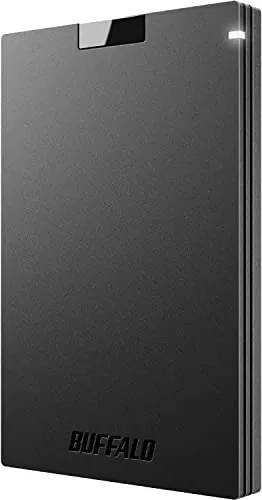
BUFFALO External SSD 500GB
- Compact 500GB SSD designed for pocketable storage and travel.
Comparison
The BUFFALO External SSD 500GB and BUFFALO LinkStation 710 2TB solve different storage problems: one is a portable USB SSD, while the other is a router-connected home NAS. The SSD is the better all-round choice for direct storage, travel, consoles, and simple use; the LinkStation is better for users who need larger shared capacity, automated backups, and personal-cloud features.
#1 Overall Winner
Contender
Choose the BUFFALO External SSD 500GB for compact USB storage, direct computer or supported console use, and the simplest everyday experience. Choose the LinkStation 710 2TB for a stationary home network that needs shared storage, automated backups, and remote-access features. For irreplaceable data, use either product as part of a broader backup plan.
Overall winner
Depends on your needs
| Feature | BUFFALO External SSD 500GB | BUFFALO LinkStation 710 2TB | Winner |
|---|---|---|---|
Storage type |
500GB portable external SSD |
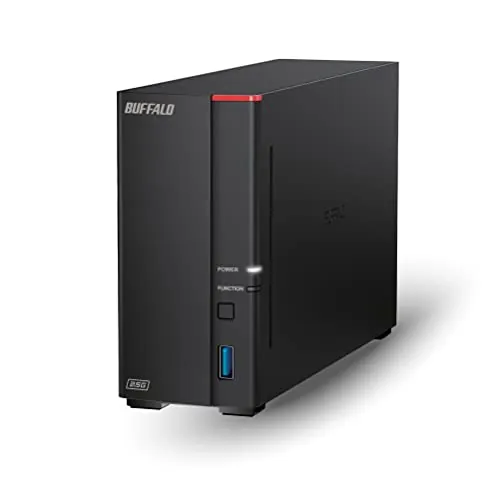
2TB one-bay NAS with HDD included |
Depends |
Connection |
USB-A and USB-C |
Ethernet NAS device |
Depends |
Portability |
Pocketable, 4.6 × 3 × 0.5 inches |
Desktop NAS, 1.66kg |
BUFFALO External SSD 500GB |
Shared network storage |
Directly attached storage |
Shared storage for networked devices |
BUFFALO LinkStation 710 2TB |
Backup features |
Manual local backup use |
Automated computer backup software included |
BUFFALO LinkStation 710 2TB |
Stated transfer performance |
Read speed up to 340MB/s |
Network speed feedback is mixed |
BUFFALO External SSD 500GB |
Console use |
Listed for PS4 and PS5 |
No console compatibility stated |
BUFFALO External SSD 500GB |
Cloud and remote features |
None stated |
Personal cloud and Dropbox, Azure, OneDrive integration |
BUFFALO LinkStation 710 2TB |
Access controls |
None stated |
Folder access restrictions and SSL transfers |
BUFFALO LinkStation 710 2TB |
Ease of use |
Generally straightforward USB use |
Mixed setup and software feedback |
BUFFALO External SSD 500GB |
Reliability feedback |
Mixed; corruption reports exist |
Mixed; failures and connection issues reported |
BUFFALO External SSD 500GB |
Warranty |
Three years registered; two years unregistered |
Two years including hard drive |
BUFFALO External SSD 500GB |
The External SSD is the stronger performer for direct file transfers. It uses solid-state storage and has a stated read speed up to 340MB/s, while reviews commonly praise its quick operation. The LinkStation's performance is tied to its Ethernet network environment and HDD-based design; some users call it fast, but others report slow transfers. For carrying files between devices or working directly from attached storage, the SSD is the more predictable choice. For simultaneous network access and centralized storage, the NAS offers a different kind of performance advantage.
The External SSD has the clearer speed proposition: BUFFALO lists read speeds up to 340MB/s, and customer feedback often highlights fast copies and responsive loading. The LinkStation is promoted as faster than an older LinkStation generation, but reported real-world NAS speeds vary widely, with some users reporting responsive access and others describing slow transfers. Network conditions and the source device affect NAS results, so the SSD is the better option when transfer speed is the priority.
Reliability is a caution area for both devices. The SSD's feedback is generally more favorable, but reviews include reports of corruption and severe speed reduction. The LinkStation has more pronounced concerns around failed units, network problems, and variable software behavior. The NAS also has only one drive bay, so it lacks internal redundancy. In either case, keep another backup of important data, ideally stored separately.
The External SSD has the simpler day-to-day model: connect it to a compatible device and use it as local storage. Reviews specifically praise easy PC and PS4 setup, although PS5 configuration can be more involved. The LinkStation includes a quick-start guide and some users report an easy installation, but other feedback describes confusing software, permission settings, discovery issues, and a steeper learning curve. The SSD is therefore the safer choice for beginners.
The External SSD is designed around mobility, measuring 4.6 by 3 by 0.5 inches and fitting easily into a bag or pocket. The LinkStation is a 1.66kg desktop device measuring 8.07 by 1.77 by 5.02 inches, intended to remain connected near a router. The SSD is preferable for travel and device-to-device transfers, while the NAS is preferable for a permanent home or office storage location.
Both products receive mixed build and long-term reliability feedback. The SSD is marketed as shock-resistant and rugged, but some buyers describe its plastic shell as thin or easy to bend, and the aggregated feedback includes shell-damage concerns. The LinkStation is a stationary enclosure containing a hard drive; its compact desktop format is practical, but review feedback includes unit failures. Neither product's physical design removes the need for a separate copy of important files.
The SSD's shock-resistant positioning gives it a practical advantage for being carried, but the reported plastic-shell weakness reduces confidence in rough treatment. The LinkStation is not meant for travel and avoids the wear of frequent carrying, yet its HDD-based, single-drive design remains vulnerable to a drive failure. The durability choice depends on use: the SSD for careful mobile use, or the NAS for a protected stationary location with an independent backup.
The External SSD wins comfortably on portability. Its slim 4.6-inch body is built for carrying files and backups between locations. The LinkStation's 1.66kg enclosure, AC adapter, and Ethernet requirement make it a fixed storage appliance, even though it is compact for a NAS. If storage needs to move with you, the SSD is the appropriate choice.
The LinkStation 710 has the broader feature set. It adds automated backups, shared folders, user access restrictions, SSL file transfers, personal-cloud access, and Dropbox, Azure, and OneDrive integration. The External SSD concentrates on core storage utility: USB-A and USB-C connection options, a compact shock-resistant body, and supported console use. Choose the SSD for uncomplicated direct storage; choose the NAS when shared access, scheduled backups, and network features justify the extra configuration.
The External SSD does not require a companion app for ordinary use, which keeps the experience simple. The LinkStation uses NAS Navigator and bundled PC backup software, and some users find the web and setup tools manageable. Other reviews cite difficulty locating the NAS, unclear configuration, non-intuitive software, and permissions friction. Buyers who prefer minimal software involvement should favor the SSD.
The LinkStation 710 is the only product here with meaningful connected-storage features. It provides personal-cloud access without a monthly subscription, cloud-service syncing, permissions, encrypted transfers, and automated backup functions. The External SSD does not add smart or network functions; its strength is a simpler local-storage approach that does not depend on a router, account, or companion management platform.
For PC and Mac use, the External SSD is generally a direct plug-in option. PS5 owners may need to follow console-specific formatting steps and use a rear USB port, based on detailed review feedback. The LinkStation needs physical placement near a router, Ethernet connection, initial configuration, and potentially firmware updates, folder setup, and permissions changes. Some owners complete this quickly, but the process is less consistently simple than SSD setup.
The External SSD has broader stated device compatibility: desktop computers, laptops, tablets, televisions, and PS4/PS5 are listed, alongside Mac and PC support. The LinkStation is listed for desktops and laptops and is positioned for Windows and macOS use. However, customer feedback mentions problems with some Windows systems and Mac M1, so prospective NAS buyers should verify their operating system and network requirements before ordering.
The External SSD has a decisive advantage for direct connectivity, supporting USB-A and USB-C for compatible PCs, Macs, and PlayStation consoles. The LinkStation connects through Ethernet to a router, enabling local network access from supported computers but adding network dependency. Its supplied Cat 6A cable is useful, yet reviews mention connection problems and compatibility inconsistencies. Pick USB for personal direct access and Ethernet NAS connectivity for shared storage across a network.
The SSD is the more efficient option for occasional storage tasks because it is USB-powered and does not require a separate power adapter. The LinkStation is designed to remain connected to the network for shared and remote availability, which requires mains power. The NAS's always-available role may be worthwhile for automated backups, but it is not as convenient for low-overhead portable use.
Value depends on the job required. The External SSD offers a compact SSD format, direct USB-A/USB-C connectivity, console support, and a longer registered warranty, though its 500GB capacity is limited. The LinkStation costs more but includes 2TB, a hard drive, network sharing, automated backups, personal-cloud access, and cloud integration. The NAS represents better functional value for a household that will use those features, while the SSD is better value for buyers who simply need dependable direct-attached storage and mobility.
Both products come from BUFFALO, so the brand comparison is effectively a comparison of product experience rather than manufacturer choice. The SSD has stronger review sentiment and a three-year registered warranty. The LinkStation includes stated 24/7 US-based support and a two-year warranty, but review experiences with support and software are inconsistent. Buyers should review the precise warranty terms and their seller's return policy before purchase.
The External SSD has the stronger customer-satisfaction profile, with a 4.4/5 average from 4,056 reviews. Buyers commonly praise its speed, compact size, capacity for large files, ease of use, and perceived value. The LinkStation has a 3.9/5 average from 3,254 reviews. Its positive feedback focuses on centralized storage and setup, while recurring negatives include slow performance, software friction, failures, compatibility concerns, and network issues.
The External SSD has a three-year warranty when registered and two years when unregistered. The LinkStation includes a two-year warranty that covers the included hard drive and is advertised with 24/7 US-based support. Review feedback for support is mixed across both product lines, so warranty duration should not be confused with data-recovery coverage. Maintain an independent backup because warranty replacement does not necessarily protect the data stored on a failed drive.
The BUFFALO External SSD 500GB is the better overall option for most buyers in this comparison. It has a stronger overall profile for direct performance, USB connectivity, portability, compatibility, usability, and customer satisfaction. Its compact SSD format makes the storage experience more immediate: connect it, transfer files, and carry it when needed.
The BUFFALO LinkStation 710 2TB is not a direct substitute; it is the better specialized choice for users who need 2TB of centralized network storage, scheduled backups, controlled sharing, and personal-cloud features. However, its single-drive architecture and mixed reports around reliability, networking, speed, and software make it less straightforward. Choose the LinkStation only if its NAS functions match a real need, and maintain a separate backup regardless of which product you buy.

Overall winner
Depends on your needs
The BUFFALO External SSD 500GB is the stronger overall choice in the supplied scoring because it performs better for portability, USB connectivity, compatibility, everyday usability, and customer satisfaction. The LinkStation 710 2TB remains the more suitable product when centralized network storage, automated backups, and shared access matter more than direct-attach convenience.
Yes. The External SSD is much better suited to travel because it is a compact, shock-resistant USB drive that can be carried in a pocket and connected directly to compatible devices. The LinkStation is a larger, mains-powered NAS intended to sit near a router, so its network features come at the expense of portability.
The LinkStation 710 provides 2TB of included HDD storage, compared with 500GB on the External SSD. That makes the NAS the more appropriate option for a larger centralized collection of media, documents, or backups. Capacity alone does not make it the better choice, however, because the two products use fundamentally different connection methods and workflows.
Not for every use. The LinkStation can centralize files and make them available over a home network, but it requires Ethernet to a router and mains power. The External SSD is better when a computer, console, or other compatible device needs direct USB storage. A NAS is primarily a shared-storage appliance, not a pocketable drive.
The External SSD is generally the easier starting point. Its direct USB connection, compact format, and positive setup feedback make it practical for simple local storage. The LinkStation has a quick-start guide and some reviewers found setup easy, but others encountered issues with discovery, permissions, software navigation, and network configuration.
It is listed as compatible with PS4 and PS5, but buyers should understand the external-storage limitations described in review feedback. One detailed review reports that it can store and play PS4 games on PS5 after correct setup, while PS5 games cannot be played from external USB storage. Formatting and rear-port requirements may also add setup steps.
Choose based on the backup workflow. The External SSD is the simpler option for manually copying files from a compatible device and carrying a separate backup away. The LinkStation is more appropriate for scheduled backups across multiple computers and centralized storage. Because it has one drive bay and no built-in redundancy, it should not be the only copy of important data.
Neither product has uniformly positive reliability feedback, but the External SSD has the stronger customer-satisfaction result and a higher 4.4/5 average from 4,056 reviews. Its feedback includes reports of data corruption and fragile casing. The LinkStation has a 3.9/5 average from 3,254 reviews, with more prominent reports of failures, slowdowns, and connection problems.
Check our rankings and expert guides to find the best electronics products for your goals.