#1 Overall Winner
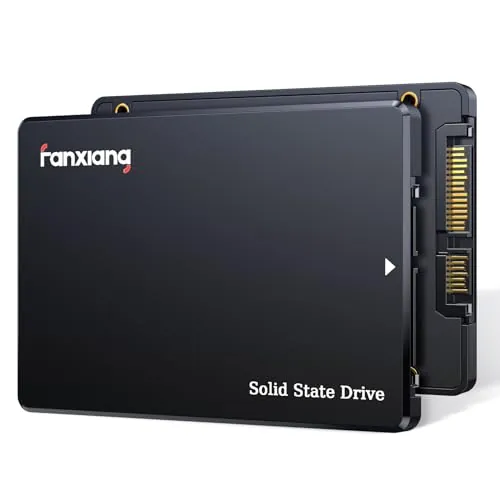
fanxiang 4TB SATA SSD S101Q
- Large 4TB capacity for substantial local storage.
Comparison
The fanxiang S101Q and S500 Pro address different upgrade priorities: the S101Q supplies 4TB in a widely compatible 2.5-inch SATA format, while the S500 Pro delivers far higher rated NVMe speed in a smaller 512GB capacity. The S500 Pro is the overall score leader for a compatible M.2 system, but the S101Q is the logical choice where storage space or SATA-only compatibility matters most.
#1 Overall Winner
Contender
Choose the fanxiang S500 Pro for a compatible M.2 PC when faster booting, loading, and transfers are the goal. Choose the fanxiang S101Q when you need 4TB of storage or are upgrading a system with a 2.5-inch SATA bay. Back up important data with either model because review feedback includes isolated early-failure reports.
Overall winner
Depends on your needs
| Feature | fanxiang 4TB SATA SSD S101Q | fanxiang S500 Pro 512GB NVMe SSD | Winner |
|---|---|---|---|
Form factor |
2.5-inch, 7mm |
M.2 2280 |
Depends |
Interface |
SATA III 6Gb/s |
PCIe Gen3x4 NVMe |
fanxiang S500 Pro 512GB NVMe SSD |
Capacity in this comparison |
4TB |
512GB |
fanxiang 4TB SATA SSD S101Q |
Rated read speed |
Up to 500MB/s |
Up to 3200MB/s |
fanxiang S500 Pro 512GB NVMe SSD |
Rated write speed |
Up to 470MB/s |
Up to 1300MB/s |
fanxiang S500 Pro 512GB NVMe SSD |
Flash and cache |
3D NAND with SLC cache |
3D NAND TLC with SLC cache |
fanxiang S500 Pro 512GB NVMe SSD |
Installation accessories |
Not listed |
Screw and screwdriver included |
fanxiang S500 Pro 512GB NVMe SSD |
Compatibility |
Windows, Linux, Mac OS; SATA systems |
Windows 7/8/10/11 and Mac OS 10.9+; M.2 systems |
Depends |
Setup score |
Strong |
Higher |
fanxiang S500 Pro 512GB NVMe SSD |
Reliability score |
Lower |
Higher |
fanxiang S500 Pro 512GB NVMe SSD |
Warranty/service |
3-year after-sales service; lifetime technical support |
3-year quality assurance |
Depends |
Overall supplied score |
Lower |
Higher |
fanxiang S500 Pro 512GB NVMe SSD |
The S500 Pro has the decisive performance advantage on compatible hardware. Its PCIe Gen3x4 NVMe connection and rated up-to-3200MB/s read speed are far ahead of the S101Q’s SATA III rating of up to 500MB/s. The S500 Pro is therefore better positioned for faster program launches, game loading, boot activity, and large file movement. The S101Q still offers a meaningful improvement over a mechanical HDD according to its product details and review feedback, but it is a capacity-oriented SATA drive rather than a direct NVMe-speed competitor.
The S500 Pro wins speed by a large margin in the stated specifications and supplied scoring. It is rated up to 3200MB/s read and 1300MB/s write, compared with up to 500MB/s read and 470MB/s write for the S101Q. Its reviews also mention faster loading and responsive everyday operation. The S101Q remains fast relative to HDD storage, but its SATA interface sets a much lower ceiling.
Neither drive has entirely risk-free feedback. The S101Q has the lower reliability score and a detailed 4TB review alleging incorrect capacity reporting, disconnects, reinitialization, and instability under heavier filling. The S500 Pro scores higher and has many reports of stable use, but there are still reports of a drive failing early or not initializing across multiple machines. The S500 Pro is the stronger choice by the provided score, but important files should be backed up on either drive.
Both drives receive positive installation feedback, and both are intended as internal upgrades. The S500 Pro has the higher usability and setup scores, helped by its included screw and screwdriver and reports of plug-and-play use. However, ease of use depends on the host system: the S101Q is usually more convenient for a machine with a 2.5-inch SATA bay, while the S500 Pro is more convenient only if a compatible M.2 NVMe slot is available.
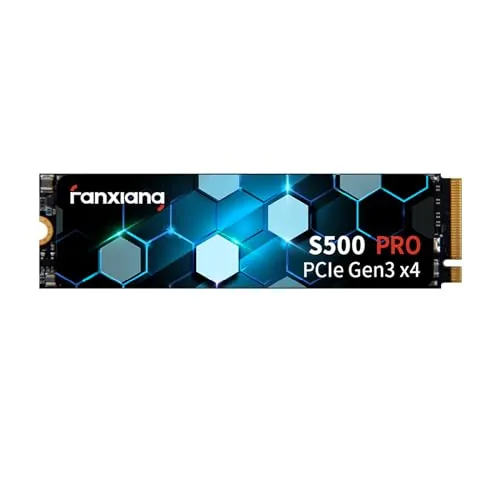
The S101Q uses a conventional 2.5-inch, 7mm drive design that suits SATA bays and many external SATA enclosures. At 38g, it remains light for its capacity. The S500 Pro uses the much smaller M.2 2280 stick format, measuring 3.15 by 0.87 by 0.08 inches and weighing 0.06 pounds. The S500 Pro is more compact inside a compatible PC; the S101Q is more flexible for systems built around 2.5-inch SATA storage.
The provided build-quality score favors the S500 Pro. It lists a polycarbonate enclosure material and graphite heat-dissipation stickers, while the S101Q lists 3D NAND as its enclosure material and emphasizes shock resistance. Reviews for both include positive comments about build quality, but the available data does not establish a substantial materials-based difference beyond the S500 Pro’s listed thermal accessory.
The S500 Pro has the higher durability score and lists up to 320TBW plus graphite heat-dissipation stickers. It also uses 3D NAND TLC according to the supplied details. The S101Q lists shock resistance and multiple maintenance and data-integrity features, but the supplied information does not state an endurance rating. Both are solid-state drives without mechanical moving parts, yet mixed long-term feedback means neither should be selected without a backup strategy.
The S500 Pro has the higher portability score because the M.2 2280 format is exceptionally compact. The 2.5-inch S101Q is also light at 38g and can be practical in SATA-to-USB enclosures, as some reviews note. For internal space efficiency, the S500 Pro wins; for portable high-capacity SATA storage, the S101Q’s 4TB capacity may be more useful despite its larger physical format.
Both drives list 3D NAND, SLC cache, shock-resistant solid-state construction, and three-year coverage. The S101Q emphasizes SATA-oriented reliability functions including garbage collection, wear leveling, RAID, ECC, TRIM, and S.M.A.R.T. The S500 Pro specifies TLC particles, graphite heat-dissipation stickers, up to 320TBW, and included mounting screws and screwdriver. The S101Q has the stronger capacity proposition; the S500 Pro has the more performance-focused package and clearer installation extras.
The S500 Pro leads the supplied setup score and includes a screw and screwdriver, which may reduce installation friction in an M.2-equipped computer. Reviewers commonly call it easy to install. The S101Q also scores strongly for setup, with reviews describing straightforward drop-in replacements and quick operating-system installations. The best setup experience is determined by the computer: use the S101Q for a SATA bay and the S500 Pro for a confirmed M.2 NVMe slot.
The S101Q is the better compatibility choice for a broad range of existing machines because it uses a 2.5-inch SATA III connection and lists Windows, Linux, and Mac OS support. The S500 Pro lists Windows 7 through 11 and Mac OS 10.9 and later, but it requires a motherboard with a compatible M.2 interface. Review feedback for each product notes some mixed compatibility experiences, so confirm the system’s physical slot, protocol support, and available mounting arrangement.
Connectivity is the central split. The S101Q connects through SATA III 6Gb/s and is backward compatible with SATA II and SATA according to the supplied details. The S500 Pro requires an M.2 PCIe Gen3x4 NVMe interface. The S101Q has the higher compatibility score because SATA is common across older systems, but the S500 Pro has the higher connectivity score because its NVMe interface supports much greater transfer performance. Neither interface is interchangeable without appropriate hardware.
The S500 Pro receives the higher power-efficiency score, and its graphite heat-dissipation stickers are intended to help thermal control. Both products are solid-state drives with no internal mechanical mechanism, so both avoid the moving parts of an HDD. The provided data does not include measured power consumption, standby drain, or thermal test results, so a precise energy-use comparison cannot be made.
The S500 Pro has the higher value score because it combines substantially higher rated NVMe speed, stronger supplied performance and satisfaction scores, included mounting hardware, and a three-year quality-assurance statement. The S101Q can still represent better value for a buyer who genuinely needs 4TB in a single SATA drive, since its capacity is dramatically larger. Do not choose purely on price: ensure the computer supports the required interface and that the available capacity matches the intended workload.
Both drives are made by fanxiang, so this is not a comparison between different brand support ecosystems. The S500 Pro has the higher brand-trust score in the supplied evaluation, while the S101Q has lower trust due in part to reliability uncertainty and conflicting buyer expectations around warranty or flash details. Both listings state three-year coverage, and the S101Q additionally lists lifetime technical support. Review reports of failures make seller and support access worth checking before purchase.
The S500 Pro has a 4.6/5 rating from 6,028 reviews and the higher customer-satisfaction score. Buyers often praise its speed, simple installation, value, and system responsiveness. The S101Q has a 4.5/5 rating from 5,646 reviews, with frequent praise for capacity, easy installation, HDD replacement performance, and value. Both have negative outliers concerning failures, but the S101Q’s detailed 4TB capacity complaint is a notable caution for this specific comparison.
Both products list three-year coverage in the supplied details. The S101Q states three years of after-sales service plus lifetime technical support, while the S500 Pro states a three-year quality-assurance service. The S500 Pro has the higher warranty-support score, but the available information does not provide detailed return procedures, replacement timelines, or regional terms. Check the exact listing and seller policies before buying.
The fanxiang S500 Pro 512GB NVMe SSD is the best overall option in this comparison. It has the higher overall score, far stronger rated read and write speeds, better supplied scores for usability and value, included installation accessories, and stronger customer-satisfaction feedback. It is the clear recommendation for a modern compatible PC where 512GB is enough storage.
The fanxiang S101Q 4TB SATA SSD remains the better choice for a different buyer: someone who needs a large 4TB drive, has only a 2.5-inch SATA connection, or wants to replace an older hard drive without changing platforms. Its SATA speed is still a meaningful upgrade over HDD storage, but it cannot approach NVMe throughput. Given reported reliability concerns for both products, particularly the detailed 4TB S101Q complaint, use either SSD with an appropriate backup routine.

Overall winner
Depends on your needs
The S500 Pro is the stronger overall option in the supplied scoring because it leads in performance, speed, usability, value, reliability, and customer satisfaction. However, the S101Q is the more suitable choice when 4TB capacity or a 2.5-inch SATA connection is the priority. The two drives fit different hardware and storage needs.
The S500 Pro is rated substantially faster on compatible hardware: up to 3200MB/s read and 1300MB/s write. The S101Q is rated up to 500MB/s read and 470MB/s write. The NVMe drive therefore has the clearer advantage for system responsiveness, game loading, and larger transfers, provided the computer has an M.2 PCIe NVMe slot.
The fanxiang S101Q has a major capacity advantage in this comparison, offering 4TB versus 512GB for the S500 Pro. That makes the SATA model more practical for large local media collections, extensive archives, or users who want one drive with considerable space. Capacity alone does not make it faster than the NVMe model.
Not directly. The S500 Pro is an M.2 2280 PCIe Gen3x4 NVMe drive, whereas the S101Q is a 2.5-inch SATA III drive. A computer must have a compatible M.2 NVMe interface for the S500 Pro. Systems designed only for 2.5-inch SATA storage are better suited to the S101Q or another SATA SSD.
Both products score well for setup, but the S500 Pro has the higher setup score and includes a mounting screw and screwdriver. Its installation is only straightforward when the system has a compatible M.2 slot. The S101Q is a practical alternative for systems with an existing 2.5-inch hard drive or SATA bay, and reviews often describe it as easy to fit.
The S101Q is generally the safer fit for an older computer that has a 2.5-inch SATA drive bay but no M.2 NVMe slot. It is designed for SATA III and is backward compatible with SATA II and SATA interfaces according to the supplied details. Confirm the available bay, connector, and physical clearance before ordering.
Yes. Both products have generally positive aggregate ratings but mixed reliability feedback. For the S101Q, a detailed 4TB review reported unstable capacity reporting, disconnects, and performance issues. For the S500 Pro, some feedback reports early failure or a drive that would not initialize. Keep backups of important data regardless of the drive selected.
The S500 Pro receives the higher value score because it combines high rated NVMe speeds, included installation hardware, strong usability feedback, and higher customer satisfaction. The S101Q can still be the better purchase for buyers who specifically need 4TB in a 2.5-inch SATA format. Value depends on whether speed or capacity and compatibility matter more.
Check our rankings and expert guides to find the best electronics products for your goals.