ElectronicsRanker
Menu

Review

Kingston A400 240GB Review

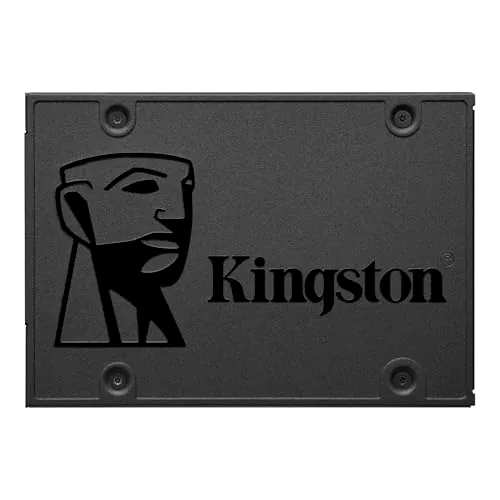
The Kingston A400 240GB is a budget 2.5-inch SATA SSD aimed at users replacing an older hard drive in a laptop or desktop. It stands out most as an affordable speed upgrade for boot times, app loading, and general responsiveness. Its main limitation is the small 240GB capacity, and customer feedback suggests compatibility can be uneven on some systems.
Expert reviewed
92
Overall score
Data-driven scoring Expert reviewed Updated analysis

Why we ranked it highly

The Kingston A400 240GB is an internal 2.5-inch SATA solid-state drive designed as a straightforward replacement for a mechanical hard drive. Based on the available data, it is best suited to budget-conscious users who want to make an older desktop or laptop feel faster without moving to a more expensive storage tier. Kingston quotes read speeds up to 500MB/s and write speeds up to 450MB/s, while customer feedback repeatedly highlights quicker boot times, faster loading, and better day-to-day responsiveness after upgrading from an HDD. This model appears strongest on value, setup ease, portability, and customer satisfaction. Its no-moving-parts design should also offer practical advantages over a hard drive in noise, vibration, and shock resistance. The trade-offs are a basic feature set, no included cloning software, and a modest 240GB capacity that may not suit users with larger storage demands.
90-day review Expert reviewed User feedback Data scoring

Key specs

Features & Specs

Digital Storage Capacity
240 GB
Hard Disk Interface
Serial ATA
Connectivity Technology
SATA
Additional Features
Backward Compatible
Hard Disk Form Factor
2.5 Inches
Compatible Devices
Desktop, Laptop
Specific Uses For Product
business, personal
Read Speed
500 Megabytes Per Second
Media Speed
450 megabits_per_second
Cache Memory Installed Size
2
Data Transfer Rate
350 Megabits Per Second
Form Factor
2.5-inch
Hardware Connectivity
SATA 3.0 Gb/s
Compatible Video Game Console Models
Microsoft Xbox One, Sony PlayStation 4
Hardware Platform
laptop

Measurements

Hard-Drive Size
240 GB
Item Weight
1.44 ounces
Item Dimensions L x W x Thickness
7"L x 5"W x 1"Th
Number of Items
1
Customer Package Type
Single Drive

Item details

Brand
Kingston
Model Number
SA400S37/240G
Hard Disk Description
Solid State Drive
Built-In Media
Kingston Technology A400 240GB SATA 3 2.5" Internal Solid State Drive, 500MB/s R
Model Name
A400 Series
Manufacturer
Kingston Digital, Inc.
Global Trade Identification Number
00740617261219
UPC
740617261219
Mfr Part Number
SA400S37/240G
Item Type Name
240GB A400 SATA 3 2.5 Solid State Drive SA400S37/240G

User guide

Installation Type
Internal Hard Drive

Additional details

Color
Black
Enclosure Material
stainless steel

Scores breakdown

91 /100

Performance

63 /100

Features

88 /100

Usability

72 /100

Design

78 /100

Connectivity

90 /100

Speed

89 /100

Reliability

68 /100

Compatibility

Strengths

  • Strong value score backed by a low entry price for a SATA SSD upgrade.
  • Fast everyday performance for older PCs and laptops, with reported improvements to boot and app loading times.
  • Very high customer satisfaction, supported by a 4.8/5 rating across a very large review base.
  • Easy installation for many users, especially as a simple 2.5-inch SATA HDD replacement.
  • No moving parts, which supports quieter operation and better shock resistance than mechanical hard drives.
  • Good portability for mobile systems thanks to its light weight and compact 2.5-inch form factor.

Limitations

  • 240GB capacity is limited for users with large game libraries, media collections, or heavier workloads.
  • Feature set is basic, with no cloning software included in the box.
  • Mixed compatibility feedback suggests some systems may not recognize the drive immediately.
  • SATA performance is solid for upgrades, but it is not positioned as a premium or cutting-edge SSD.
  • Warranty and support information is limited in the available data.
  • Some users may need to initialize the drive manually before the operating system can use it.

Ideal user profiles

  • People upgrading an older laptop from a mechanical hard drive to improve boot and load times.
  • Desktop users looking for an affordable 2.5-inch SATA SSD for basic computing.
  • Budget-focused buyers who want a reliable boot drive rather than large-capacity storage.
  • Users needing a simple internal SSD for office work, web browsing, and everyday personal use.

Use cases

  • Replacing an aging HDD in a laptop to improve startup speed and system responsiveness.
  • Using as a primary boot drive for Windows or Linux on an older desktop or notebook.
  • Adding affordable SSD storage for office applications, documents, and web use.
  • Refreshing an older family PC for lighter everyday tasks.
  • Installing in compatible PlayStation 4 or Xbox One systems where SATA 2.5-inch storage is relevant.
  • Creating a quieter and lower-vibration storage setup than a traditional hard drive.

Fit and positioning

Who this works for

Category positioning

The A400 sits firmly in the budget SATA SSD segment. Its scores and review feedback suggest it is positioned as a practical upgrade drive rather than a premium enthusiast storage product. It focuses on the core benefits most buyers want from a hard-drive replacement: faster startup, quicker application loading, simpler installation, and good everyday reliability. Compared with higher-tier SSDs, the compromise is a more basic feature set and lower overall capacity at this version.

Best for

This SSD is best for users upgrading an older laptop or desktop from a traditional hard drive and wanting a low-cost performance boost. Its strong value, setup, speed, and customer satisfaction scores support that role well. It makes the most sense for web browsing, office work, light personal computing, and as a compact boot drive where affordability matters more than high capacity or advanced features.

Not best for

It is less suitable for users who need lots of storage space, premium SSD features, or guaranteed plug-and-play compatibility across every older system. The 240GB capacity can fill up quickly, and mixed compatibility feedback means some buyers may need extra setup steps. If you want bundled migration tools, broader support detail, or a more full-featured storage upgrade, this model may feel limited.

Performance analysis

How it performs in practice

Each scoring dimension is separated into a compact card so the strengths and tradeoffs are easier to compare without reading one long block.

Performance analysis

For its class, the A400 performs well as a hard-drive replacement. The supplied specification lists speeds up to 500MB/s read and 450MB/s write, and review feedback consistently points to faster startup, shorter loading times, and a more responsive feel in everyday computing. Its performance score of 91 fits that pattern. This is not evidence of top-tier SSD performance across all storage categories, but for a SATA 2.5-inch drive aimed at reviving older systems, it appears to deliver the main performance gains buyers expect.

Feature analysis

The feature set is functional but basic, which is reflected in the lower feature score of 63. It offers the essentials: 2.5-inch SATA connectivity, backward compatibility with older SATA revisions, and capacities across the wider product range. However, the supplied data also notes that cloning software is not included, and there are no standout advanced features mentioned. This is a simple SSD built around affordable upgrade value rather than extras.

Usability analysis

Daily usability is one of the stronger parts of the A400. The 88 usability score aligns with review feedback describing a simple installation process and immediate improvements in everyday tasks. Users commonly mention faster Windows installation, quicker application launches, and smoother system behavior after replacing an HDD. Some friction remains around drive detection and initialization on certain systems, but once installed correctly, it appears easy to live with as a basic internal SSD.

Design

The A400 uses a standard 2.5-inch internal SSD format, which favors practical compatibility with many desktops and laptops. Its design score of 72 suggests a straightforward, utilitarian approach rather than anything distinctive. That is not necessarily a drawback in this category: the small form factor, low weight, and simple SATA layout are exactly what many upgrade buyers need. Its physical design is primarily about fitting older systems easily and replacing mechanical drives with minimal fuss.

How it compares

Within the SATA SSD category, the A400 compares best as an entry-level or value-focused option. It appears to do very well on the fundamentals that matter for HDD replacements: startup speed, file loading, ease of installation, reliability, and low noise. Where it is less competitive is in broader feature depth, included migration tools, and the limited 240GB capacity of this version. Its mixed compatibility feedback also means it may require more care than the most universally trouble-free options. In short, it looks stronger on practical upgrade value than on premium refinement.

Ranking summary

The Kingston A400 240GB ranks well because it delivers what many budget SSD buyers actually need: a meaningful speed upgrade, easy installation, strong reliability signals, and very good value. Its overall score of 92 is supported by high marks for performance, speed, setup, value, portability, and customer satisfaction. Review feedback consistently reinforces those strengths, especially for replacing older hard drives in laptops and desktops. It falls short of top premium storage options because the feature set is basic, the 240GB capacity is limited, and compatibility reports are somewhat mixed. Even so, within the affordable SATA SSD segment, it stands out as a practical and well-proven choice.

Buying advice

Consider the Kingston A400 240GB if your main goal is to make an older desktop or laptop feel faster without spending much. It is especially suitable as a budget boot drive for everyday use, office work, browsing, and light personal computing. Before buying, check that your system supports a 2.5-inch SATA SSD and be aware that cloning software is not included, so drive migration may require extra tools. If you need more storage space, want more advanced SSD features, or prefer a lower risk of compatibility friction, you may want to compare larger or more full-featured alternatives.
92
Overall score

Final verdict

The Kingston A400 240GB is a strong budget SATA SSD for older-system upgrades. Its main strength is straightforward value: it offers faster boot times, quicker loading, and a more responsive everyday experience at a low cost, backed by very strong customer satisfaction. Its main limitation is that this 240GB version is relatively small and may not suit users with larger storage needs. Overall, it is best viewed as a practical, proven HDD replacement rather than a premium SSD, and for that role it appears to perform very well.
Back to review

Key topics

Kingston A400 240GB review, Kingston A400 SATA SSD review, best budget SATA SSD, 240GB internal SSD comparison, Kingston A400 HDD replacement, 2.5 inch SATA SSD for laptop, budget SSD for older PC, Kingston A400 value SSD

Frequently asked questions

Is the Kingston 240GB A400 worth it?
For buyers who want a low-cost SATA SSD to replace a hard drive, the available data points to strong value. It scores well for performance, setup, reliability, and customer satisfaction, and review feedback consistently mentions faster boot times and better responsiveness. Its main trade-off is the relatively small 240GB capacity.
Is the Kingston 240GB A400 good for upgrading an old laptop?
Yes, that appears to be one of its strongest use cases. Reviews repeatedly describe it as an effective HDD replacement that makes older laptops feel faster in everyday use. Its 2.5-inch SATA form factor, light weight, and simple installation also make it well suited to older notebook upgrades.
What are the main limitations of the Kingston 240GB A400?
The biggest limitations are its basic feature set, modest 240GB capacity, and some mixed compatibility feedback. A few users report that their systems did not recognize the drive immediately, and the package does not include cloning software. It is best seen as a practical budget SSD rather than a premium storage option.
How fast is the Kingston 240GB A400?
Based on the supplied specifications, Kingston rates it for read speeds up to 500MB/s and write speeds up to 450MB/s. In practice, review feedback supports the idea of clearly faster boot and loading times compared with mechanical hard drives. That makes it a meaningful speed upgrade for older systems still using HDD storage.
Is the Kingston 240GB A400 easy to install?
For many buyers, yes. Customer feedback often describes installation as simple, especially when replacing a 2.5-inch SATA hard drive in a laptop or desktop. Some users note that a fresh operating system install is quick, but others mention the drive may need to be initialized before it appears properly in the operating system.
Is the Kingston 240GB A400 reliable?
The available evidence is positive overall. It has a high reliability score and a very strong average star rating from a large review count. Reviews also mention long-term use without major issues, though buyer experiences can still vary by system, setup, and workload.
Is the Kingston 240GB A400 compatible with desktops and laptops?
It is listed as compatible with desktops and laptops that support a 2.5-inch SATA drive, and it is also described as backward compatible with SATA Rev. 2.0. That said, compatibility feedback is mixed in the review summary, so it is worth checking your device bay, connector type, and installation requirements before buying.
Is 240GB enough for this SSD?
That depends on your use. For a boot drive with Windows, office apps, web browsing, and light personal storage, 240GB can be enough. For larger game libraries, media files, or heavier multitasking setups, it may feel restrictive fairly quickly, so higher capacities may be more practical.

Related Guides & Rankings