#1 Overall Winner
INLAND Professional 256GB SATA SSD 5-Pack
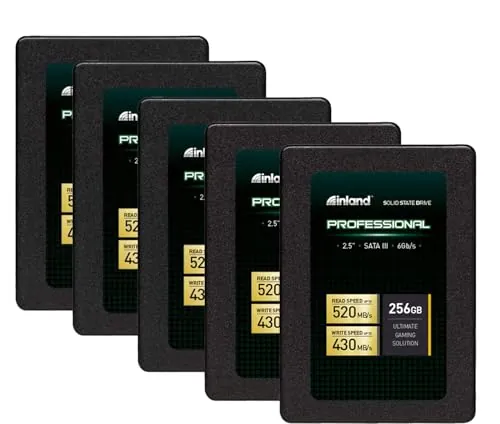
- Five 256GB 2.5-inch SATA SSDs provide separate upgrade drives for multiple compatible laptops or desktops.
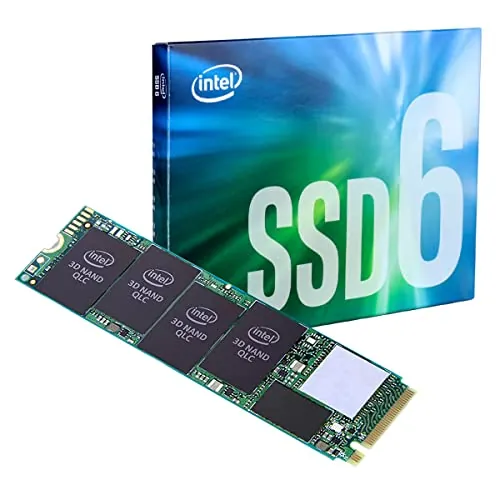
Comparison
The INLAND Professional package supplies five 256GB 2.5-inch SATA SSDs for upgrading multiple compatible systems, while the Intel 660p is a single 2TB M.2 NVMe drive for a compatible PCIe slot. Intel is the narrow overall winner for capacity, connectivity, and peak sequential speed; INLAND remains the better fit for several older SATA-based laptops or desktops.
#1 Overall Winner
Contender
Choose Intel 660p for one compatible M.2 NVMe system needing 2TB of fast, read-heavy storage. Choose the INLAND Professional 5-Pack to revive several SATA-equipped PCs with affordable 256GB boot or everyday-use drives. Avoid treating either as a specialist drive for frequent, sustained large writes.
Overall winner
Depends on your needs
| Feature | INLAND Professional 256GB SATA SSD 5-Pack | Intel 660p 2TB NVMe SSD | Winner |
|---|---|---|---|
Form factor |
Five 2.5-inch SATA drives |
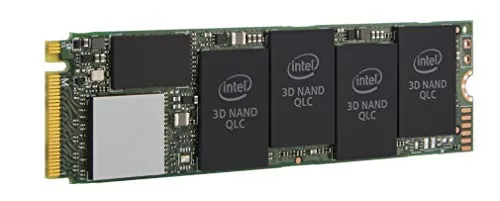
One M.2 2280 drive |
Depends |
Included capacity |
256GB per drive; five drives |
2TB in one drive |
Intel 660p 2TB NVMe SSD |
Interface |
SATA III 6Gb/s |
PCIe NVMe 3.0 x4 |
Intel 660p 2TB NVMe SSD |
Quoted sequential read |
Up to 520MB/s |
Up to 1,800MB/s |
Intel 660p 2TB NVMe SSD |
Quoted sequential write |
Up to 430MB/s |
Up to 1,800MB/s |
Intel 660p 2TB NVMe SSD |
NAND type |
TLC 3D NAND |
QLC 3D NAND |
Depends |
Light-use SATA upgrades |
Designed for multiple SATA systems |
Requires NVMe M.2 support |
INLAND Professional 256GB SATA SSD 5-Pack |
Read-heavy game storage |
Limited to 256GB per drive |
2TB NVMe storage |
Intel 660p 2TB NVMe SSD |
Setup |
Strong setup score; SATA installation |
Strong setup score; M.2 installation |
Tie |
Reliability score |
72 |
70 |
INLAND Professional 256GB SATA SSD 5-Pack |
Value score |
86 |
89 |
Intel 660p 2TB NVMe SSD |
Overall score |
77 |
79 |
Intel 660p 2TB NVMe SSD |
The drives target different performance tiers. INLAND is rated up to 520MB/s sequential read and 430MB/s sequential write, which is typical of a SATA III upgrade and a major step up from a mechanical drive for booting and basic application loading. Intel is rated up to 1,800MB/s sequential read and write through PCIe NVMe 3.0 x4, giving it a much higher peak transfer ceiling.
Peak ratings do not tell the entire story. Intel 660p reviews repeatedly note that its QLC design performs best with read-heavy work and shorter writes while cache is available; long, frequent writes can slow sharply. INLAND is also not recommended in supplied reviews for heavy write workloads. For ordinary use, both can improve system responsiveness, but Intel has the stronger headroom on compatible hardware.
Intel has the clear specification advantage in peak sequential speed: up to 1,800MB/s reads and writes versus INLAND’s up to 520MB/s reads and 430MB/s writes. Its advantage is most relevant for compatible hardware and transfers that remain within its effective cache behavior.
INLAND’s speed score is slightly higher in the provided scoring, reflecting solid everyday SATA performance rather than a higher peak specification. For booting an older SATA laptop or routine tasks, the difference may be less important than compatibility. For large reads, game loading, and faster NVMe transfers, Intel is the stronger choice.
Neither product has uniformly positive reliability feedback. INLAND scores slightly higher for reliability, and several reviewers report long-running drives, but others report failures within months, freezes, or Windows recognition problems. Intel’s reliability feedback is likewise mixed; reviews praise normal operation but raise concerns about QLC endurance and suitability for write-heavy use.
For either option, use backups and avoid selecting solely on a single anecdotal report. The INLAND pack’s slightly higher reliability score does not remove its reported quality-control concerns, while Intel’s higher brand-trust score does not eliminate the workload limitations of QLC NAND.
Both products receive strong usability feedback. INLAND users regularly describe simple SATA installation and a quick improvement in boot and application response. Intel reviewers similarly describe inserting the M.2 card, securing it, and initializing or formatting it in the operating system.
INLAND is easier for users familiar with traditional 2.5-inch drive bays and SATA cables. Intel installation is physically simple in a supported M.2 slot, but buyers must verify that the slot supports PCIe NVMe rather than only another M.2 storage format. Intel also may require more attention to thermal conditions and cache-sensitive workloads.
The designs are fundamentally different. INLAND uses a 2.5-inch SATA form factor, so each drive needs a SATA data connection and a compatible bay or mounting position. Intel uses the much smaller M.2 2280 card format, installed directly on a compatible motherboard slot.
Intel has the higher design score because its M.2 layout concentrates 2TB into one compact internal drive. INLAND’s five-drive format is more practical when storage upgrades must be distributed across several machines rather than consolidated in one system.
Intel has the higher build-quality score. Its compact M.2 board design is intended for internal PCIe storage, although reviews differ on temperatures and some users add a heatsink. INLAND’s lower build-quality score aligns with review comments describing a very lightweight, basic-feeling enclosure, despite positive reports of drives continuing to work in mobile enclosed systems.
Neither supplied listing provides a like-for-like material or construction specification beyond INLAND’s stated shock resistance. The practical distinction is that Intel may need thermal consideration in demanding installations, while INLAND’s SATA enclosure is designed for conventional drive bays.
INLAND has the higher durability score and lists resistance to shock, vibration, and movement. Reviews include examples of drives used in moving enclosed systems, although other reports describe early failure. Intel’s QLC NAND design is regularly identified in reviews as a durability trade-off for capacity and price, especially when write activity is high.
For light or moderate everyday use, either may be appropriate with normal backup practices. For workloads that write large amounts of data continuously, the supplied evidence suggests looking beyond both options toward a drive designed for higher sustained-write demands.
Intel’s M.2 2280 card is much smaller and lighter as a single drive, making it the more compact solution within a laptop or small desktop. INLAND’s individual 2.5-inch drives are still portable internal SSDs, but the five-pack creates more physical storage to manage and requires SATA cabling in most installations.
Portability should not outweigh compatibility. A compact M.2 drive is useful only in a system with the right slot; a 2.5-inch SATA SSD remains the practical option for many older devices.
INLAND’s key feature is quantity: the package includes five separate 256GB 2.5-inch SATA SSDs, with TLC 3D NAND, shock resistance, and a listed three-year limited parts-and-labor warranty. Intel’s defining features are a single 2TB M.2 2280 drive, PCIe NVMe 3.0 x4 connectivity, QLC NAND, and the high-capacity value proposition.
Neither product provides smart or app-based features in the supplied product details. The relevant feature choice is therefore physical interface, capacity arrangement, and NAND behavior rather than software functionality.
Setup is a tie by score, with both products scoring 84. INLAND follows the familiar process of mounting a 2.5-inch drive, connecting SATA, and installing or migrating an operating system. Intel users generally report a simple insert-and-secure M.2 installation followed by disk initialization and formatting.
Intel setup has a greater compatibility check: the M.2 slot must support PCIe NVMe. Some systems may need an adapter or provide reduced bandwidth. INLAND avoids the M.2 protocol question but still requires a free SATA connection and suitable physical mounting space.
Compatibility is the decisive category. INLAND is compatible with desktops and laptops that accept a 2.5-inch SATA drive. It is therefore a natural option for conventional SATA upgrades, although some customer feedback mentions Windows 10 recognition issues.
Intel works with systems that accept M.2 2280 PCIe drives, including compatible notebooks, desktops, and supported servers or arrays. It has the higher compatibility score, but it is not universally interchangeable with SATA hardware. Some review examples use adapters or encounter bandwidth limits on older platforms, so verify slot type, boot support, and lane availability.
The Intel 660p wins on connectivity potential with PCIe NVMe 3.0 x4, reflected in its higher connectivity score and substantially higher quoted sequential speeds. However, that advantage only applies when the host has a compatible M.2 2280 PCIe NVMe slot and sufficient PCIe bandwidth.
INLAND uses the widely established SATA III 6Gb/s interface. It is the more compatible physical choice for systems built around 2.5-inch SATA bays, but SATA’s bandwidth limits its quoted read and write speeds. Confirm the exact storage interface before buying; M.2 physical slots are not automatically NVMe-capable.
INLAND has the higher power-efficiency score and is described as quiet and non-overheating in the supplied listing, with positive review feedback around power behavior. Intel’s score is lower, and heat feedback is mixed: some customers report cool operation under a heatsink, while others report higher temperatures.
No directly comparable power-consumption figures are provided. Buyers should treat these observations as workload and system dependent, particularly for the Intel M.2 drive in compact systems.
Intel has the higher value score because it combines 2TB of storage, NVMe connectivity, and strong customer satisfaction in a single drive. It is most compelling when its capacity and speed can be used in a compatible system, particularly for read-heavy libraries and general storage.
INLAND’s value is different: five SATA drives can be useful for upgrading multiple machines, and its value score is also strong. Comparing the listed package prices alone is not a complete value test because the products differ in total capacity, number of drives, interface, and intended deployment. Choose according to the number of systems and capacity required.
Intel has the higher brand-trust score. That advantage aligns with review comments expressing confidence in the brand, but it does not change the 660p’s QLC and sustained-write limitations. INLAND’s brand-trust score is lower, while many reviews still report good results and value for basic upgrades.
For either brand, product-specific evidence matters more than brand name alone: confirm compatibility, match the NAND and workload characteristics, and retain backups for important data.
Intel leads customer satisfaction with a 91 score and a 4.8/5 average from 2,737 reviews. Customers frequently praise capacity, everyday speed, installation, and value, while recurring reservations concern heat, QLC endurance, and large-write slowdowns.
INLAND also has substantial feedback, with a 4.6/5 average from 4,669 reviews and an 84 customer-satisfaction score. Buyers commonly appreciate its price, straightforward installation, and improved startup performance, but reliability and Windows recognition complaints occur more often in the supplied overview.
INLAND lists a three-year limited parts-and-labor warranty. No warranty or after-sales support detail is provided for the Intel 660p in the supplied data, so a direct warranty comparison cannot be made. Check the current seller terms, manufacturer coverage, and return conditions before purchase.
The Intel 660p 2TB is the best overall option in this comparison, narrowly leading on overall score while delivering more capacity in one drive, PCIe NVMe connectivity, higher quoted peak throughput, stronger brand-trust scoring, and higher customer satisfaction. It makes the most sense for a compatible modern laptop or desktop used for a game library, general storage, or other largely read-heavy workloads.
The INLAND Professional 256GB 5-Pack should not be treated as a direct substitute for that use case. Its advantage is practical deployment: five separate TLC SATA SSDs can upgrade several older systems that cannot use NVMe storage. It also scores slightly better in reliability and durability, despite reports of early failures and recognition issues. Select INLAND for multiple SATA upgrades; select Intel for large single-drive NVMe storage, while avoiding sustained write-heavy work on either model.
Overall winner
Depends on your needs
The Intel 660p has the higher overall score and offers one 2TB NVMe drive with much higher quoted sequential throughput. It is the stronger option when a compatible M.2 NVMe slot is available and large, mostly read-heavy storage is the goal. The INLAND pack is preferable when several SATA-equipped computers need modest-capacity upgrades.
On compatible PCIe NVMe hardware, the Intel 660p is rated for up to 1,800MB/s sequential reads and writes, compared with up to 520MB/s reads and 430MB/s writes for each INLAND SATA SSD. However, reviews note that Intel’s sustained write performance can drop significantly once its cache is filled.
Not directly. The INLAND drive uses a 2.5-inch SATA form factor and SATA III connection, while the Intel 660p is an M.2 2280 PCIe NVMe drive. Check that the computer has an M.2 slot that supports PCIe NVMe storage before choosing the Intel model.
The Intel 660p is the more suitable choice for a large game library because it provides 2TB in one drive and reviewers specifically report good results storing games and read-heavy applications. It is not the best fit for frequent, very large sustained writes, but its capacity and NVMe interface are useful for compatible gaming PCs.
The INLAND five-pack is usually the more practical option for older laptops that have a 2.5-inch SATA bay and no NVMe-capable M.2 slot. Customers report noticeably quicker booting and application loading after replacing older hard drives. Confirm the laptop’s drive bay, SATA connection, and capacity needs before ordering.
Neither is an ideal choice based on the supplied feedback. INLAND reviews advise against write-intensive scratch-disk work, while Intel 660p reviews warn that large or frequent writes can exceed the SLC cache and slow considerably. Buyers with sustained production workloads should prioritize a drive designed for that write pattern.
Both have strong star ratings, but the Intel 660p has the higher customer-satisfaction score and a 4.8/5 rating from 2,737 reviews. The INLAND pack has a 4.6/5 rating from 4,669 reviews and strong praise for value and easy upgrades, alongside more reports of recognition issues and early failures.
No. The INLAND pack scores slightly higher for reliability and durability, though its reviews still include early failures, freezes, and recognition problems. The Intel 660p has mixed reliability feedback as well, with QLC endurance and sustained-write behavior being recurring concerns. Maintain backups regardless of which drive is selected.
Check our rankings and expert guides to find the best electronics products for your goals.