ElectronicsRanker
Menu
INLAND 1TB SSD vs INLAND 256GB 5-Pack SSD Comparison

Comparison

INLAND 1TB SSD vs INLAND 256GB 5-Pack SSD Comparison

The INLAND Professional 1TB SSD and INLAND Professional 256GB five-pack are 2.5-inch SATA SSD upgrades aimed at mainstream PCs and laptops. Choose the 1TB drive for one system needing more storage and stronger stated write performance; choose the five-pack when several systems need modest-capacity boot drives. The five-pack has the slightly stronger overall assessment, but the best option depends primarily on deployment needs.

Expert tested Data driven Unbiased reviews Updated 2 August 2026
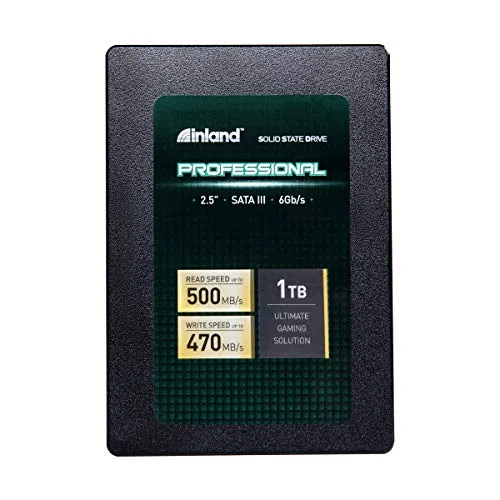
INLAND Professional 1TB SSD 3D NAND SATA III 6Gb/s 2.5" 7mm Internal Solid State Drive (1T)

#1 Overall Winner

INLAND Professional 1TB SSD 3D NAND SATA III 6Gb/s 2.5" 7mm Internal Solid State Drive (1T)

76/100
  • Provides 1TB of storage in one drive for an OS, applications, files, and game storage.
View review
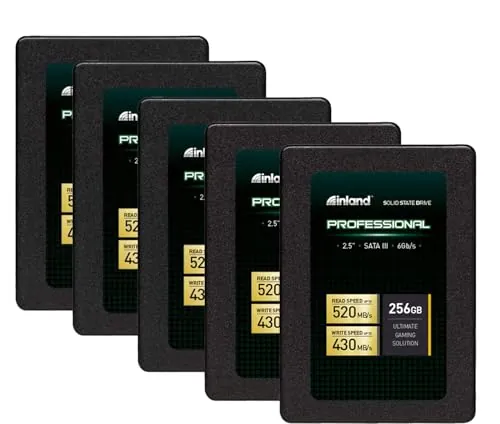
INLAND Professional 256GB SSD 3D TLC NAND SATA III 6Gb/s 2.5" SATA Internal Solid State Drive, Upgrade Laptop PC and Desktops (5 Pack)

Contender

INLAND Professional 256GB SSD 3D TLC NAND SATA III 6Gb/s 2.5" SATA Internal Solid State Drive, Upgrade Laptop PC and Desktops (5 Pack)

77/100
  • The five-pack supplies five separate 256GB SATA SSDs for multi-system upgrades or spare-drive planning.
View review

Quick verdict

Choose the 1TB SSD for one compatible PC that needs substantial storage. Choose the 256GB five-pack for several basic PC upgrades, boot drives, or replacement inventory. Both are best treated as everyday SATA SSDs with backups in place, rather than as drives for demanding, sustained write workloads.

Overall winner

Depends on your needs

At-a-glance comparison

Feature INLAND Professional 1TB SSD 3D NAND SATA III 6Gb/s 2.5" 7mm Internal Solid State Drive (1T) INLAND Professional 256GB SSD 3D TLC NAND SATA III 6Gb/s 2.5" SATA Internal Solid State Drive, Upgrade Laptop PC and Desktops (5 Pack) Winner

Package configuration

One 1TB SSD

Five 256GB SSDs

Depends

Capacity per drive

1TB

256GB

INLAND Professional 1TB SSD 3D NAND SATA III 6Gb/s 2.5" 7mm Internal Solid State Drive (1T)

Total included capacity

1TB

1.28TB across five drives

INLAND Professional 256GB SSD 3D TLC NAND SATA III 6Gb/s 2.5" SATA Internal Solid State Drive, Upgrade Laptop PC and Desktops (5 Pack)

Stated sequential read

Up to 500MB/s

Up to 520MB/s

INLAND Professional 256GB SSD 3D TLC NAND SATA III 6Gb/s 2.5" SATA Internal Solid State Drive, Upgrade Laptop PC and Desktops (5 Pack)

Stated sequential write

Up to 470MB/s

Up to 430MB/s

INLAND Professional 1TB SSD 3D NAND SATA III 6Gb/s 2.5" 7mm Internal Solid State Drive (1T)

Random performance

Up to 70,000 4K IOPS

Up to 55,000 read / 50,000 write 4K IOPS

INLAND Professional 1TB SSD 3D NAND SATA III 6Gb/s 2.5" 7mm Internal Solid State Drive (1T)

Stated endurance

Up to 660TBW

Not provided

INLAND Professional 1TB SSD 3D NAND SATA III 6Gb/s 2.5" 7mm Internal Solid State Drive (1T)

Interface and form factor

2.5-inch SATA III 6Gb/s

2.5-inch SATA III 6Gb/s

Tie

Warranty

Three-year limited parts and labor

Three-year limited parts and labor

Tie

Everyday upgrade role

One higher-capacity system upgrade

Multiple basic system upgrades

Depends

Customer feedback

4.6/5 from 4,669 reviews

4.6/5 from 4,669 reviews

Tie

Overall assessment

Strong everyday capacity and performance

Strong multi-drive value for everyday use

INLAND Professional 256GB SSD 3D TLC NAND SATA III 6Gb/s 2.5" SATA Internal Solid State Drive, Upgrade Laptop PC and Desktops (5 Pack)

Detailed comparison

Performance

For routine SATA SSD duties, both products should offer a substantial improvement over a mechanical hard drive in booting and application loading. Item 2 has the higher stated sequential read maximum at 520MB/s, while Item 1 has the higher stated sequential write maximum at 470MB/s and lists higher random IOPS. In practice, the capacity difference matters more for most buyers: the 1TB drive is more suitable as one primary drive, while each 256GB unit in the bundle is best for leaner installations. Review feedback describes both as adequate for everyday work, not as the fastest SATA options for intensive production tasks.

Speed

Item 2 claims the faster maximum sequential read speed at up to 520MB/s, compared with up to 500MB/s for Item 1. Item 1 claims the faster maximum sequential write speed at up to 470MB/s, compared with up to 430MB/s for Item 2, and lists higher 4K random IOPS. These are manufacturer-stated maxima and can vary with hardware and configuration. For typical boot-drive use, reviews suggest both are responsive upgrades from mechanical hard drives; for repeated heavy transfers, neither is presented as a high-end option.

Reliability

Reliability is the main caution for both products. The review summaries include positive long-term reports and deployments across numerous drives, but also reports of early failure, freezing, and Windows recognition problems. Item 2 has the slightly stronger reliability assessment, yet the difference is not enough to eliminate the need for a backup plan. Item 1 has a stated endurance figure of up to 660TBW, while no comparable figure is supplied for Item 2. Neither drive should hold the only copy of important data.

INLAND Professional 1TB SSD 3D NAND SATA III 6Gb/s 2.5" 7mm Internal Solid State Drive (1T)

Pros

  • Provides 1TB of storage in one drive for an OS, applications, files, and game storage.
  • Rated for sequential speeds up to 500MB/s read and 470MB/s write .
  • States up to 660TBW endurance for the 1TB model.
  • Uses a standard 2.5-inch, 7mm SATA form factor for many desktops and laptops.
  • Customer feedback frequently notes easy installation, faster startup, and good results as an OS boot drive.
  • Shock- and vibration-resistant solid-state construction operates without mechanical-drive noise.

Cons

  • Reported compatibility is mixed, including some cases where Windows 10 did not recognize the drive.
  • Some buyers report early failures or freezing, so important data should be backed up.
  • Reviews position the drive as less suitable for frequent file movement and write-intensive work.
  • A single 1TB drive is less useful than a multi-drive bundle when several systems need upgrades.
INLAND Professional 1TB SSD 3D NAND SATA III 6Gb/s 2.5" 7mm Internal Solid State Drive (1T)

INLAND Professional 256GB SSD 3D TLC NAND SATA III 6Gb/s 2.5" SATA Internal Solid State Drive, Upgrade Laptop PC and Desktops (5 Pack)

Pros

  • The five-pack supplies five separate 256GB SATA SSDs for multi-system upgrades or spare-drive planning.
  • Rated for sequential speeds up to 520MB/s read and 430MB/s write .
  • Uses TLC 3D NAND and a 2.5-inch SATA form factor suitable for supported laptops and desktops.
  • Reviews describe it as an effective low-cost boot-drive upgrade for older systems and test machines.
  • Several reviewers report light-to-moderate deployments with good results across multiple drives.
  • Includes a three-year limited parts and labor warranty.

Cons

  • Each drive has only 256GB of capacity, which can be limiting for larger local libraries or installations.
  • The stated write speed is lower than the 1TB drive's stated write speed.
  • Reviews include reports of early failures, freezes, and Windows recognition issues.
  • Reviewer feedback advises against using these drives for heavy write-intensive workloads or video-editing scratch use.
  • Some feedback characterizes the physical build as lightweight and basic.
INLAND Professional 256GB SSD 3D TLC NAND SATA III 6Gb/s 2.5" SATA Internal Solid State Drive, Upgrade Laptop PC and Desktops (5 Pack)

Final verdict

The INLAND Professional 256GB five-pack is the narrow overall winner because it has the slightly higher overall assessment and can offer strong practical value for multi-system upgrades. Its five individual drives make sense for buyers who need several basic SATA boot drives rather than one large storage volume.

For most people upgrading a single laptop or desktop, however, the INLAND Professional 1TB SSD is the more appropriate purchase. It gives substantially more capacity in one drive, higher stated write speed, stronger listed random performance, and stated endurance up to 660TBW. Both products share a similar everyday SATA SSD purpose and receive comparable customer feedback: many buyers report easy installation and faster older systems, while others report compatibility problems or early failures. Select based on capacity and number of systems, maintain backups, and avoid treating either as the preferred choice for sustained heavy-write workloads.

Overall winner

Depends on your needs

Frequently asked questions

<p>Which is better: the INLAND Professional 1TB SSD or the 256GB 5-pack?</p>

The 1TB SSD is the more practical choice when one computer needs meaningful local storage for an operating system, applications, and files. The 256GB five-pack is better when several compatible systems each need a basic SSD upgrade. Both target everyday SATA use rather than demanding write-heavy production workloads.

<p>Which INLAND SSD has the faster stated sequential speed?</p>

The 256GB model in the five-pack has the higher stated sequential read figure, at up to 520MB/s versus up to 500MB/s for the 1TB model. The 1TB drive has the higher stated sequential write figure, at up to 470MB/s versus up to 430MB/s. Actual performance can vary with the host system and configuration.

<p>Is the INLAND 1TB SSD better for an operating-system drive?</p>

For one system, yes. The 1TB drive offers much more room than a single 256GB drive, while the supplied reviews describe these SSDs as easy to install and effective for OS boot-drive upgrades. It remains sensible to keep backups because some feedback reports early failures, freezes, or recognition problems.

<p>Who should buy the INLAND Professional 256GB SSD five-pack?</p>

The five-pack suits buyers who are upgrading multiple compatible laptops or desktops, preparing spare boot drives, or equipping systems with modest storage requirements. Its advantage is the number of separate drives, not greater capacity per drive. Each unit provides 256GB, so storage-heavy users should consider whether that capacity is enough for each machine.

<p>Are these INLAND SATA SSDs suitable for video editing or heavy write workloads?</p>

The provided reviewer feedback recommends caution. It describes these as consumer drives that work well for basic use, boot drives, and light-to-moderate workloads, but not as the preferred option for video-editing scratch disks or other write-intensive tasks. Buyers with sustained heavy-write needs should seek a drive designed and documented for that workload.

<p>Do both SSDs work with laptops and desktops?</p>

Both products are specified as 2.5-inch SATA SSDs for compatible desktops and laptops. Before purchase, confirm that the computer has a compatible 2.5-inch SATA bay and connection. The supplied customer summary also notes mixed compatibility reports, including cases where Windows 10 did not recognize the drive, so installation checks and backups are prudent.

<p>Which option offers better value?</p>

Value depends on the number of systems being upgraded. The five-pack has the stronger value assessment for buyers who can use all five 256GB drives. The 1TB model offers a different kind of value: one larger drive with a stated endurance rating of up to 660TBW. Neither choice is automatically better without considering capacity needs and intended workload.

Related comparisons

Still not sure which one to choose?

Check our rankings and expert guides to find the best electronics products for your goals.

View all rankings